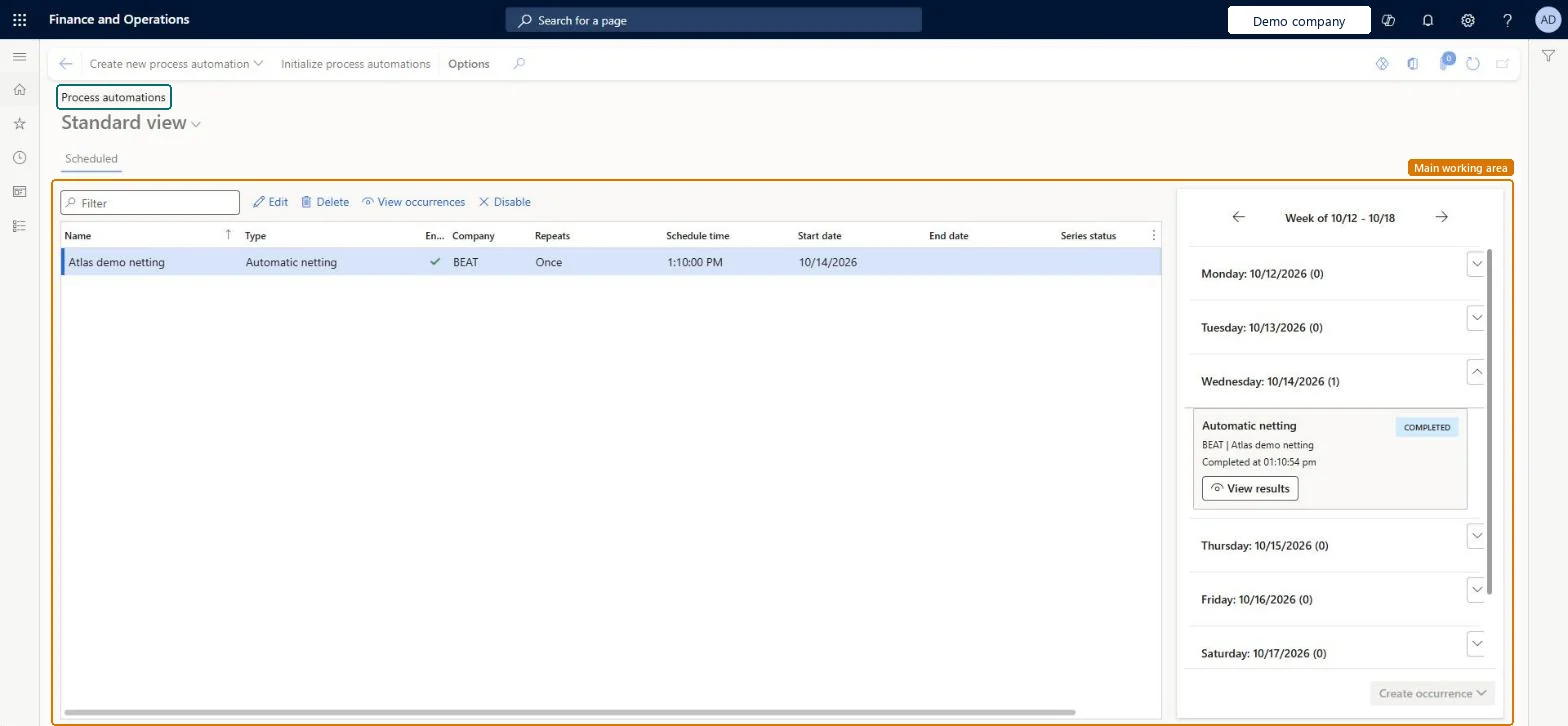
Setup step on the Process automations page · Cash and bank management
Schedule automatic netting
Schedules recurring automatic netting through process automation so that open customer and vendor balances under active netting agreements are netted before each payment run.
Use netting agreements to settle customer balances with vendor balances in Dynamics 365 Finance
Menu item
CustVendNettingAutomationScheduleSeries
Main table
ProcessScheduleSeries
Setup steps
1 on this page
Show what matters for
SETUP GUIDEHow to set it up8 sections. Choose a role to highlight what matters to you.
Everyone
1What it is and why
What it is
A process automation page where you schedule automatic netting to run periodically.
What you do here
Use this page to run netting rules on a regular schedule instead of starting them one at a time.
Example
For example, a series named Netting of type Automatic netting runs the rule MONTHLY each month on the day before the vendor payment proposal, so that the netted invoices are settled before the payment journal is created.
The page in Dynamics 365. page title tab to open what to set or check
About the examples: Examples and screenshots in this guide use BEAT, a demo company in a Dynamics 365 test environment. Use your own company's codes and values instead of copying them.
Setup steps on this page
Schedule automatic netting
Schedules recurring automatic netting through process automation so that open customer and vendor balances under active netting agreements are netted before each payment run.
Steps from Microsoft
Go to Cash and bank management > Netting > Process automations.
Select Create new process automation, choose the Automatic netting type and pick the active netting rule to run.
Set the recurrence and the start date so each run happens before the payment run.
Check the occurrences in the weekly calendar on the right; select View occurrences to see past and planned runs, and Disable to pause the series.
After a run, open Netting history and check the netted pairs.
Process automation relies on the system batch job Process automation polling system job. If it isn't running or is in error, select Initialize process automation on System administration > Setup > Process automations. Microsoft Learn
Netted invoices were paid in full anyway
The schedule ran after the payment proposal. Transactions already in a payment journal aren't netted, so move the series before the payment run. Microsoft Learn
Test checklist
Schedule periodic automatic netting from Process automation on the Netting menu, with an active netting rule.
Make sure the run is scheduled before the payment run; invoices already in a payment journal aren't netted.
After the run, check Netting history for the netted customer and vendor pairs.
Use the All marked transaction details report to confirm which transactions were already marked for settlement.
A recurring series of type Automatic netting that runs an active netting rule before each payment run, before payment proposals and payment journals are created.Netting is designed to run before a payment journal is created so that only the remaining open amounts go to payment. Transactions that are already in a payment journal aren't netted.
The series runs the netting rule you pick, and the rule nets the netting agreements of the legal entity. Every process automation in the system is also listed on System administration > Setup > Process automations. Microsoft Learn
Can it be undone
Hard to reverse: The schedule can be changed or stopped at any time, but each run posts netting journals. Posted netting is undone only with Reverse netting on Netting history.
If you change it later
Each occurrence posts netting journals without anyone marking invoices. Changing the series or a single occurrence affects only future runs; runs already posted stay posted. Microsoft Learn
Technical architect
6Technical
Menu item
CustVendNettingAutomationScheduleSeriesChecked in Dynamics 365
Form
ProcessScheduleSeriesChecked in Dynamics 365
Table
ProcessScheduleSeriesShown as “Schedule series” in Record infoChecked in Dynamics 365
To set it up or change itAccounts payable payments clerk PaymAccountsPayablePaymentsClerkAccounts receivable payments clerk PaymAccountsReceivablePaymentsClerkGive people one of these roles. On this system, 2 roles can open this page.Checked in Dynamics 365
Actions on the page
Buttons: Create new process automation, Initialize process automationsChecked in Dynamics 365
Load order: A process automation series has no data entity in Data management, so it can't be loaded from a file or a configuration template. Create the series by hand in each environment once the netting rule is active.Microsoft Learn