BeyondERP.Newsletter
Menu

Setup step on the Spare parts item groups page · Asset management

Set up Spare parts item groups

Use this page to choose which item groups count as spare parts, so that item consumption on work orders builds the spare parts history of each asset.

Used by
Maintenance clerk, Maintenance manager
Business process
Classify assets
Menu item
EntAssetStandardSparePartsItemGroup
Main table
EntAssetStandardSparePartsItemGroup
Setup steps
1 on this page
Show what matters for
SETUP GUIDEHow to set it up8 sections. Choose a role to highlight what matters to you.
Everyone

1What it is and why

What it isA setup page where you select the item groups whose items are tracked as spare parts history on asset BOMs.
What you do hereUse this page to choose which item groups count as spare parts, so that item consumption on work orders builds the spare parts history of each asset.
ExampleFor example, you add the item group for spare parts so that spare parts consumed on work orders show in the spare parts history of each asset.
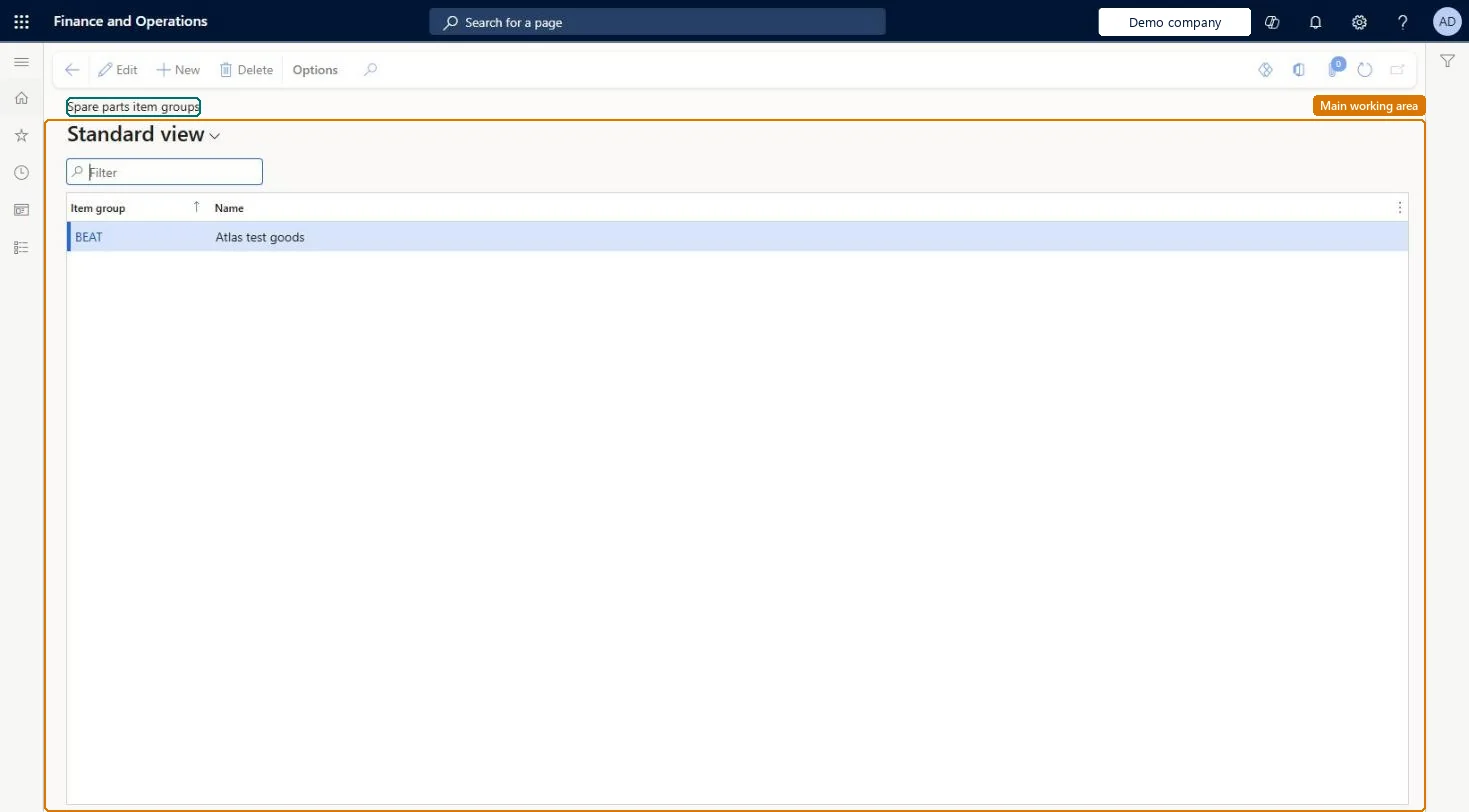
Spare parts item groups page in Dynamics 365
The page in Dynamics 365. page title tab to open what to set or check
Functional consultant · Solution architect

2Where it fits

Business processDefine asset strategy › Classify assets
Menu pathAsset management › Setup › Assets › Spare parts item groups
Set up firstItem groups Microsoft Learn
Used next byAsset BOM Microsoft Learn Update asset BOM Microsoft Learn
In this process Set up Asset types · Set up Functional location lifecycle models
End user · Functional consultant

3How to do it

About the examples: Examples and screenshots in this guide use BEAT, a demo company in a Dynamics 365 test environment. Use your own company's codes and values instead of copying them.

Setup steps on this page

Set up Spare parts item groups

Use this page to choose which item groups count as spare parts, so that item consumption on work orders builds the spare parts history of each asset.

Steps from Microsoft

  1. Go to Asset management > Setup > Assets > Spare parts item groups.
  2. Select New.
  3. In the Item group field, select the item group.
  4. Check that the Name field is filled in, and then save.

Source: Microsoft Learn

Fields on the page

FieldWhat it meansTable column
Item groupThe inventory item group to track as spare parts.Microsoft Learn ItemGroupId
NameThe item group name, filled in automatically.Microsoft Learn

Test checklist

  1. Add a spare parts item group.
  2. Post item consumption of an item from that group on a work order.
  3. Run Update asset BOM (or move the work order to a state with Update asset BOM = Yes).
  4. Open Asset BOM for the asset and check the item line is shown.

Source: Microsoft Learn

Functional consultant

4Setup decisions

Setup stepRecommended value and whyDecision, common mistake and test
Set up Spare parts item groupsAdd every item group that holds spare partsSpare parts history on the Asset BOM page is tracked only for items in the item groups selected here.Leaving this page empty and expecting the Asset BOM to build up from work order consumption; without spare parts item groups the history isn't tracked.
Solution architect

5Design impact

Can it be undoneReversible: Item groups can be added or removed; this decides what is tracked from then on.
Technical architect

6Technical

Menu itemEntAssetStandardSparePartsItemGroup Checked in Dynamics 365
FormEntAssetStandardSparePartsItemGroup Checked in Dynamics 365
TableEntAssetStandardSparePartsItemGroupShown as “SPARE PARTS ITEM GROUPS” in Record infoKey field: ItemGroupIdChecked in Dynamics 365
Who can open itPrivilegesMaintain maintenance management setup EntAssetSetupMaintainView maintenance management setup EntAssetSetupViewDutiesMaintain Asset Management setup EntAssetSetupMaintainView Enterprise Asset Management setup EntAssetSetupView
2 security rolesMaintenance clerk EntAssetMaintenanceClerkMaintenance manager EntAssetMaintenanceManager
Checked in Dynamics 365
Roles to set it up and use itTo set it up or change itMaintenance manager EntAssetMaintenanceManagerTo use itMaintenance clerk EntAssetMaintenanceClerkGive people one of these roles. On this system, 2 roles can open this page.Checked in Dynamics 365
Developer

7Developer

Open it by URLhttps://<your-environment>/?mi=EntAssetStandardSparePartsItemGroup
Everyone

8Sources

To cite this step: AM-ASSET-020, Set up Spare parts item groups. Beyond ERP Atlas Hub, 2026-11-11. https://www.beyonderp.cloud/atlas/step/AM-ASSET-020