BeyondERP.Newsletter
Menu

Setup step on the Index rate type page · Asset leasing

Set up Index rate type

Use this page to add index rate types and rates, and choose how the index rate is applied, so that index-linked lease payments can be revalued.

Used by
Lease accountant, Lease manager, Accountant and 1 more role
Business process
Define leasing policies
Menu item
AssetLeaseIndexRateType
Main table
AssetLeaseIndexRateType
Data entity
AssetLeaseIndexDataEntity
Setup steps
1 on this page
Show what matters for
SETUP GUIDEHow to set it up8 sections. Choose a role to highlight what matters to you.
Everyone

1What it is and why

What it isA setup page where you maintain index rate types and their dated rate values for leases whose payments depend on an index.
What you do hereUse this page to add index rate types and rates, and choose how the index rate is applied, so that index-linked lease payments can be revalued.
ExampleFor example, BEAT creates a CPI rate type for its office leases and adds a new dated rate value each January before running the index revaluation.
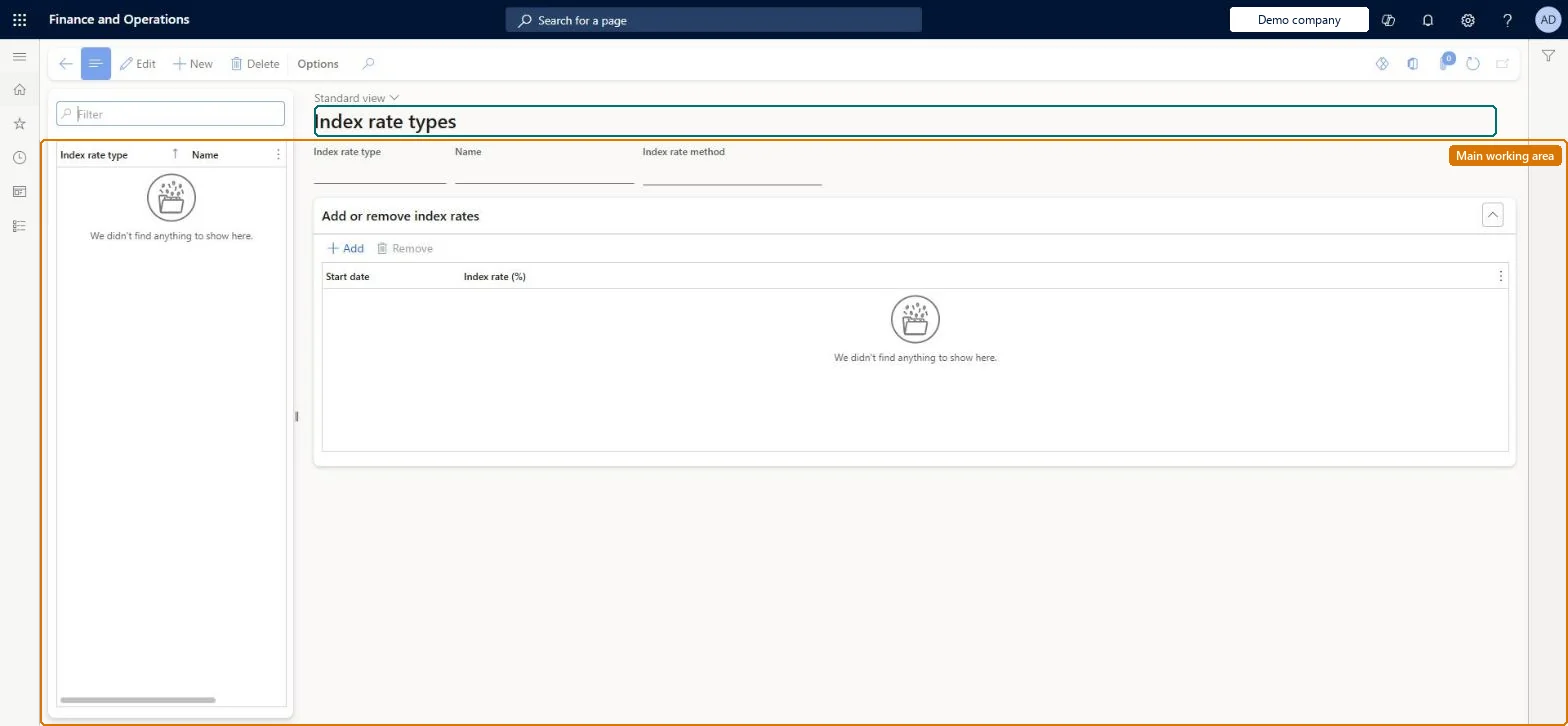
Index rate type page in Dynamics 365
The page in Dynamics 365. page title tab to open what to set or check
Functional consultant · Solution architect

2Where it fits

End user · Functional consultant

3How to do it

About the examples: Examples and screenshots in this guide use BEAT, a demo company in a Dynamics 365 test environment. Use your own company's codes and values instead of copying them.

Setup steps on this page

Set up Index rate type

Use this page to add index rate types and rates, and choose how the index rate is applied, so that index-linked lease payments can be revalued.

Steps from Microsoft

  1. Go to Asset leasing > Setup > Index rate type.
  2. Select New.
  3. Enter the rate type and the name of the index rate.
  4. To add a rate value, select the index rate type, and then select Add.
  5. Select the effective start date and the rate value.

Source: Microsoft Learn

Fields on the page

FieldWhat it meansExampleTable column
Index rate value differenceA method that calculates the new payment from the difference between the index rate on the start date and the most recent rate.Microsoft Learn
Index rate valueA method that calculates the payment by using the percentage entered in Index rate (%).Microsoft Learn
Index rate (%)The index rate percentage used by the selected method.Microsoft Learn 3.2IndexRate

Common errors and fixes

MessageWhat to do
Leases are revalued with last year's rateRevaluation uses the latest rate dated on or before the revaluation date. Add the new value with its effective start date before you run it. Microsoft Learn

Test checklist

  1. Create an index rate type, choose the method and add two dated values.
  2. Use a confirmed lease whose payments depend on that index rate type.
  3. Run Index rate revaluation with a revaluation date after the second value.
  4. Check the revalued payment uses the most recent value as of the revaluation date.

Source: Microsoft Learn

Functional consultant

4Setup decisions

Setup stepRecommended value and whyDecision, common mistake and test
Set up Index rate typeOne rate type per published index the contracts use, with every published value entered with its effective start date.Revaluation takes the most recent rate as of the revaluation date, so the dated history decides the new payments.Which index rate method should the rate type use?Not keeping the dated index values current. Revaluation uses the most recent rate as of the revaluation date, so a missing new value means leases are revalued with an old rate.Test: Revaluation picks the latest rate

Feature management and licence

Feature to turn onAsset leasing (Must be on)
Licence or add-inAsset leasing must be turned on in Feature management (feature Asset leasing). Microsoft Learn describes three Asset leasing roles: Maintain lease (add, edit and post leases), View lease (view leases and schedules and run reports) and Lease clerk (create new leases only). Maintain lease users keep the index rates.

Microsoft Learn

Solution architect

5Design impact

Can it be undoneReversible: Rate types and values can be maintained at any time. They only feed later revaluation runs; revaluations already posted are not changed.
If you change it laterRevaluation uses the most recent index rate as of the revaluation date, so new rate values change the revalued lease payments. Microsoft Learn
Technical architect

6Technical

Menu itemAssetLeaseIndexRateType Checked in Dynamics 365
FormAssetLeaseIndexRateType Checked in Dynamics 365
TableAssetLeaseIndexRateTypeShown as “INDEX RATE TYPE” in Record infoKey field: NameChecked in Dynamics 365
Data entitiesAssetLeaseIndexDataEntityIndex rate (%) Checked in Dynamics 365
Who can open itPrivilegesMaintain lease AssetLeaseLeaseMaintainMaintain lease without vendor invoice access AssetLeaseLeaseMaintainWithoutVendInvoiceAccessView lease AssetLeaseLeaseViewDutiesLease inquire AssetLeaseLeaseInquireMaintain lease AssetLeaseLeaseMaintainMaintain lease without vendor invoice access AssetLeaseLeaseMaintainWithoutVendInvoiceAccess
4 security rolesLease accountant AssetLeaseLeaseMaintainLease manager AssetLeaseLeaseViewAccountant LedgerAccountantAccounting manager LedgerAccountingManager
Checked in Dynamics 365
Roles to set it up and use itTo set it up or change itLease accountant AssetLeaseLeaseMaintainAccountant LedgerAccountantTo use itLease manager AssetLeaseLeaseViewAccounting manager LedgerAccountingManagerGive people one of these roles. On this system, 4 roles can open this page.Checked in Dynamics 365
Developer

7Developer

Open it by URLhttps://<your-environment>/?mi=AssetLeaseIndexRateType
Integrate withAssetLeaseIndexDataEntity data entity Checked in Dynamics 365
Data migrationAssetLeaseIndexDataEntity (Index rate (%)): the index rate types and their dated values.Load order: Load the Asset leasing setup in Microsoft's order: lease books, lease groups, then the parameters (journal names, posting accounts, executory cost accounts), expense types, payment amount types, index rate types and locations, and only then the leases.Microsoft Learn
Everyone

8Sources

To cite this step: AL-SETUP-040, Set up Index rate type. Beyond ERP Atlas Hub, 2026-11-11. https://www.beyonderp.cloud/atlas/step/AL-SETUP-040