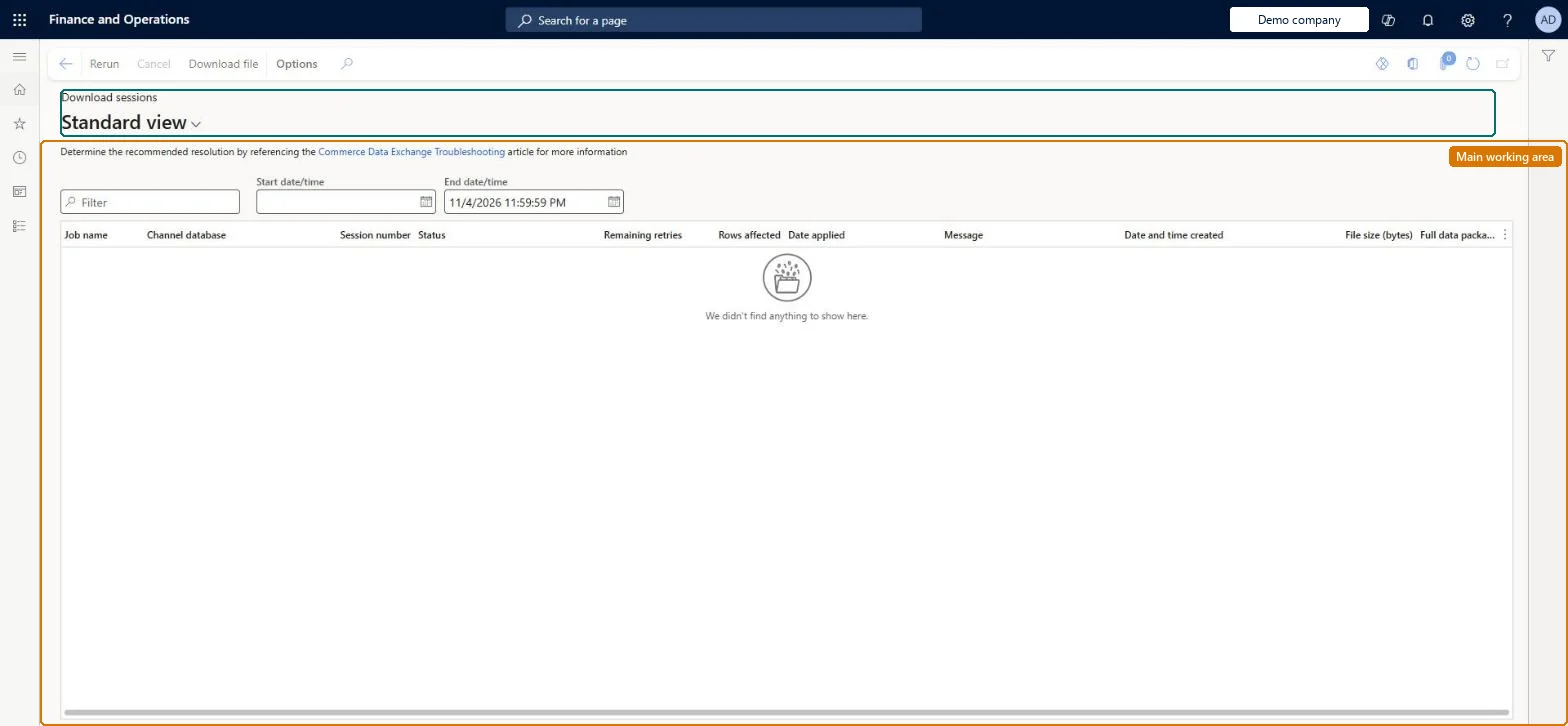
An inquiry page that lists the Commerce Data Exchange data packages sent from headquarters down to channel and offline databases, from creation until they are applied.
Retail and CommerceInquiries and reportsCommerce Data Exchange
RetailCDXDownloadSessionDataStore
Used by
Retail operations manager, Retail service, Retail store IT and 2 more roles
Business process
Manage sales channels
Menu item
RetailCDXDownloadSessionDataStore
Main table
RetailCDXDownloadSession
Show what matters for
PAGE GUIDEWhat the page does and how to use it7 sections. Choose a role to highlight what matters to you.
Everyone
1What it is and why
What it is
An inquiry page that lists the Commerce Data Exchange data packages sent from headquarters down to channel and offline databases, from creation until they are applied.
What you do here
Use this page to see how many rows each package holds, when it was made available and applied, and to troubleshoot packages, for example by viewing errors or cancelling or deleting a stuck job.
Example
For example, if a Store Commerce register cannot find its terminal configuration offline, filter Download sessions by its offline database to see whether sessions are still Available.
The page in Dynamics 365. page title tab to open what to set or check
About the examples: Examples and screenshots in this guide use BEAT, a demo company in a Dynamics 365 test environment. Use your own company's codes and values instead of copying them.
Steps from Microsoft
Go to Retail and Commerce > Inquiries and reports > Commerce Data Exchange > Download sessions.
Filter by the affected channel or offline database.
Check whether sessions are still in an Available state.
Select a failed session to view its error.
If a package keeps failing, cancel or delete it, or retry it.
Deleting or manually retrying a package that is stuck changes whether and when its data reaches the channel or offline database. Microsoft Learn
Technical architect
5Technical
Menu item
RetailCDXDownloadSessionDataStoreChecked in Dynamics 365
Form
RetailCDXDownloadSessionDataStoreChecked in Dynamics 365
Table
RetailCDXDownloadSessionShown as “COMMERCE DATA EXCHANGE DOWNLOAD SESSIONS” in Record infoChecked in Dynamics 365
Who can open it
PrivilegesMaintain Retail Commerce Data Exchange RetailCDXMaintainRetail deployment self service RetailDeploymentSelfServiceMaintain the runtime of scale units. ScaleUnitRuntimeMaintainDutiesManage Commerce Data Exchange: Synch Service RetailCDXMaintainRetail deployment self service RetailDeploymentSelfServiceMaintain the runtime of scale units. ScaleUnitRuntimeMaintain5 security rolesRetail operations manager RetailOperationsManagerRetail service RetailServiceRetail store IT RetailStoreITRetail store manager RetailStoreManagerScale unit administrator ScaleUnitRuntimeAdminChecked in Dynamics 365
Roles to set it up and use it
To set it up or change itRetail service RetailServiceRetail operations manager RetailOperationsManagerRetail store manager RetailStoreManagerRetail store IT RetailStoreITTo use itScale unit administrator ScaleUnitRuntimeAdminGive people one of these roles. On this system, 5 roles can open this page.Checked in Dynamics 365
Actions on the page
(Action Pane without tabs): Rerun, Cancel, Download fileChecked in Dynamics 365