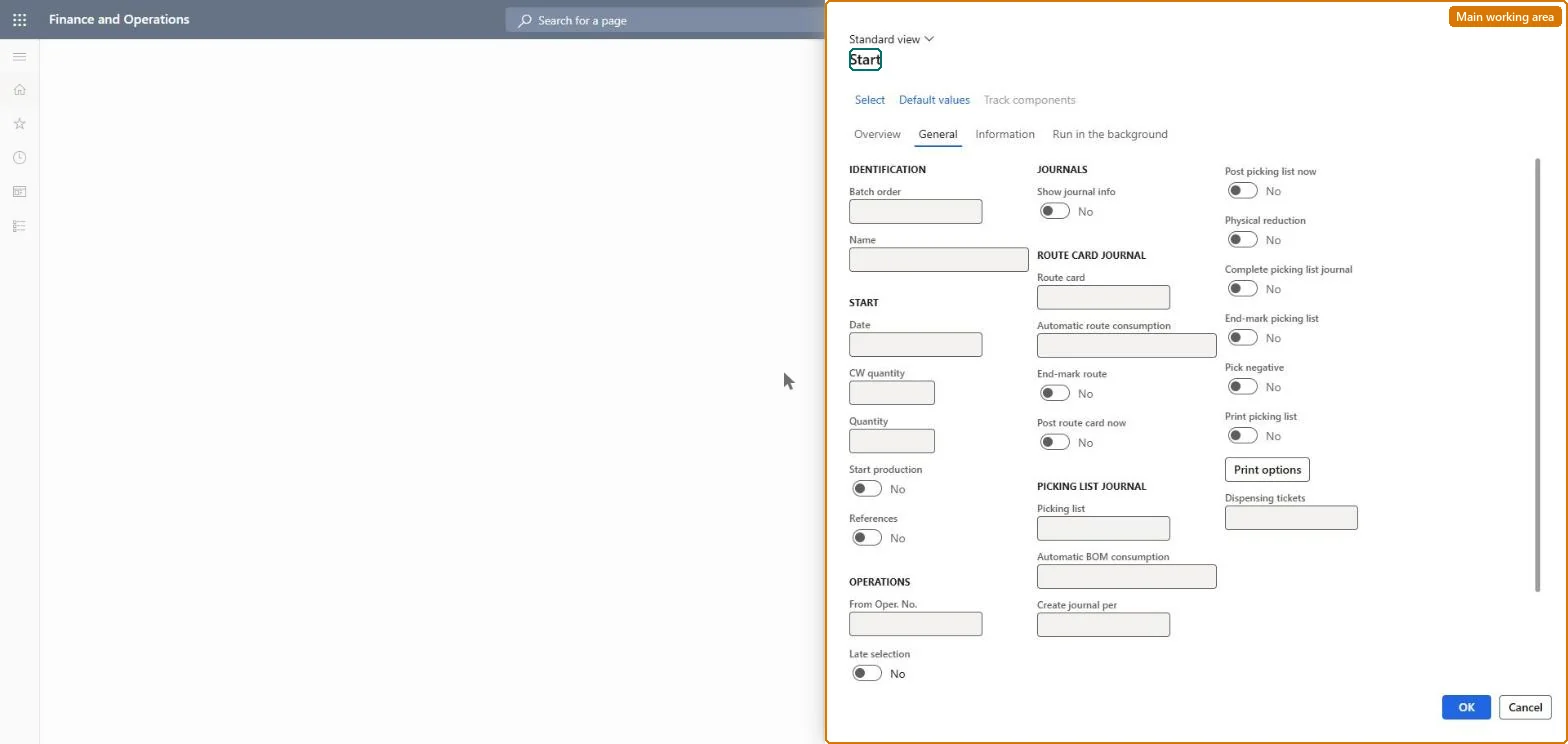
A periodic page that starts one or many production orders, optionally posting material and route consumption automatically and printing the picking list.
Production controlPeriodic tasksProduction order status update
action:ProdStartUp
Business process
Manually start production from the production order form in Dynamics 365 Supply Chain Management
Menu item
action:ProdStartUp
Show what matters for
PAGE GUIDEWhat the page does and how to use it7 sections. Choose a role to highlight what matters to you.
Everyone
1What it is and why
What it is
A periodic page that starts one or many production orders, optionally posting material and route consumption automatically and printing the picking list.
What you do here
Use this page to start released orders in bulk or on a batch schedule, and to decide whether picking list and route card journals are created and posted automatically when the order starts.
Example
For example, start only part of the order quantity so that the picking list posts material in proportion to what is started.
The page in Dynamics 365. page title tab to open what to set or check
About the examples: Examples and screenshots in this guide use BEAT, a demo company in a Dynamics 365 test environment. Use your own company's codes and values instead of copying them.
When to run it
When to run it
When released orders begin on the shop floor and you want material and time consumption reported from that point.
How often
Whenever released orders begin production, or as a batch job for many orders.
Batch settings
Run it in the background when many orders start at the same time, for example at shift start.
What the output shows
Production orders with status Started and, depending on the options, picking list and route card journals that are created or posted. Material posted at start (preflushing) appears as consumption on the order and in the ledger.
Go to Production control > Periodic tasks > Production order status update > Start.
Select the production orders that have the Released status and enter the Quantity to start; a negative quantity reverses a started quantity.
In From Oper. No., enter the first operation to start, and set the posting Date.
Set Automatic route consumption and Post route card now to decide whether time is posted at start, and Automatic BOM consumption and Post picking list now to decide whether material is consumed at start.
Select Print picking list if a printed list is needed, then open the order and review the posted picking list and route card journals.
Yes, by resetting status: Reset to Released reverses picked material, registered time and WIP postings, or start a negative quantity. Microsoft Learn
If you change it later
Starting with automatic consumption posts material and time to the order and the ledger immediately; if the order is started automatically from a later step, job cards are not printed. Microsoft Learn
Technical architect
5Technical
Menu item
action:ProdStartUpChecked in Dynamics 365
Form
ProdParmStartUpChecked in Dynamics 365
Roles to set it up and use it
To use itProduction supervisor ProdProductionSupervisorShop supervisor JmgShopSupervisorProject manager ProjProjectManagerMachine operator JmgMachineOperatorGive people one of these roles. On this system, 4 roles can run this page.Checked in Dynamics 365