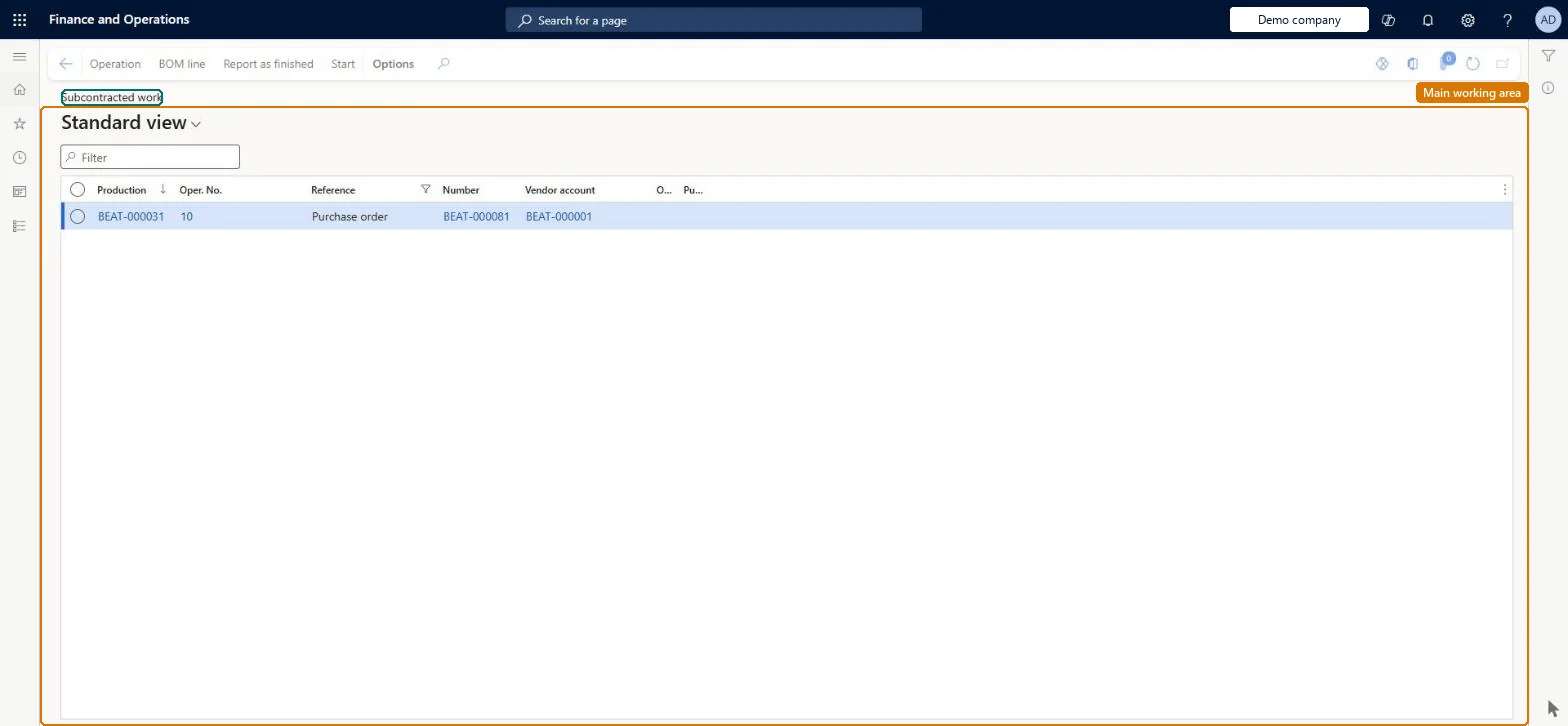
A list page that shows the subcontracted route operations of production and batch orders, anchored on the purchase orders created for the vendor service.
Shop supervisor, Production manager, Production supervisor and 2 more roles
Business process
Subcontract services using production in Dynamics 365 Supply Chain Management
Menu item
ProdBOMVendorListPage
Main table
ProdBOM
Data entity
ProdBatchOrderFormulaLineEntity
Show what matters for
PAGE GUIDEWhat the page does and how to use it7 sections. Choose a role to highlight what matters to you.
Everyone
1What it is and why
What it is
A list page that shows the subcontracted route operations of production and batch orders, anchored on the purchase orders created for the vendor service.
What you do here
Use this page to ship raw material and semi-finished products to the vendor with a picking list journal and delivery note, and to follow the receipt of the subcontracted service that completes the operation.
Example
For example, a planner posts the picking list journal for a painting operation so that the parts travel to the vendor with a delivery note before the painted parts come back via item arrival.
The page in Dynamics 365. page title tab to open what to set or check
About the examples: Examples and screenshots in this guide use BEAT, a demo company in a Dynamics 365 test environment. Use your own company's codes and values instead of copying them.
How to use it
Go to Production control > Operations > Subcontracted work.
Read the list of subcontracted route operations and their purchase orders.
Select a line and select Operation or BOM line under Order details on the Action Pane to open the route operation or the vendor BOM line.
Select Start to start the subcontracted operation, or Report as finished to report it finished.
Routes for one production order cannot cross sites, so vendor-managed warehouses used for subcontracted work must sit in the same site as the internal resources on the route. Microsoft Learn
Technical architect
5Technical
Menu item
ProdBOMVendorListPageChecked in Dynamics 365
Form
ProdBOMVendorListPageChecked in Dynamics 365
Table
ProdBOMShown as “PRODUCTION BOM” in Record infoChecked in Dynamics 365
Data entities
ProdBatchOrderFormulaLineEntityBatch order formula lines Microsoft data model ProdProductionOrderBillOfMaterialsLineEntityProduction bill of materials lines Microsoft data model
Who can open it
PrivilegesView subcontractor work ProdBOMVendorViewDutiesMaintain production orders ProdProductionOrderMaintainInquire into production orders ProdProductionOrderProgressInquire5 security rolesShop supervisor JmgShopSupervisorProduction manager ProdProductionManagerProduction supervisor ProdProductionSupervisorProject manager ProjProjectManagerProduction planner ReqProductionPlannerChecked in Dynamics 365
Roles to set it up and use it
To use itProduction supervisor ProdProductionSupervisorProduction manager ProdProductionManagerShop supervisor JmgShopSupervisorProduction planner ReqProductionPlannerProject manager ProjProjectManagerGive people one of these roles. On this system, 5 roles can open this page.Checked in Dynamics 365
Actions on the page
(Action Pane without tabs): Operation, BOM line, Report as finished, StartChecked in Dynamics 365