Use corrective and preventative (CAPA) management module to enter and record details about CAPA cases in Dynamics 365 Supply Chain Management
Menu item
QMSCAPAWorkerGroup
Main table
QMSCAPAWorkerGroup
Data entity
QMSCAPAWorkerGroupEntity
Setup steps
1 on this page
Show what matters for
PAGE GUIDEWhat the page does and how to use it8 sections. Choose a role to highlight what matters to you.
Everyone
1What it is and why
What it is
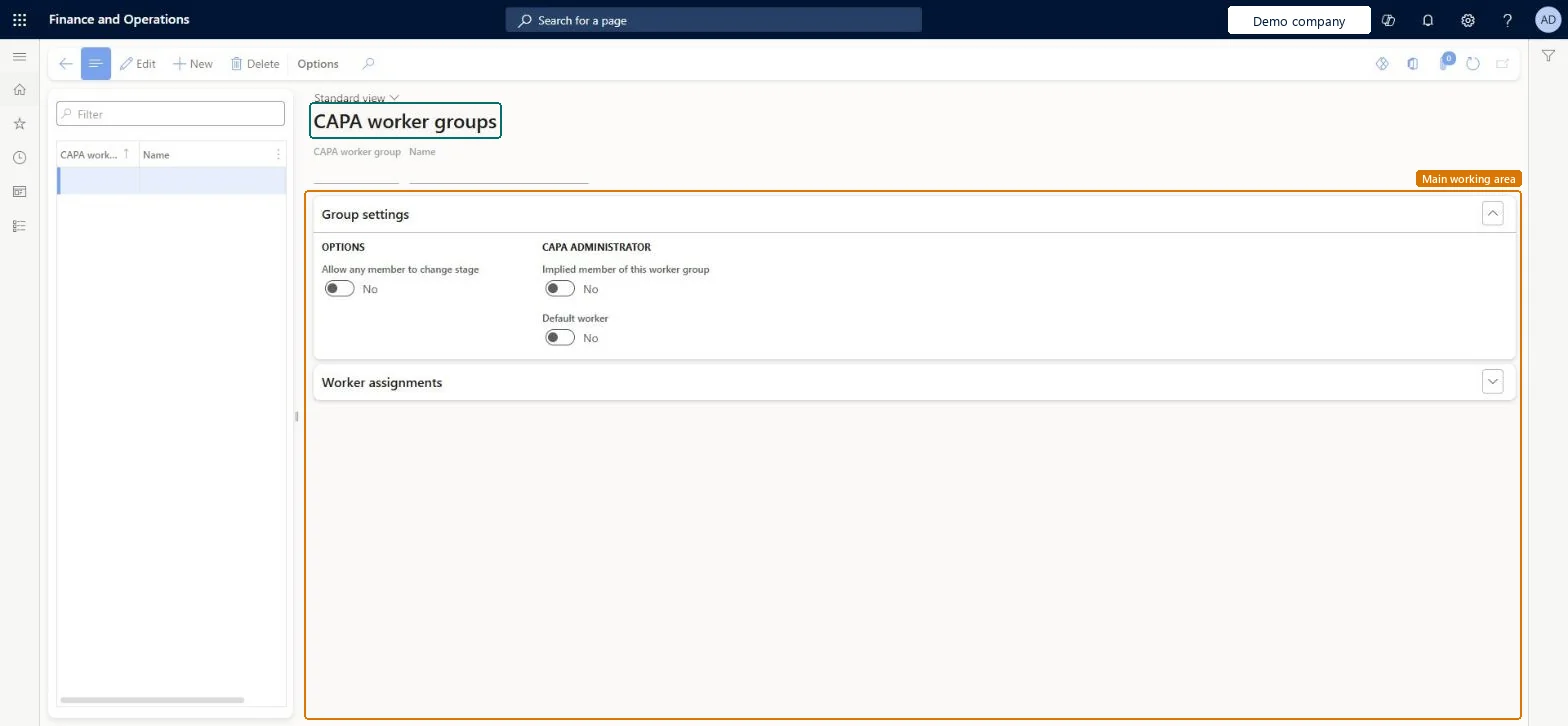
A setup page where you group users together for corrective and preventive action (CAPA) purposes.
What you do here
Use this page to assign a group of workers to each stage and activity of a CAPA process, so the system can validate assignments and notify the right people.
Example
For example, typical worker groups are Investigator, Implementer, Approver and Verifier.
The page in Dynamics 365. page title tab to open what to set or check
About the examples: Examples and screenshots in this guide use BEAT, a demo company in a Dynamics 365 test environment. Use your own company's codes and values instead of copying them.
Step by step, with screenshots
Set up CAPA worker groups1 screen
Use this page to assign a group of workers to each stage and activity of a CAPA process, so the system can validate assignments and notify the right people.
Screen 1
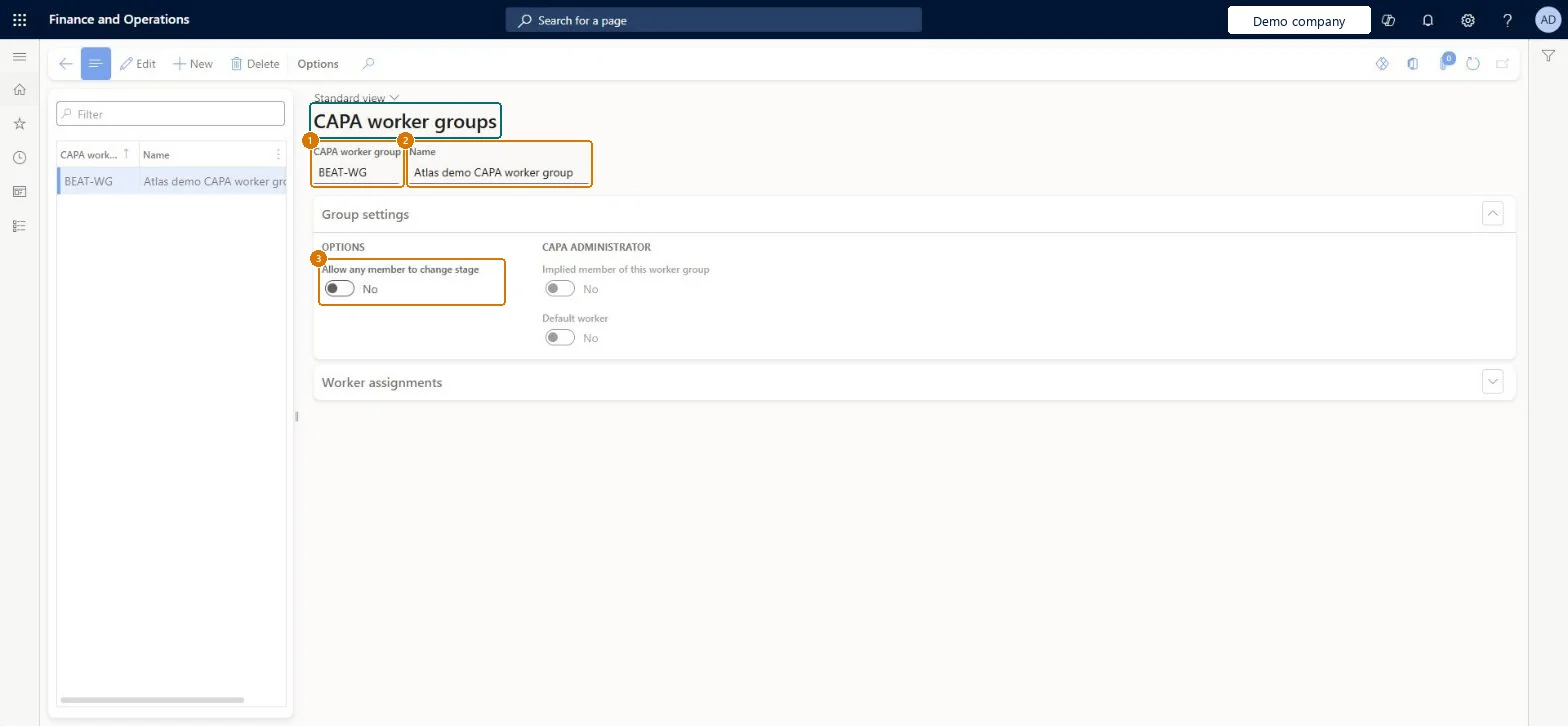
Create a CAPA worker group
Go to Inventory management > Setup > CAPA management > CAPA worker groups
Select New
Enter the worker group code and name
Under Group settings, choose whether any member may change the stage
Select Save
Under Worker assignments, add the workers who belong to the group
1CAPA worker group
BEAT-WG
2Name
CAPA worker group
3Allow any member to change stage
No
Show the full screen page title tab to open what to set or check
Steps from Microsoft
Go to Inventory management > Setup > CAPA management > CAPA worker groups.
Select New to add a worker group, or select an existing one to edit.
In the header, enter the CAPA worker group and a short Name.
On the Group settings FastTab, choose whether any member can change the stage and whether the CAPA administrator is an implied member or the default worker.
On the Worker assignments FastTab, add the workers in the group.
For each worker, select Allowed or Default worker as needed.
Groups by role (for example Investigator, Implementer, Approver, Verifier) with one default worker each; use Implied member for the CAPA administrator instead of adding them by nameLearn names these typical groups and notes that adding the administrator directly needs extra maintenance if the administrator changes.
No default worker in a group: if no worker is assigned on a stage, the default worker is used, so cases have no owner without one.
Feature management and licence
Feature to turn on
Advanced quality management (Mandatory, on by default)
Reversible: Members and settings can be changed. A worker group can be deleted only if it isn't assigned to CAPA case activities. Microsoft Learn
If you change it later
A worker group can be deleted only if it isn't assigned to CAPA case activities. Microsoft Learn
Technical architect
6Technical
Menu item
QMSCAPAWorkerGroupChecked in Dynamics 365
Form
QMSCAPAWorkerGroupChecked in Dynamics 365
Table
QMSCAPAWorkerGroupShown as “CAPA worker groups” in Record infoKey field: GroupIdChecked in Dynamics 365
Data entities
QMSCAPAWorkerGroupEntityCAPA worker groups Checked in Dynamics 365
Who can open it
PrivilegesMaintain CAPA worker groups and worker assignments QMSCAPAWorkerGroupMaintainView CAPA worker groups and worker assignments QMSCAPAWorkerGroupViewDutiesInquire into processes associated with CAPA cases QMSCAPAProcessDefinitionInquireMaintain processes associated with CAPA cases QMSCAPAProcessDefinitionMaintain2 security rolesCAPA administrator QMSCAPAAdministratorCAPA updater QMSCAPAUpdaterChecked in Dynamics 365
Roles to set it up and use it
To set it up or change itCAPA updater QMSCAPAUpdaterCAPA administrator QMSCAPAAdministratorGive people one of these roles. On this system, 2 roles can open this page.Checked in Dynamics 365
Actions on the page
Options: Personalize, Page options, ShareChecked in Dynamics 365
Developer
7Developer
Open it by URL
https://<your-environment>/?mi=QMSCAPAWorkerGroup
Integrate with
QMSCAPAWorkerGroupEntity data entity Checked in Dynamics 365
Checked in a working Dynamics 365 system, version 10.0.49: the menu item, form, table and security, the page, the demo records and the values in the screenshots.