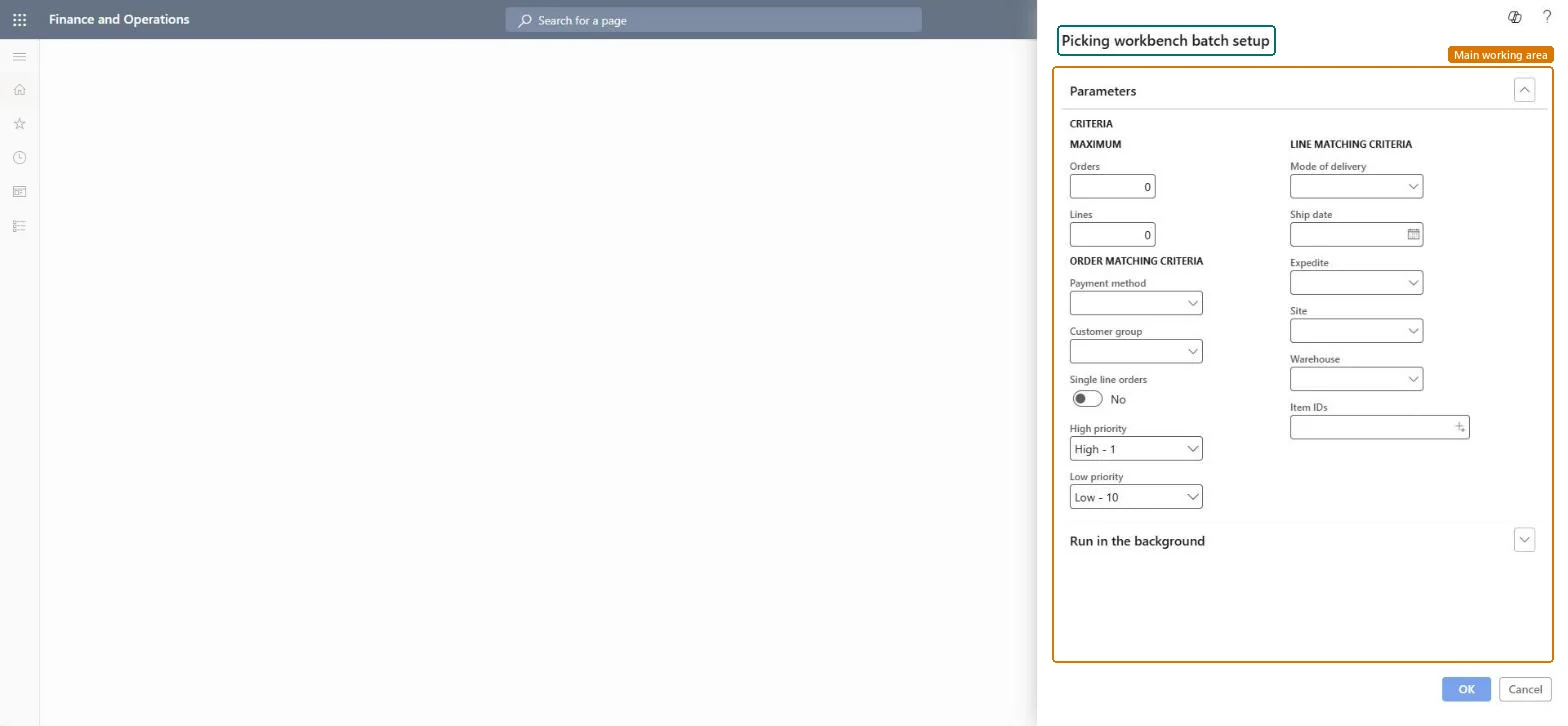
A periodic job that runs the picking workbench in batch, finding sales orders that match your criteria and creating picking batches and picking lists for them.
PAGE GUIDEWhat the page does and how to use it7 sections. Choose a role to highlight what matters to you.
Everyone
1What it is and why
What it is
A periodic job that runs the picking workbench in batch, finding sales orders that match your criteria and creating picking batches and picking lists for them.
What you do here
Use this periodic task to organize paper-based picking for a warehouse on a regular schedule, reserving inventory and creating picking lists only for items that can be reserved.
Example
For example, if a courier collects shipments at 14:00, you can arrange for the matching picking lists to be handed out at noon.
The page in Dynamics 365. page title tab to open what to set or check
About the examples: Examples and screenshots in this guide use BEAT, a demo company in a Dynamics 365 test environment. Use your own company's codes and values instead of copying them.
When to run it
When to run it
When a warehouse that uses paper-based picking lists organizes picking on a regular schedule.
How often
On a recurring schedule that matches the warehouse's picking rounds.
Batch settings
Run it as a recurring batch job with the same matching criteria for each picking round.
What the output shows
Picking batches and picking lists for the sales orders that match your criteria, with inventory reserved for each line. An order that is missing usually didn't match the criteria or had nothing that could be reserved.
Go to Inventory management > Periodic tasks > Picking workbench.
Under Maximum, enter the number of Orders and Lines that one run may include.
Under Order matching criteria, set Payment method, Customer group, Single line orders, High priority and Low priority to choose which sales orders qualify.
Under Line matching criteria, set Mode of delivery, Ship date, Expedite, Site, Warehouse and Item IDs to choose which lines are picked.
Under Run in the background, set a recurrence when the warehouse picks on a fixed schedule.
After the run, review the picking batches and picking lists. Lines with no available inventory, or already on another picking list, are left out.
Partly: Picking lists can be reduced afterwards, but the reservations and lists the run created stay until you change them. Microsoft Learn
If you change it later
Picking lists are created only for quantities that can be reserved; items with no available inventory, or already on another picking list, are left out. Microsoft Learn
Technical architect
5Technical
Menu item
action:MCRPickingWorkbenchBatchChecked in Dynamics 365
Form
DialogChecked in Dynamics 365
Roles to set it up and use it
To use itBuying agent TradeBuyingAgentSales clerk TradeSalesClerkGive people one of these roles. On this system, 2 roles can run this page.Checked in Dynamics 365