BeyondERP.Newsletter
Menu

Setup page · Inventory management

Box definitions

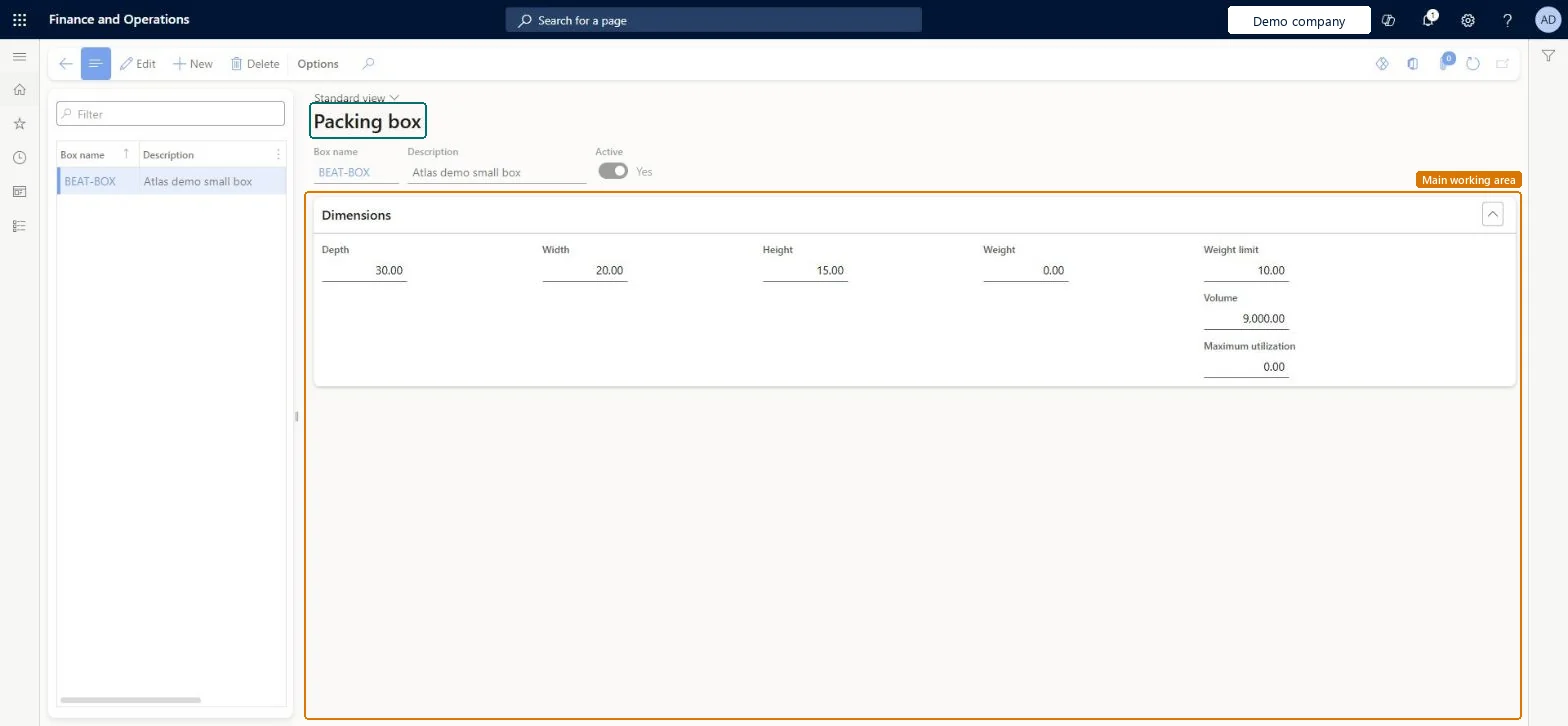
A setup page where you define the boxes, with their dimensions and maximum utilization, that boxing logic uses when items are picked and packed.

Used by
Sales clerk, Sales representative, Warehouse manager and 1 more role
Business process
Maintain inventory levels
Menu item
MCRPackingBoxTable
Main table
MCRPackingBoxTable
Setup steps
1 on this page
Show what matters for
PAGE GUIDEWhat the page does and how to use it7 sections. Choose a role to highlight what matters to you.
Everyone

1What it is and why

What it isA setup page where you define the boxes, with their dimensions and maximum utilization, that boxing logic uses when items are picked and packed.
What you do hereUse this page to let the system suggest the smallest suitable box for the items on a picking route.
ExampleFor example, 10 items going to the same address can be packed together in one medium-sized box instead of 10 small boxes.
Box definitions page in Dynamics 365
The page in Dynamics 365. page title tab to open what to set or check
Functional consultant · Solution architect

2Where it fits

Business processMaintain inventory levels
Menu pathInventory management › Setup › Picking workbench › Box definitions
Set up firstInventory and warehouse management parameters Microsoft Learn Set up Inventory and warehouse management parameters
Used next byPicking workbench Microsoft Learn
Related pagesWorkbench profiles Microsoft Learn
End user · Functional consultant

3How to do it

About the examples: Examples and screenshots in this guide use BEAT, a demo company in a Dynamics 365 test environment. Use your own company's codes and values instead of copying them.

Step by step, with screenshots

Set up Box definitions1 screen

Use this page to let the system suggest the smallest suitable box for the items on a picking route.

  1. Screen 1

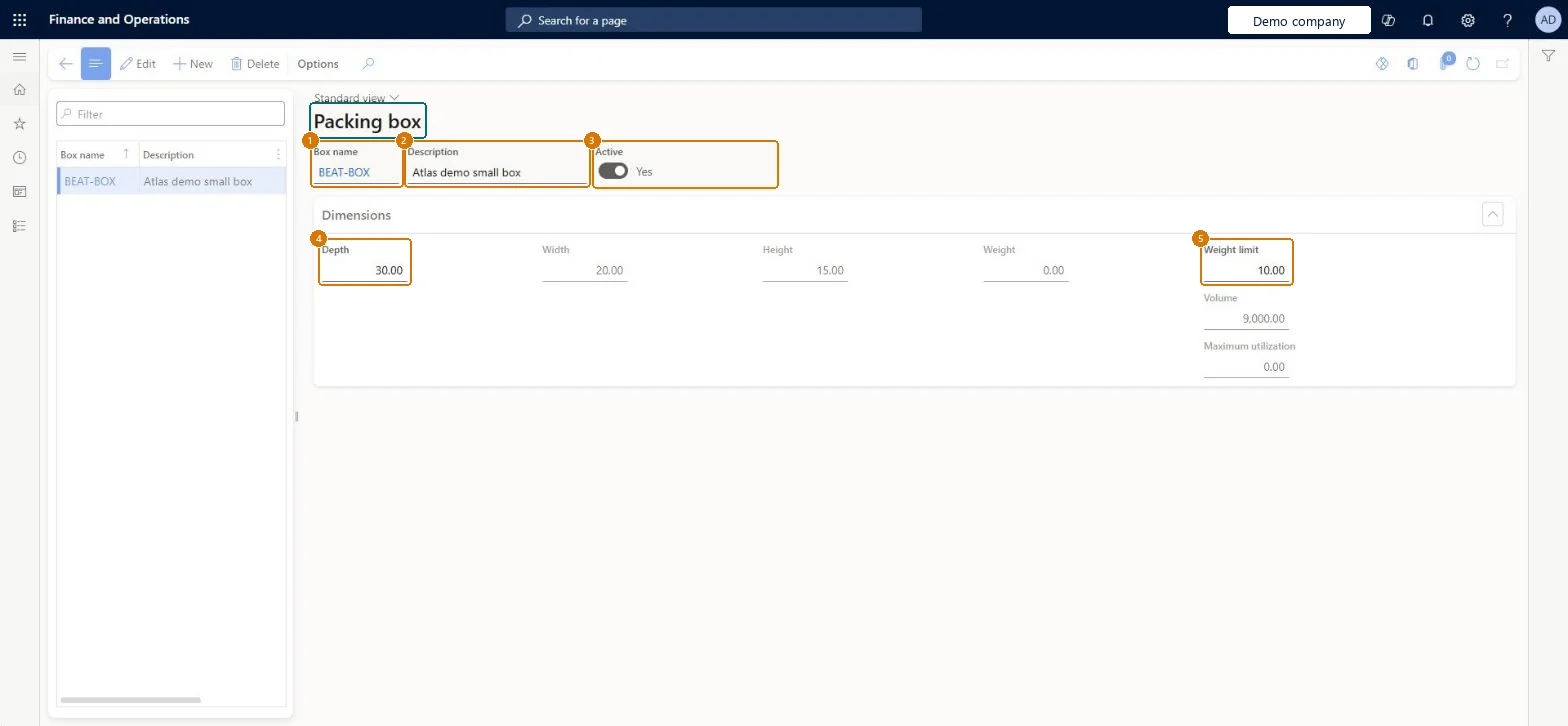
    Define a packing box

    Go to Inventory management > Setup > Picking workbench > Box definitions

    1. Select New
    2. Enter the box name and a description
    3. Leave Active on so the box can be suggested
    4. Enter the depth, width and height (the volume is calculated)
    5. Enter the weight limit and, optionally, the empty box weight and maximum utilization
    6. Select Save
    1Box nameBEAT-BOX
    2DescriptionSmall box
    3ActiveYes
    4Depth30.00
    5Weight limit10.00
    Width20.00
    Height15.00
    Define a packing box (zoomed on the outlined fields)
    Show the full screenDefine a packing box
    page title tab to open what to set or check

Steps from Microsoft

  1. Go to Inventory management > Setup > Picking workbench > Box definitions.
  2. Select New and enter a name for the box, such as BoxSmall.
  3. Enter a brief description.
  4. On the Dimensions FastTab, enter the measurements of the box.
  5. Select the Active check box.

Source: Microsoft Learn

Fields on the page

FieldWhat it meansExampleTable column
Maximum utilizationThe highest percentage of the box volume that can be used for the items; the rest is left for packing material.Microsoft Learn MaximumUtilizationPercent
ActiveTurns on the box definition so boxing logic can use it.Microsoft Learn YesActive
Box nameThe name of the box.Checked in Dynamics 365SMALLPackingBoxName
DescriptionA description of the box.Checked in Dynamics 365Small boxDescription
Depth30.00DepthLimit
Width20.00WidthLimit
Height15.00HeightLimit
Weight limit10.00WeightLimit
Solution architect

4Design impact

Shared or per companyPer company: each legal entity has its own records. Microsoft data model
Technical architect

5Technical

Menu itemMCRPackingBoxTable Checked in Dynamics 365
FormMCRPackingBoxTable Checked in Dynamics 365
TableMCRPackingBoxTableShown as “Packing box table” in Record infoChecked in Dynamics 365
Who can open itPrivilegesMaintain box definitions MCRPackingBoxTableMaintainView box definitions MCRPackingBoxTableViewDutiesMaintain sales order MCRSalesMaintainInquire into packing operations master MCRWMSPackingOperationMasterInquireMaintain packing operations master MCRWMSPackingOperationMasterMaintain
5 security roles MCRTestUserRoleSales clerk TradeSalesClerkSales representative TradeSalesRepresentativeWarehouse manager WMSWarehouseManagerWarehouse worker WMSWarehouseWorker
Checked in Dynamics 365
Roles to set it up and use itTo set it up or change itWarehouse manager WMSWarehouseManagerSales clerk TradeSalesClerkSales representative TradeSalesRepresentativeTo use itWarehouse worker WMSWarehouseWorkerGive people one of these roles. On this system, 4 roles can open this page.Checked in Dynamics 365
Actions on the pageOptions: Personalize, Page options, ShareChecked in Dynamics 365
Developer

6Developer

Open it by URLhttps://<your-environment>/?mi=MCRPackingBoxTable
Table definitionMCRPackingBoxTable columns and relations Microsoft data model
Everyone

7Sources