Collections manager, Human resource manager, Rental clerk and 7 more roles
Business process
Define address and location policies
Menu item
GlobalAddressBookListPage
Main table
DirPartyTable
Data entity
DirPartyV2Entity
Setup steps
1 on this page
Show what matters for
PAGE GUIDEWhat the page does and how to use it8 sections. Choose a role to highlight what matters to you.
Everyone
1What it is and why
What it is
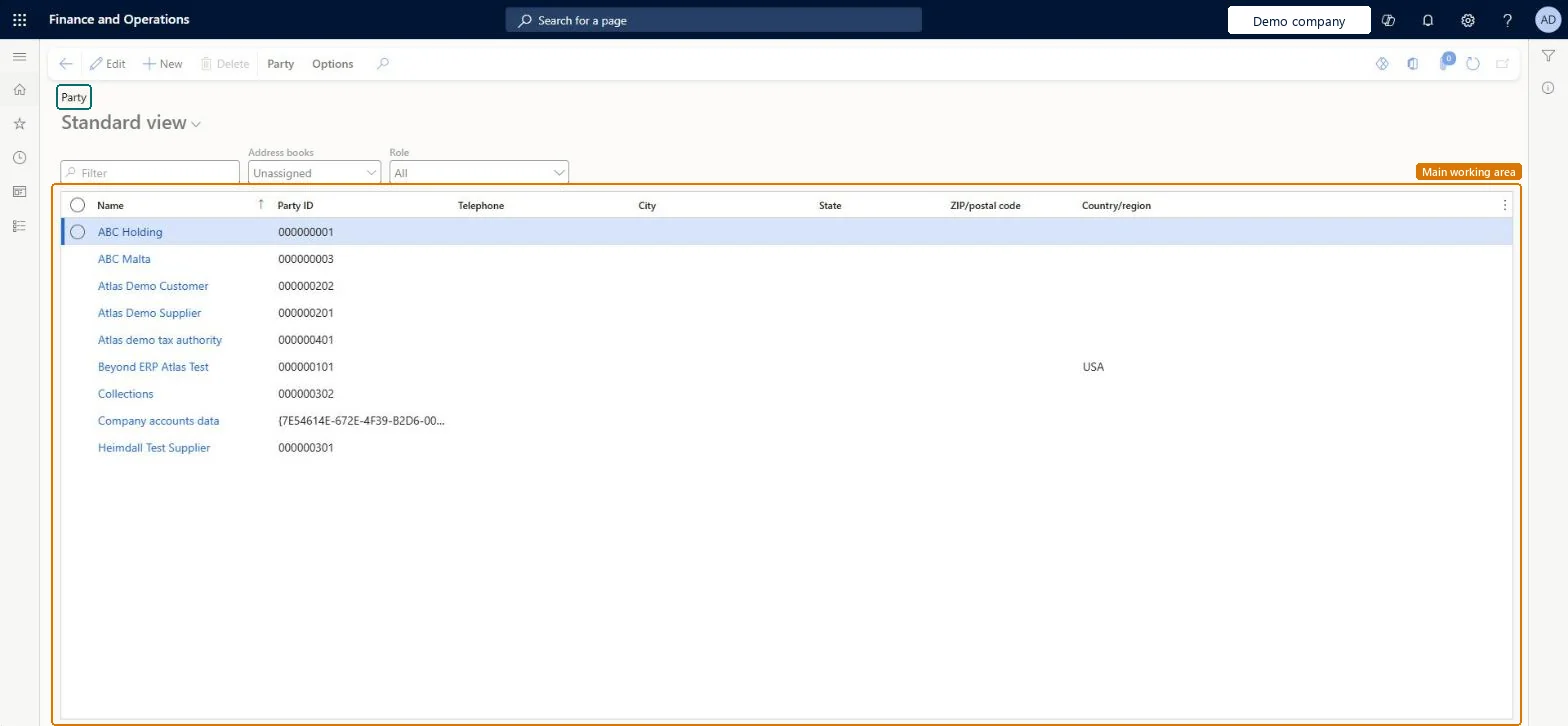
A list page of all parties, the people and organizations your company deals with, with their names, addresses and contact information.
What you do here
Use this page to create and keep party records in one place, so that every role a party has, such as customer or vendor, shares the same addresses and contact details.
Example
For example, BEAT's supplier BEAT-000001 is also bought from by a second legal entity and later becomes a customer. All three roles point at one party record, so when the supplier moves office, one address change in the global address book updates the vendor in both companies and the customer at once.
The page in Dynamics 365. page title tab to open what to set or check
About the examples: Examples and screenshots in this guide use BEAT, a demo company in a Dynamics 365 test environment. Use your own company's codes and values instead of copying them.
Setup steps on this page
Keep one party per real organization or person
Use one party record for every role an organization or person plays, so addresses and contacts are kept once.
Steps from Microsoft
Open the Global address book list page.
Select New.
In the Name field, enter the party name.
In the Address books field, select the address book.
On the Addresses FastTab, select Add, enter the address, and select OK.
On the Party tab, in the Maintain group, select Check for duplicates.
Search the global address book and run Check for duplicates before creating any customer, vendor or workerAddresses and contact information belong to the party and are shared by all its roles, so a duplicate party splits the history and the addresses.
On the live system, these roles can open the page: Human resource manager, Information technology manager, Collections manager, Logistics manager, Rental representative, Rental coordinator agent and 3 more.
Checked in Dynamics 365
Solution architect
5Design impact
Shared or per company
Shared: parties in the global address book are used by every legal entity, and the roles (customer, vendor, worker) on a party can sit in different legal entities. Microsoft Learn
Can it be undone
Hard to reverse: Addresses and contact information belong to the party and are shared by all its roles, so a change updates every customer, vendor and contact record linked to that party at once. A party that is a legal entity can't be deleted: the Delete button is unavailable. Microsoft Learn
If you change it later
A party that is a legal entity can't be deleted from the global address book. Microsoft Learn
Technical architect
6Technical
Menu item
GlobalAddressBookListPageChecked in Dynamics 365
Form
DirPartyTableChecked in Dynamics 365
Table
DirPartyTableShown as “GLOBAL ADDRESS BOOK” in Record infoKey field: NameChecked in Dynamics 365
Data entities
DirPartyV2EntityGlobal address book V2 DirPartyEntityGlobal address book
Who can open it
PrivilegesMaintain party records DirPartyTableMaintainView party records DirPartyTableViewDutiesInquire into global address book master DirAddressBookMasterInquireMaintain global address book master DirAddressBookMasterMaintainInquire into customer fleet item details RentalCustomerRentalItemDetailsInquire10 security rolesCollections manager CollectionLetterCollectionsManagerHuman resource manager HcmHumanResourceManagerRental clerk RentalClerkRental coordinator agent RentalCoordinatorAgentRental manager RentalManagerRental purchasing manager RentalPurchasingManagerRental representative RentalRepresentativeRental sales manager RentalSalesManagerInformation technology manager SysServerITManagerLogistics manager TMSLogisticsManagerChecked in Dynamics 365
Roles to set it up and use it
To set it up or change itHuman resource manager HcmHumanResourceManagerInformation technology manager SysServerITManagerCollections manager CollectionLetterCollectionsManagerLogistics manager TMSLogisticsManagerTo use itRental representative RentalRepresentativeRental coordinator agent RentalCoordinatorAgentRental manager RentalManagerRental clerk RentalClerkRental sales manager RentalSalesManagerGive people one of these roles. On this system, 10 roles can open this page.Checked in Dynamics 365
Actions on the page
Party: Maintain, New, Attachments, RegistrationChecked in Dynamics 365
DirPartyV2Entity (Global address book V2): shared by all companies.DirPartyEntity (Global address book): shared by all companies.Load order: Load the global address book parties before customers, vendors and workers, so their roles attach to existing parties instead of creating duplicates. Microsoft's default template 010 - System Setup loads the address setup that parties depend on.Load first: address books, address setupChecked in Dynamics 365