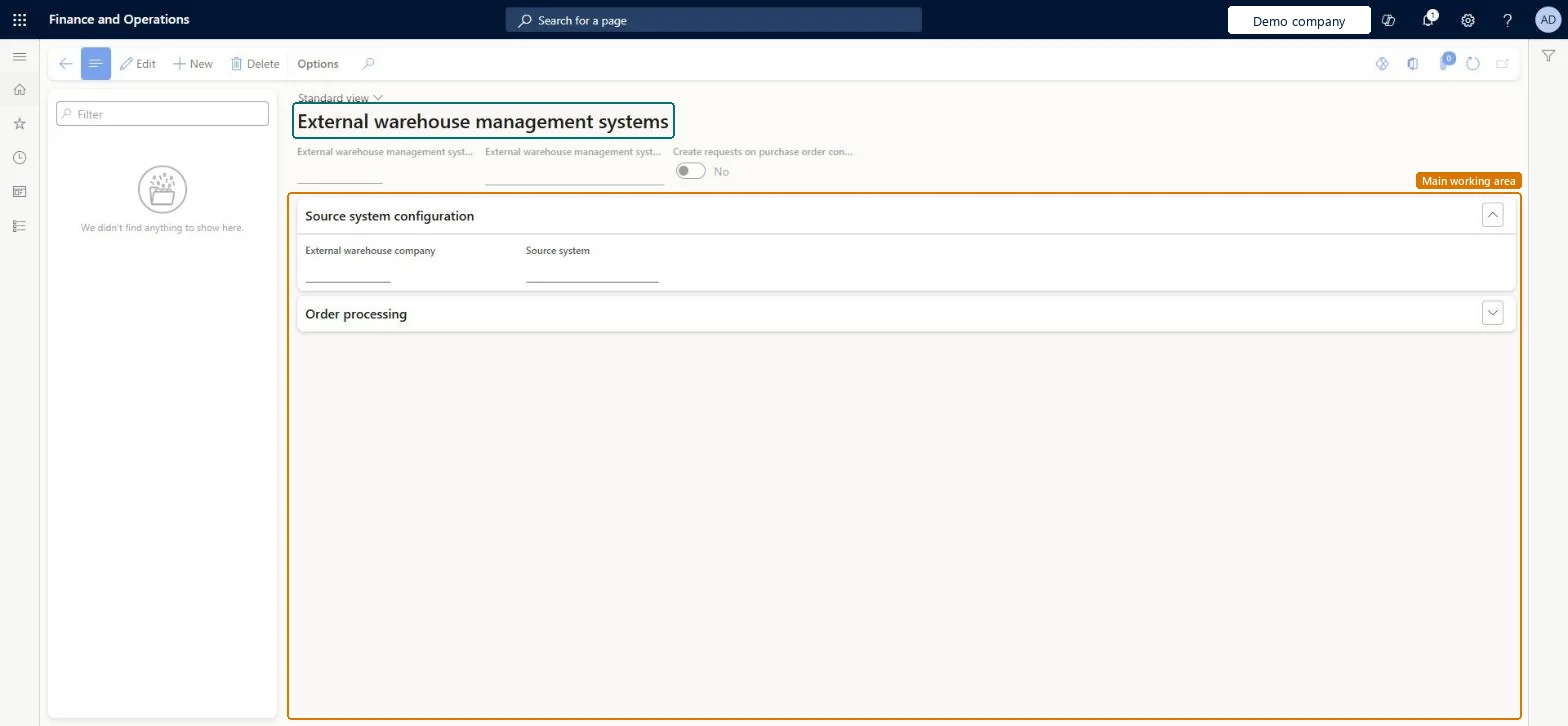
Setup step on the External warehouse management system page · Warehouse management
Set up External warehouse management system
Use this page to register the external warehouse management system that handles warehouse operations for another legal entity, such as a shared warehouse.
SETUP GUIDEHow to set it up8 sections. Choose a role to highlight what matters to you.
Everyone
1What it is and why
What it is
A setup page where you define an external warehouse management system and link it to a source system, so that a legal entity can send orders to an externally managed warehouse.
What you do here
Use this page to register the external warehouse management system that handles warehouse operations for another legal entity, such as a shared warehouse.
Example
For example, a sales legal entity can link an external warehouse management system to the source system of a shared warehouse legal entity.
The page in Dynamics 365. page title tab to open what to set or check
About the examples: Examples and screenshots in this guide use BEAT, a demo company in a Dynamics 365 test environment. Use your own company's codes and values instead of copying them.
Setup steps on this page
Set up External warehouse management system
Use this page to register the external warehouse management system that handles warehouse operations for another legal entity, such as a shared warehouse.
How to use it
Go to Warehouse management > Setup > Warehouse management integration > External warehouse management system.
On the Action Pane, select New to create a record.
Enter an ID and a name for the external warehouse management system, and choose whether to create requests on purchase order confirmation.
On the Source system configuration FastTab, select the External warehouse company and the Source system.
Expand the Order processing FastTab to review the order settings.
Source: Checked in Dynamics 365
Test checklist
In the ordering legal entity, create the external WMS of type Legal entity and link it to the source system in the warehousing entity.
Release a transfer or sales order from the externally managed warehouse.
In the warehousing entity, process the outbound shipment order messages and check the outbound shipment order is created.
Ship-confirm there and check the ordering entity's order is updated when the external warehouse updates are processed.
Type Legal entity, linked to the source system set up in the warehousing legal entity; that source system uses an Outbound shipment processing policy with Enforce shipment to order matching set to Yes and keeps Enable warehouse inventory update logs offLearn's shared-warehouse setup links an external WMS of the Legal entity type to the source system in the warehousing entity, requires the order-matching policy, and says to keep inventory update logs off so adjustments don't update on-hand in the sales entities.
On version 10.0.45 and earlier, confirming a shipment whose shipped quantity differs from the ordered quantity without first updating the delivery remainder; the update then fails in the ordering legal entity.
Feature management and licence
Feature to turn on
Warehouse management only mode (Mandatory, on by default)
Hard to reverse: The link drives orders and updates between two legal entities; once orders flow through it, changing it means aligning both entities and any open external warehouse shipment order requests.
Technical architect
6Technical
Menu item
WHSEWManagementSystemChecked in Dynamics 365
Form
WHSEWManagementSystemChecked in Dynamics 365
Table
WHSEWManagementSystemShown as “EXTERNAL WAREHOUSE MANAGEMENT SYSTEM” in Record infoChecked in Dynamics 365
Data entities
WHSExternalWarehouseManagementSystemEntityExternal warehouse management systems Checked in Dynamics 365
Who can open it
PrivilegesMaintain external warehouse management systems WHSEWManagementSystemMaintainView external warehouse management systems WHSEWManagementSystemViewDutiesWarehouse management integration inquire WarehouseManagementIntegrationSetupInquireWarehouse management integration setup maintain WarehouseManagementIntegrationSetupMaintain2 security rolesMaterials manager InventMaterialsManagerWarehouse manager WMSWarehouseManagerChecked in Dynamics 365
Roles to set it up and use it
To set it up or change itWarehouse manager WMSWarehouseManagerTo use itMaterials manager InventMaterialsManagerGive people one of these roles. On this system, 2 roles can open this page.Checked in Dynamics 365
Checked in a working Dynamics 365 system, version 10.0.49: the menu item, form, table and security, the page.
To cite this step: WM-SETUP-410, Set up External warehouse management system. Beyond ERP Atlas Hub, 2026-11-11. https://www.beyonderp.cloud/atlas/step/WM-SETUP-410