Receiving clerk, Shipping clerk, Warehouse planner and 2 more roles
Business process
Manage warehouse operations
Menu item
WHSShipConsolidationPolicy
Main table
WHSShipConsolidationPolicy
Data entity
WHSShipConsolidationPolicyV2Entity
Setup steps
1 on this page
Show what matters for
SETUP GUIDEHow to set it up8 sections. Choose a role to highlight what matters to you.
Everyone
1What it is and why
What it is
A setup page where you define the policies that decide how shipments are consolidated when orders are released to the warehouse.
What you do here
Use this page to choose, for each order type, which fields must match for shipments to be consolidated and in what order the policies are applied.
Example
For example, a policy can group order lines that share the same customer requisition number into one shipment, even when the lines come from different sales orders.
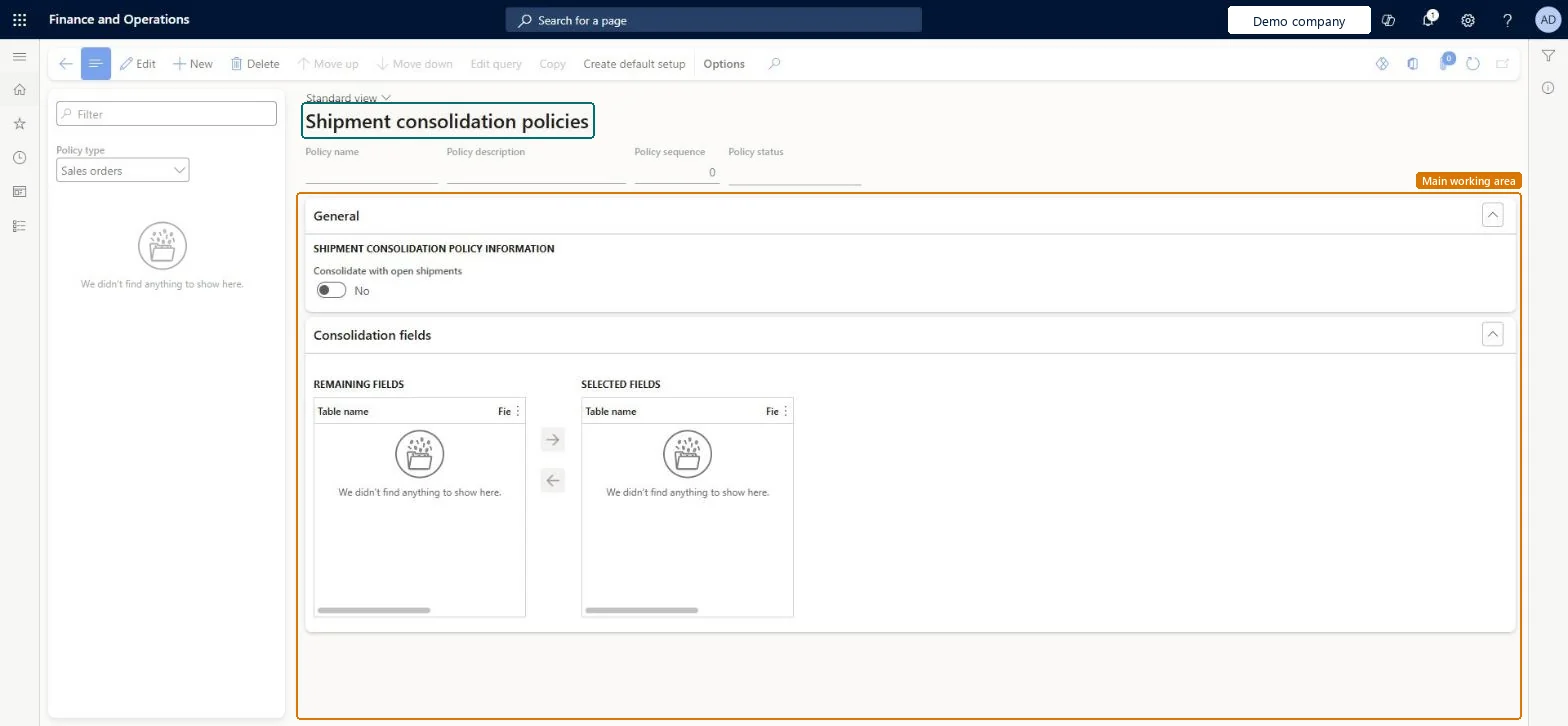
The page in Dynamics 365. page title tab to open what to set or check
About the examples: Examples and screenshots in this guide use BEAT, a demo company in a Dynamics 365 test environment. Use your own company's codes and values instead of copying them.
Setup steps on this page
Set up Shipment consolidation policies
Use this page to choose, for each order type, which fields must match for shipments to be consolidated and in what order the policies are applied.
Steps from Microsoft
Go to Warehouse management > Setup > Release to warehouse > Shipment consolidation policies.
Set the Policy type, for example Sales orders.
On the Action Pane, select New, then enter a Policy name and a Policy description.
Set the Consolidate with open shipments option and select Save.
On the Consolidation fields FastTab, use the arrow buttons to move fields from the remaining fields to the selected fields.
On the Action Pane, select Edit query to define when the policy applies.
Use Move up and Move down to set the order in which the policies are applied.
Specific policies (narrow query) first in the sequence and a Default policy last for each policy type; turn on Consolidate with open shipments only where orders released at different times should join one shipmentEvery policy has a query and a sequence number that sets the execution order, and the policies are evaluated each time a new shipment is created. Consolidate with open shipments makes release to warehouse search existing open shipments created by the same policy.
Reversible: Policies can be resequenced and edited; they apply when new shipments are created. Mandatory consolidation fields (for sales: Account number, Delivery recipient, Postal address, Warehouse) can't be removed.
Technical architect
6Technical
Menu item
WHSShipConsolidationPolicyChecked in Dynamics 365
Form
WHSShipConsolidationPolicyChecked in Dynamics 365
Table
WHSShipConsolidationPolicyShown as “SHIPMENT CONSOLIDATION POLICIES” in Record infoKey field: ShipConsolidationPolicyNameChecked in Dynamics 365
Data entities
WHSShipConsolidationPolicyV2EntityShipment consolidation policies V2 Checked in Dynamics 365WHSShipConsolidationPolicyV3EntityShipment consolidation policies V3 Checked in Dynamics 365WHSShipConsolidationPolicyFieldEntityShipment consolidation policy fields Checked in Dynamics 365
Who can open it
PrivilegesMaintain the shipment consolidation policy WHSShipConsolidationPolicyMaintainView the shipment consolidation policy WHSShipConsolidationPolicyViewDutiesMaintain warehouse planning WHSWarehousePlanningMaintainInquire into warehouse planning status WHSWarehousePlanningStatusInquire5 security rolesReceiving clerk InventReceivingClerkShipping clerk InventShippingClerkWarehouse planner WHSWarehousePlannerWarehouse manager WMSWarehouseManagerWarehouse worker WMSWarehouseWorkerChecked in Dynamics 365
Roles to set it up and use it
To set it up or change itWarehouse planner WHSWarehousePlannerTo use itWarehouse manager WMSWarehouseManagerWarehouse worker WMSWarehouseWorkerShipping clerk InventShippingClerkReceiving clerk InventReceivingClerkGive people one of these roles. On this system, 5 roles can open this page.Checked in Dynamics 365
Actions on the page
(Action Pane without tabs): Move up, Move down, Edit query, Copy, Create default setupChecked in Dynamics 365
Checked in a working Dynamics 365 system, version 10.0.49: the menu item, form, table and security, the page.
To cite this step: WM-SETUP-280, Set up Shipment consolidation policies. Beyond ERP Atlas Hub, 2026-11-11. https://www.beyonderp.cloud/atlas/step/WM-SETUP-280