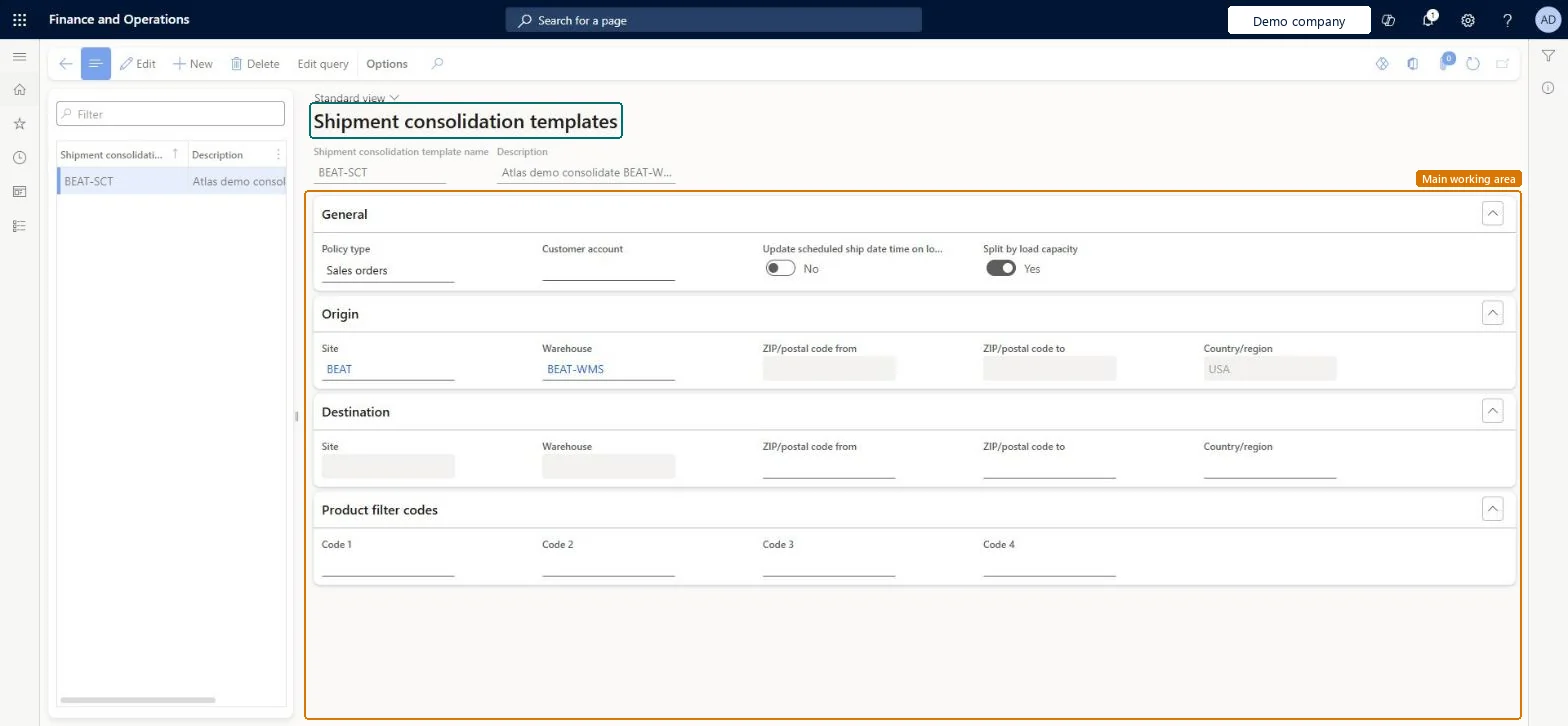
A setup page where you define shipment consolidation templates, which you apply in the Shipment consolidation workbench to assess proposed consolidations of shipments.
Receiving clerk, Shipping clerk, Warehouse planner and 2 more roles
Business process
Manage warehouse operations
Menu item
WHSShipConsolidationTemplate
Main table
WHSShipConsolidationTemplate
Data entity
WHSShipConsolidationTemplateV2Entity
Setup steps
1 on this page
Show what matters for
PAGE GUIDEWhat the page does and how to use it7 sections. Choose a role to highlight what matters to you.
Everyone
1What it is and why
What it is
A setup page where you define shipment consolidation templates, which you apply in the Shipment consolidation workbench to assess proposed consolidations of shipments.
What you do here
Use this page to set up the templates that the Shipment consolidation workbench uses, so that you can assess proposed consolidations of unconfirmed shipments before you confirm them.
The page in Dynamics 365. page title tab to open what to set or check
About the examples: Examples and screenshots in this guide use BEAT, a demo company in a Dynamics 365 test environment. Use your own company's codes and values instead of copying them.
Setup steps on this page
Set up Shipment consolidation templates
Use this page to set up the templates that the Shipment consolidation workbench uses, so that you can assess proposed consolidations of unconfirmed shipments before you confirm them.
How to use it
Go to Warehouse management > Setup > Release to warehouse > Shipment consolidation templates.
On the Action Pane, select New to create a template.
Enter a Shipment consolidation template name and a Description.
On the General FastTab, select the Policy type and the Customer account, and choose whether to split by load capacity.
Expand the Origin, Destination and Product filter codes FastTabs to set the further conditions for the template.
Source: Checked in Dynamics 365
Test checklist
Release several orders for the same customer to the warehouse without consolidation.
Open Warehouse management > Release to warehouse > Shipment consolidation workbench and apply the template.
Review the proposed consolidations and remove or add shipments as needed.
Confirm and check the shipments are consolidated before shipment confirmation.
Reversible: Templates only drive proposals on the Shipment consolidation workbench. You can apply them several times and edit them freely; only confirmed consolidations change shipments. Microsoft Learn
Technical architect
5Technical
Menu item
WHSShipConsolidationTemplateChecked in Dynamics 365
Form
WHSShipConsolidationTemplateChecked in Dynamics 365
Table
WHSShipConsolidationTemplateShown as “SHIPMENT CONSOLIDATION TEMPLATE” in Record infoKey field: ShipConsolidationTemplateNameChecked in Dynamics 365
Data entities
WHSShipConsolidationTemplateV2EntityShipment consolidation templates V2 Microsoft data model
To set it up or change itWarehouse planner WHSWarehousePlannerTo use itWarehouse manager WMSWarehouseManagerWarehouse worker WMSWarehouseWorkerShipping clerk InventShippingClerkReceiving clerk InventReceivingClerkGive people one of these roles. On this system, 5 roles can open this page.Checked in Dynamics 365
Actions on the page
(Action Pane without tabs): Edit queryChecked in Dynamics 365