SETUP GUIDEHow to set it up8 sections. Choose a role to highlight what matters to you.
Everyone
1What it is and why
What it is
A setup page where you add the warehouses that should use warehouse management processes and give their locations a location profile, and then validate and process the changes.
What you do here
Use this page to enable existing warehouses for warehouse management processes and to assign a location profile to their locations.
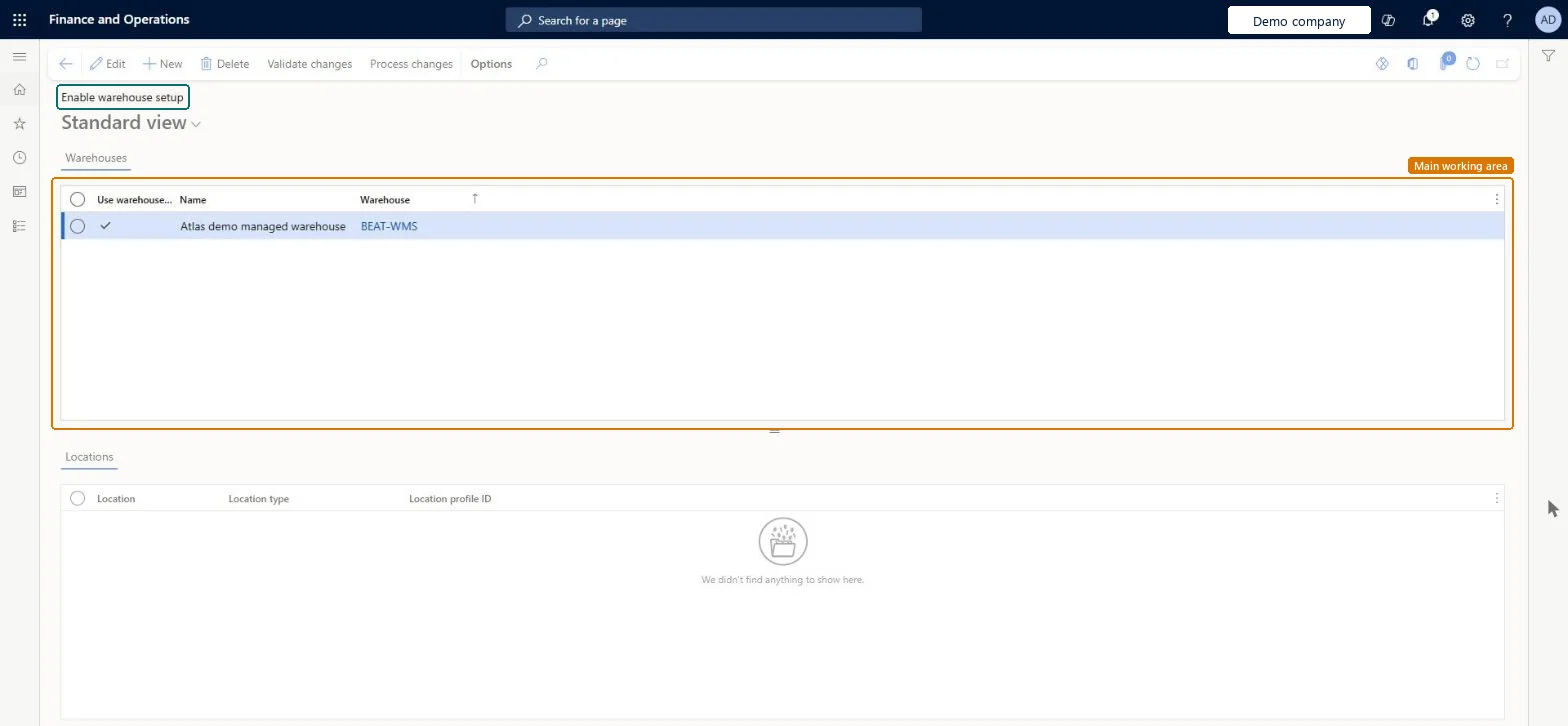
The page in Dynamics 365. page title tab to open what to set or check
About the examples: Examples and screenshots in this guide use BEAT, a demo company in a Dynamics 365 test environment. Use your own company's codes and values instead of copying them.
Setup steps on this page
Enable warehouse setup
Use this page to enable existing warehouses for warehouse management processes and to assign a location profile to their locations.
Steps from Microsoft
Go to Warehouse management > Setup > Enable warehouse management processes > Enable warehouse setup.
Add the warehouses that should be enabled to use warehouse management processes, either directly on the page or by using the Microsoft Office integration.
Create at least one location profile first, add the warehouses, assign a location profile to every location, Validate, and only then ProcessEvery location in a warehouse that uses warehouse management processes must have a location profile, and the validation step checks data integrity before the change is processed.
One-way: Warning: once inventory transactions are processed in a warehouse that uses warehouse management processes, the Use warehouse management processes option can't be turned off.
Technical architect
6Technical
Menu item
InventLocationWHSProcessEnablementChecked in Dynamics 365
Form
InventLocationWHSProcessEnablementChecked in Dynamics 365
Table
InventLocationWHSProcessShown as “WAREHOUSE MANAGEMENT PROCESS ENABLEMENT REQUESTS FOR WAREHOUSES” in Record infoChecked in Dynamics 365
Data entities
WHSWarehouseLocationAdvancedWarehouseManagementProcessEnablementRequestEntityEnable warehouse locations for advanced warehouse management processes Checked in Dynamics 365
Who can open it
PrivilegesMaintain warehouse process enablement requests InventLocationWHSProcessEnablementRequestMaintainDutiesMaintain migration to advanced warehouse management processes WMSAdvancedMigrationMaintain1 security roleMaterials manager InventMaterialsManagerChecked in Dynamics 365
Roles to set it up and use it
To set it up or change itMaterials manager InventMaterialsManagerGive people one of these roles. On this system, 1 role can open this page.Checked in Dynamics 365
Actions on the page
(Action Pane without tabs): Validate changes, Process changesChecked in Dynamics 365