About the examples: Examples and screenshots in this guide use BEAT, a demo company in a Dynamics 365 test environment. Use your own company's codes and values instead of copying them.
Setup steps on this page
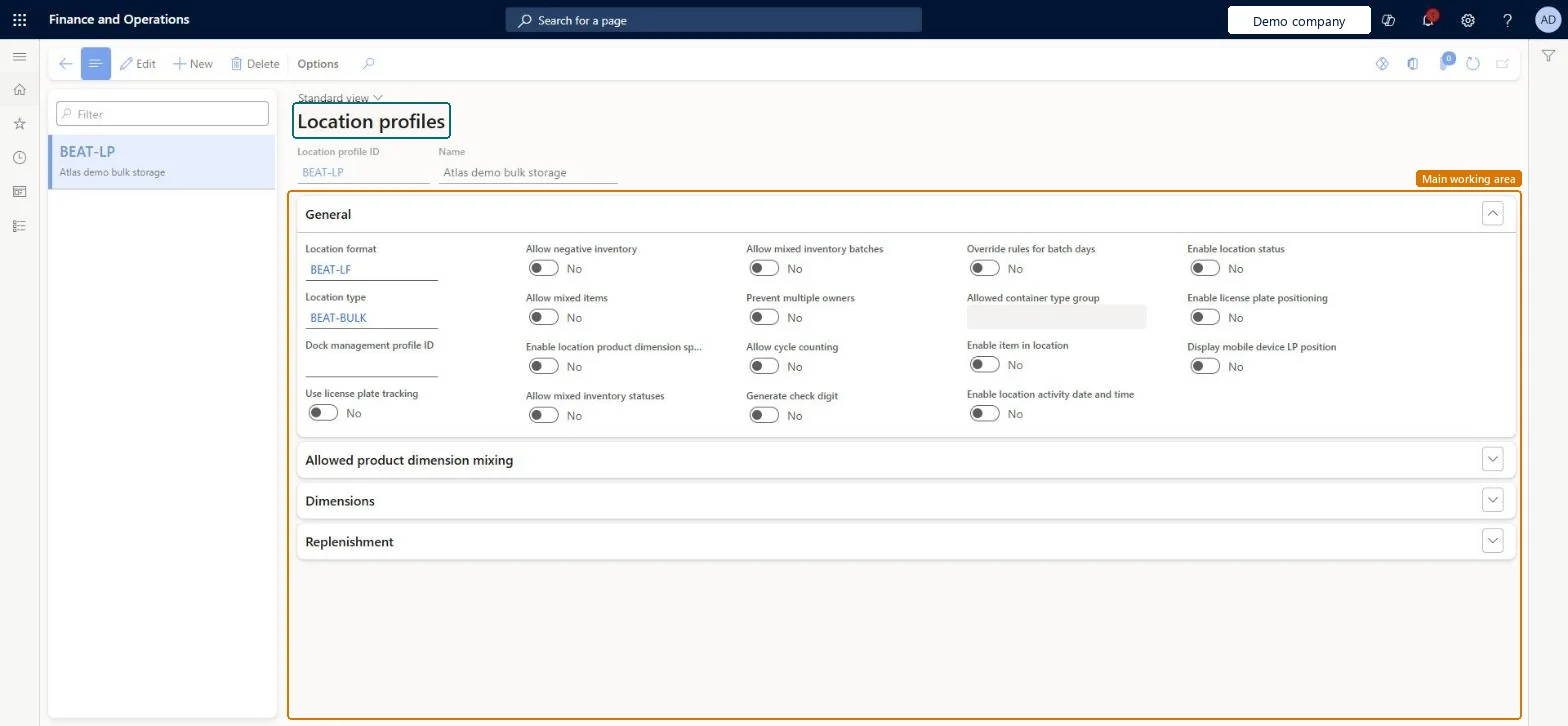
Set up Location profiles
Use this page to decide what inventory each group of locations can hold and how it is stored.
Steps from Microsoft
Go to Warehouse management > Setup > Warehouse > Location profiles.
Select New.
In the Location profile ID and Name fields, enter an ID and a name.
In the Location format and Location type fields, select the format and type for the profile.
In the Dock management profile ID field, select a dock management profile if one applies.
Set Allow mixed items, Allow mixed inventory statuses and Allow cycle counting as the locations require.
Separate profiles per zone use: bulk (mixed items, batches and statuses allowed), picking (Allow mixed items No), receiving (mixing allowed, dock management profile) and staging (Allow mixed inventory statuses No), all with Use license plate tracking YesLearn gives these typical configurations for bulk, picking, receiving and staging locations.
Turning off Allow mixed inventory statuses where status changes happen in place; goods must then be moved to an empty location before their status can change.
PrivilegesMaintain location profiles WHSLocationProfileMaintainView location profiles WHSLocationProfileViewDutiesInquire into warehouse operation master WMSWarehouseOperationMasterInquireMaintain warehouse operation master WMSWarehouseOperationMasterMaintain6 security rolesField Service Integration User FieldServiceIntegrationUserProduction supervisor ProdProductionSupervisorProcess engineer RouteProcessEngineerProcess engineering manager RouteProcessEngineeringManagerWarehouse planner WHSWarehousePlannerWarehouse manager WMSWarehouseManagerChecked in Dynamics 365
Roles to set it up and use it
To set it up or change itWarehouse manager WMSWarehouseManagerProcess engineer RouteProcessEngineerTo use itWarehouse planner WHSWarehousePlannerProduction supervisor ProdProductionSupervisorProcess engineering manager RouteProcessEngineeringManagerField Service Integration User FieldServiceIntegrationUserGive people one of these roles. On this system, 6 roles can open this page.Checked in Dynamics 365
WHSWarehouseLocationProfileEntity (Warehouse location profiles): loaded for each company, in Microsoft's default template 300 - Inventory.Load order: Microsoft's default template 300 - Inventory loads Warehouse location profiles at execution unit 1, level 300, sequence 60. Lower levels load first, and entities at the same level load in sequence order.Load first: Units, Allowed container type groups, Loading dock management profiles, Warehouse location formats, Warehouse location types, the default templates at lower levels (System setup to Budgeting)Microsoft Learn