SETUP GUIDEHow to set it up8 sections. Choose a role to highlight what matters to you.
Everyone
1What it is and why
What it is
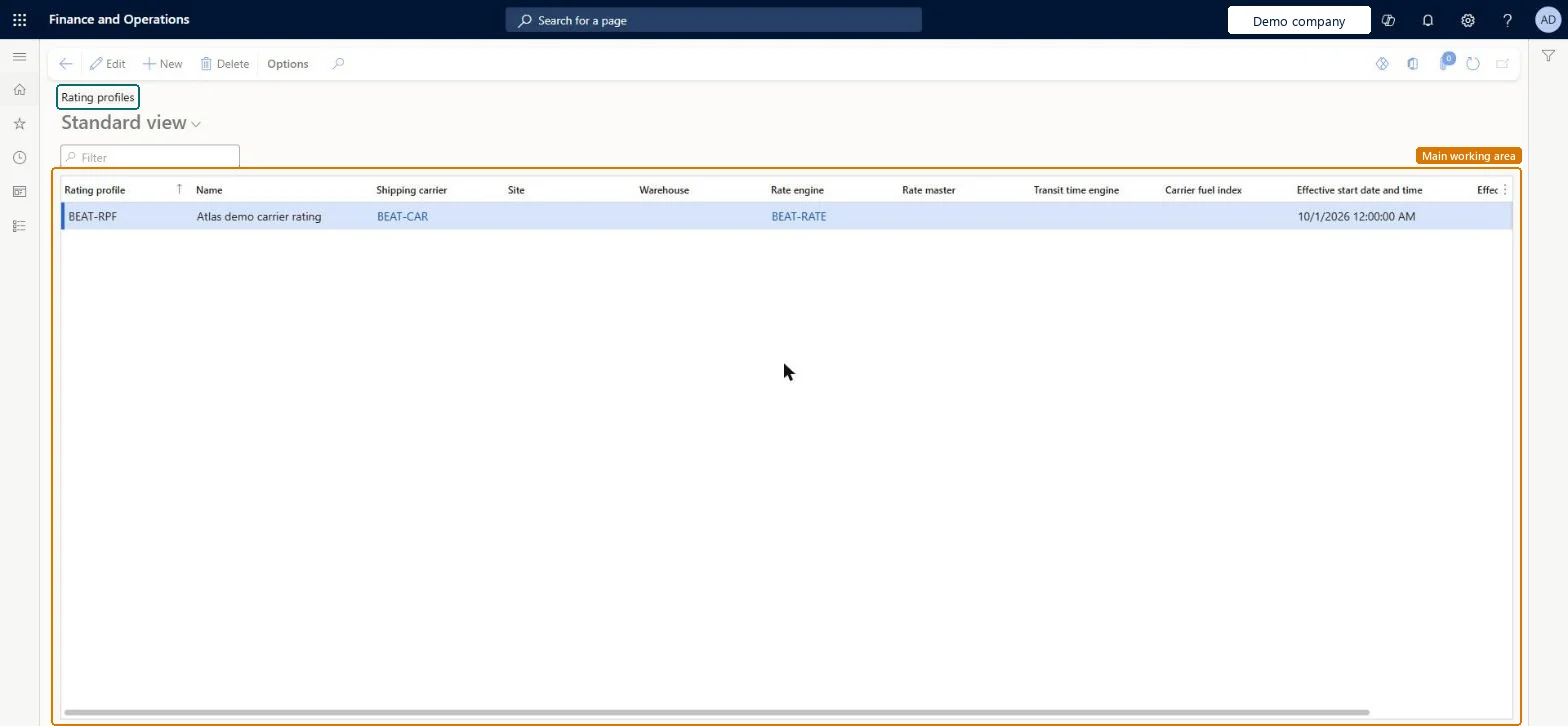
A list page that shows all rating profiles, where each profile links a shipping carrier to a rate engine, rate master, transit time engine and carrier fuel index for a period.
What you do here
Use this page to review, create and edit the rating profiles that determine transportation tariffs for loads.
The page in Dynamics 365. page title tab to open what to set or check
About the examples: Examples and screenshots in this guide use BEAT, a demo company in a Dynamics 365 test environment. Use your own company's codes and values instead of copying them.
Setup steps on this page
Set up Rating profile
Use this page to review, create and edit the rating profiles that determine transportation tariffs for loads.
Steps from Microsoft
Go to Transportation management > Setup > Rating > Rating profile.
On the Action Pane, select New to add a rating profile, or select Edit to edit an existing one.
Enter a unique Rating profile ID and a descriptive Name.
Select the Shipping carrier, Site and Warehouse.
Select the Rate engine, Rate master, Transit time engine and Carrier fuel index.
Enter the effective start and end date and time to define when the profile is active.
One rating profile per shipping carrier, site and warehouse, linking the rate engine, rate master, transit time engine and carrier fuel index for a defined effective periodThe rating profile is the logistics contract that decides the tariff for a load and is unique to a carrier.
Choosing a rate master whose rating metadata doesn't match the rate engine, or leaving gaps in effective dates, so the carrier returns no rate.Test: Rating profile drives the carrier rate
Reversible: Use effective dates to replace a profile; rates already on confirmed loads stay in the freight bill.
Technical architect
6Technical
Menu item
TMSRatingProfileChecked in Dynamics 365
Form
TMSRatingProfileChecked in Dynamics 365
Table
TMSRatingProfileShown as “RATING PROFILE” in Record infoKey field: RatingProfileCodeChecked in Dynamics 365
Data entities
TMSShippingCarrierRatingProfileEntityShipping carrier rating profile Microsoft data model
Who can open it
PrivilegesMaintain rating profiles TMSRatingProfileMaintainView rating profiles TMSRatingProfileViewDutiesInquire into carrier master and network planning information TMSCarrierMasterInquireMaintain carrier and network planning master TMSCarrierMasterMaintain2 security rolesLogistics manager TMSLogisticsManagerTransportation coordinator TMSTransportationCoordinatorChecked in Dynamics 365
Roles to set it up and use it
To set it up or change itLogistics manager TMSLogisticsManagerTo use itTransportation coordinator TMSTransportationCoordinatorGive people one of these roles. On this system, 2 roles can open this page.Checked in Dynamics 365
TMSShippingCarrierRatingProfileEntity (Shipping carrier rating profile): loaded for each company, in Microsoft's default template 405 - Transportation management.Load order: Microsoft's default template 405 - Transportation management loads Shipping carrier rating profile at execution unit 1, level 405, sequence 20. Lower levels load first, and entities at the same level load in sequence order.Load first: the default templates at lower levels (System setup to Warehouse management)Microsoft Learn