SETUP GUIDEHow to set it up8 sections. Choose a role to highlight what matters to you.
Everyone
1What it is and why
What it is
A setup page where you define the rules for workers' flexible hours: the allowed minimum and maximum flex balance and the principle used to calculate the flex balance.
What you do here
Use this page to set flex limits and how a worker's flex balance and pay are adjusted when those limits are exceeded.
Example
For example, with a flex minimum of -0.5 hours and a worker flex balance of -4 hours, the transfer job adjusts the balance by 3.5 hours up to the minimum.
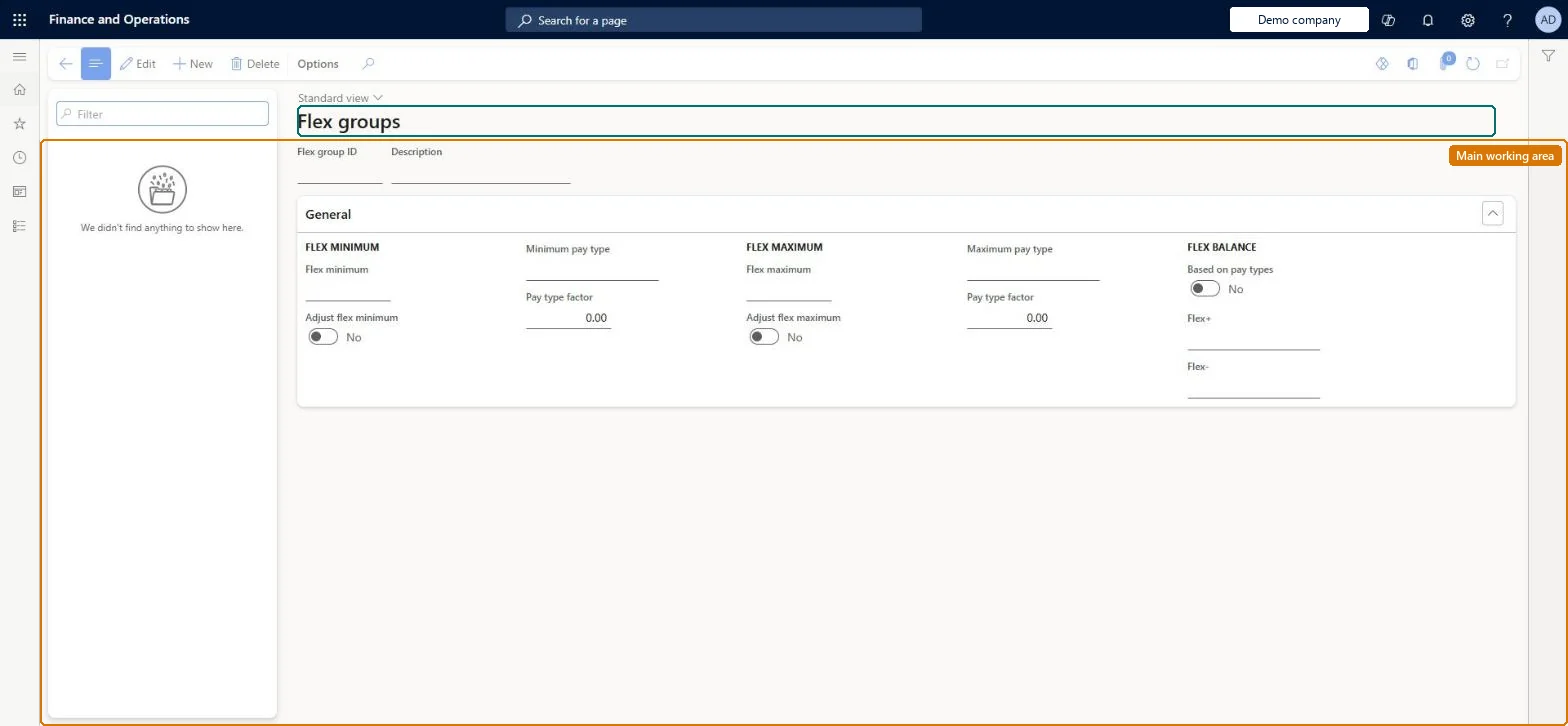
The page in Dynamics 365. page title tab to open what to set or check
About the examples: Examples and screenshots in this guide use BEAT, a demo company in a Dynamics 365 test environment. Use your own company's codes and values instead of copying them.
Setup steps on this page
Set up Flex groups
Use this page to set flex limits and how a worker's flex balance and pay are adjusted when those limits are exceeded.
Steps from Microsoft
Go to Time and attendance > Setup > Groups > Flex groups.
Select New.
Enter the flex limits for the group.
If the flex balance should be based on pay types, set Based on pay types to Yes.
In the Flex+ and Flex- fields, specify the pay types to use.
Flex minimum and Flex maximum per your flex policy, with Based on pay types = No (time principle) unless flex hours must be weighted by a factorWith the time principle, flex is calculated from the Flex+ and Flex- zones in the profile; Learn suggests pay types only when you want to increase the flex account by a factor in some zones.
Time and attendance roles come from the security read in the Technical section. On this system the page is opened with roles such as Human resource manager, Production supervisor. The Microsoft Learn article for this page names no Feature management feature to turn on.
Per company: each legal entity has its own flex groups. Checked in Dynamics 365
Can it be undone
Reversible: Limits and the principle are applied at the next Transfer pay or Adjust flex balance run.
If you change it later
Flex limits are applied only when pay is transferred or the flex balance adjustment job runs, not during daily approval and transfer of registrations. Microsoft Learn
Technical architect
6Technical
Menu item
JmgFlexGroupChecked in Dynamics 365
Form
JmgFlexGroupChecked in Dynamics 365
Table
JmgFlexGroupShown as “FLEX GROUPS” in Record infoChecked in Dynamics 365
Data entities
JmgTimeAndAttendanceFlexGroupEntityTime and attendance flex groups Microsoft data model
Who can open it
PrivilegesMaintain flex groups JmgFlexGroupMaintainView flex groups JmgFlexGroupViewDutiesMaintain flex time process JmgFlexProcessMaintainInquire into time and attendance policies JmgTimeAttendancePoliciesInquire2 security rolesHuman resource manager HcmHumanResourceManagerProduction supervisor ProdProductionSupervisorChecked in Dynamics 365
Roles to set it up and use it
To set it up or change itProduction supervisor ProdProductionSupervisorTo use itHuman resource manager HcmHumanResourceManagerGive people one of these roles. On this system, 2 roles can open this page.Checked in Dynamics 365
JmgTimeAndAttendanceFlexGroupEntity (Time and attendance flex groups): loaded for each company, in Microsoft's default template 410 - Production control.Load order: Microsoft's default template 410 - Production control loads Time and attendance flex groups at execution unit 1, level 30, sequence 10. Lower levels load first, and entities at the same level load in sequence order.Load first: the default templates at lower levels (System setup to General ledger)Microsoft Learn