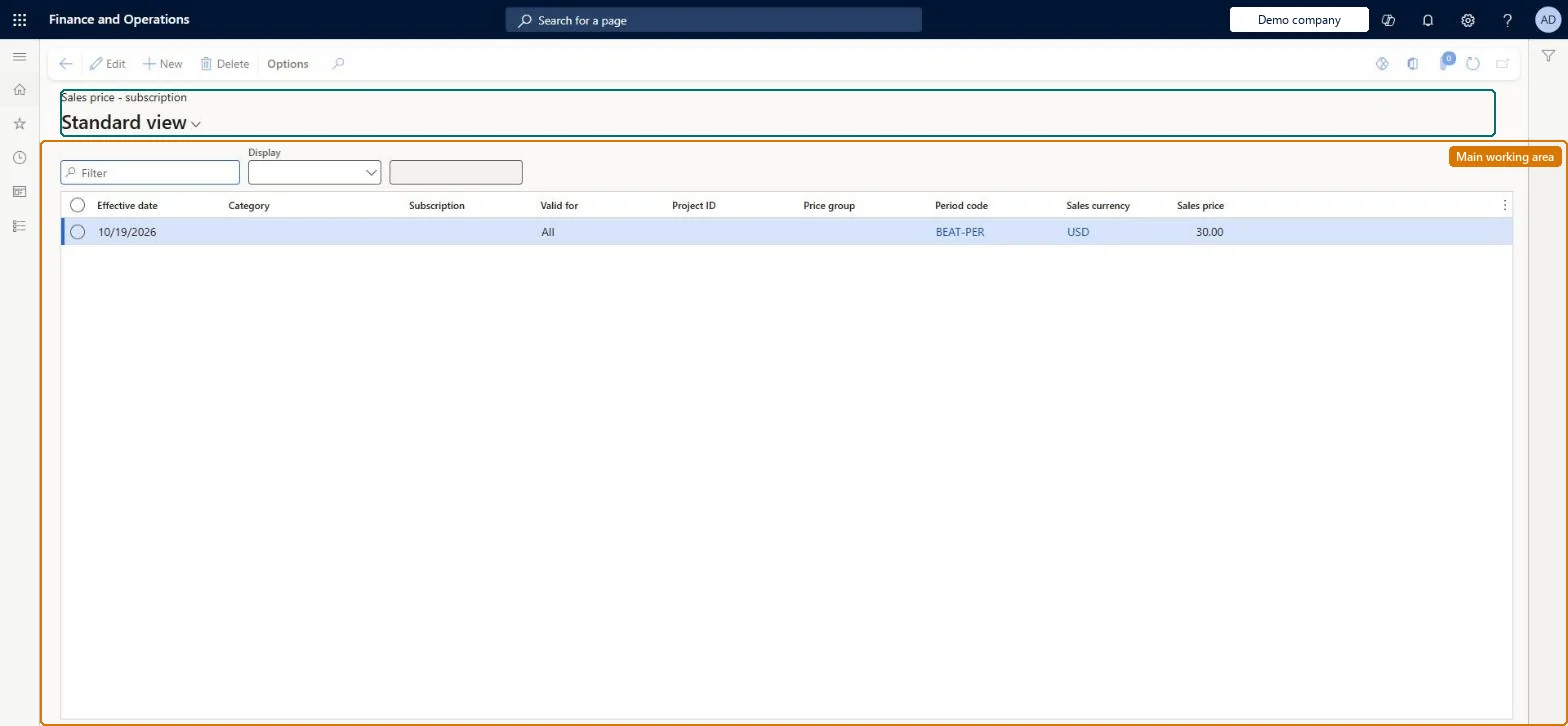
Setup step on the Sales price (subscription) page · Service management
Set up Sales price (subscription)
Use this page to set the prices that subscription fees are created with; the price whose period code and currency match the subscription and that has the greatest level of detail is used.
Chief executive officer, Project accountant, Service delivery manager
Business process
Receive service requests
Menu item
SMASalesPriceSubsciption
Main table
SMASalesPriceSubscription
Data entity
SMAServiceSubscriptionSalesPriceEntity
Setup steps
1 on this page
Show what matters for
SETUP GUIDEHow to set it up8 sections. Choose a role to highlight what matters to you.
Everyone
1What it is and why
What it is
A setup page where you define subscription sales prices by effective date, category, project, subscription, period code and currency, from specific to general, so that a base price is applied automatically to new subscriptions and their fees.
What you do here
Use this page to set the prices that subscription fees are created with; the price whose period code and currency match the subscription and that has the greatest level of detail is used.
Example
For example, a EUR 500 monthly price for project 9030 applies to all its subscriptions until a more specific EUR 550 price is added for category SubCat1 on that project.
The page in Dynamics 365. page title tab to open what to set or check
About the examples: Examples and screenshots in this guide use BEAT, a demo company in a Dynamics 365 test environment. Use your own company's codes and values instead of copying them.
Setup steps on this page
Set up Sales price (subscription)
Use this page to set the prices that subscription fees are created with; the price whose period code and currency match the subscription and that has the greatest level of detail is used.
How to use it
Go to Service management > Setup > Service subscriptions > Sales price (subscription).
Use the Filter box, or the Display selector above the grid, to find a price.
Review the Effective date, Category, Subscription, Valid for, Project ID, Price group, Period code, Sales currency and Sales price columns.
Select New and enter the Effective date, Valid for, Period code, Sales currency and Sales price, and the Category, Subscription, Project ID or Price group the price applies to.
Select Edit to change a selected price, or Delete to remove it.
A general price line per project, period code and currency, plus more specific lines (category or subscription) only for exceptionsWhen a fee is created, the matching line with the greatest level of detail wins, so general lines cover the default and specific lines override it.
A period code or currency on the price line that differs from the subscription. The line is then never applied.Test: Most specific price line wins
Solution architect
5Design impact
Can it be undone
Reversible: Price lines can be added or changed; they are read when subscriptions and fees are created.
If you change it later
A price is used only when its period code and currency equal the subscription's, and the most specific matching line wins, so adding a more specific line changes the price of future fees for that combination. Microsoft Learn
Technical architect
6Technical
Menu item
SMASalesPriceSubsciptionChecked in Dynamics 365
Form
SMASalesPriceSubscriptionChecked in Dynamics 365
Table
SMASalesPriceSubscriptionShown as “SALES PRICE - SUBSCRIPTION” in Record infoChecked in Dynamics 365
Data entities
SMAServiceSubscriptionSalesPriceEntitySales price - subscription Microsoft data model
Who can open it
PrivilegesMaintain sales price subscriptions SMASalesPriceSubsciptionMaintainView sales price subscriptions SMASalesPriceSubsciptionViewDutiesReview service subscription process performance SMAServiceSubscriptionProcessPerfReviewInquire into service subscription sales price master SMAServiceSubscriptionSalesPriceInquireMaintain service subscription sales price master SMAServiceSubscrSalesPriceMasterMaintai3 security rolesChief executive officer CompanyChiefExecutiveOfficerProject accountant ProjProjectAccountantService delivery manager SMAServiceDeliveryManagerChecked in Dynamics 365
Roles to set it up and use it
To set it up or change itService delivery manager SMAServiceDeliveryManagerProject accountant ProjProjectAccountantTo use itChief executive officer CompanyChiefExecutiveOfficerGive people one of these roles. On this system, 3 roles can open this page.Checked in Dynamics 365
Checked in a working Dynamics 365 system, version 10.0.49: the menu item, form, table and security, the page.
To cite this step: SVC-SUB-020, Set up Sales price (subscription). Beyond ERP Atlas Hub, 2026-11-11. https://www.beyonderp.cloud/atlas/step/SVC-SUB-020