SETUP GUIDEHow to set it up8 sections. Choose a role to highlight what matters to you.
Everyone
1What it is and why
What it is
A setup page for sales units and teams: each unit has an ID, an optional parent unit, an organization type, a description, the worker in charge and an Active flag, and links to the Sales unit designer, Responsibilities and Responsibility assignment.
What you do here
Use it to model how the sales force is organized, so leads, opportunities and sales targets can be assigned to the right unit and its members.
Example
BEAT creates sales unit EAST with the regional sales manager as worker in charge and sub-unit EAST-RETAIL with Parent ID EAST. When EAST is switched to Active, sales targets of 250,000.00 per quarter can be set for the unit and its members.
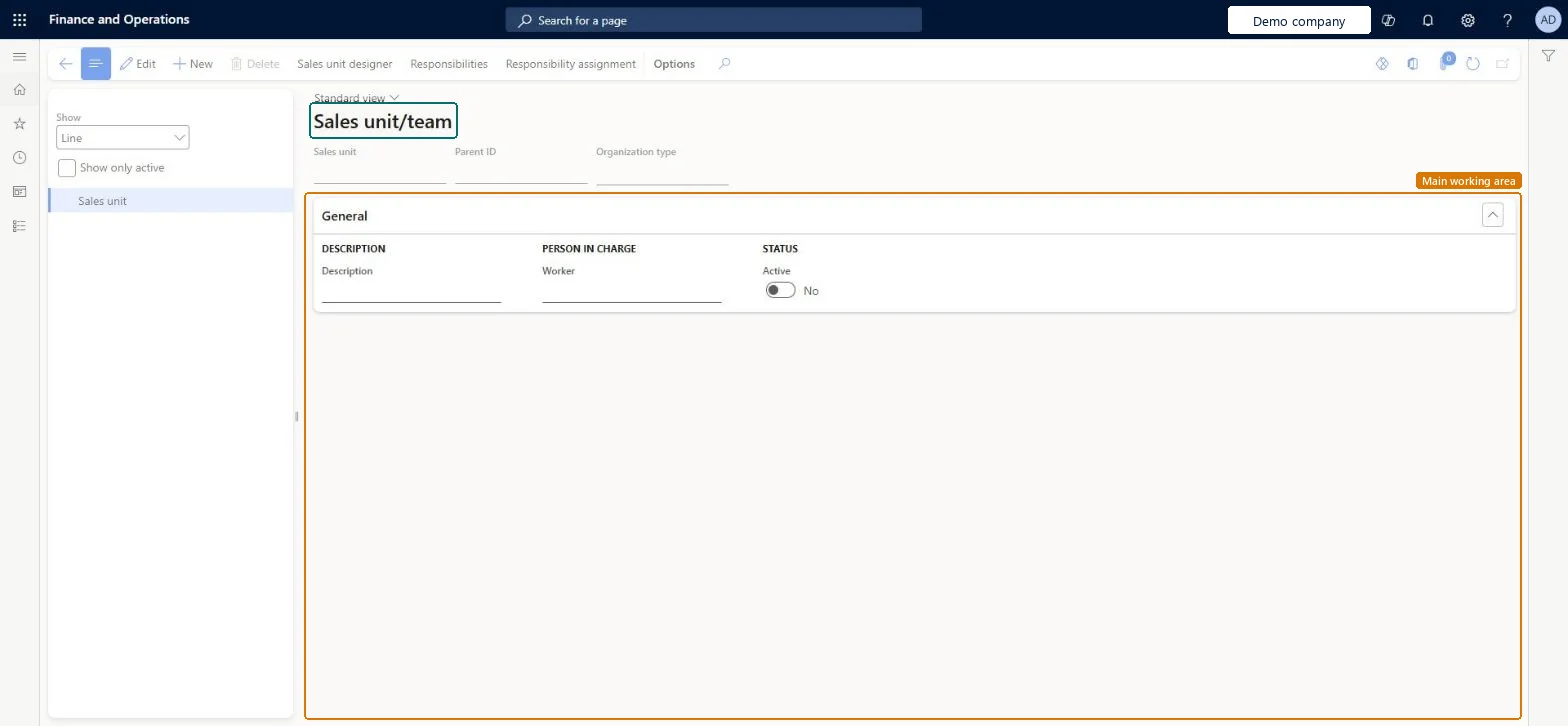
The page in Dynamics 365. page title tab to open what to set or check
About the examples: Examples and screenshots in this guide use BEAT, a demo company in a Dynamics 365 test environment. Use your own company's codes and values instead of copying them.
Step by step, with screenshots
Set up Sales unit/team1 screen
Use this page to model how the sales force is organized, so leads, opportunities and sales targets can be assigned to the right unit and its members.
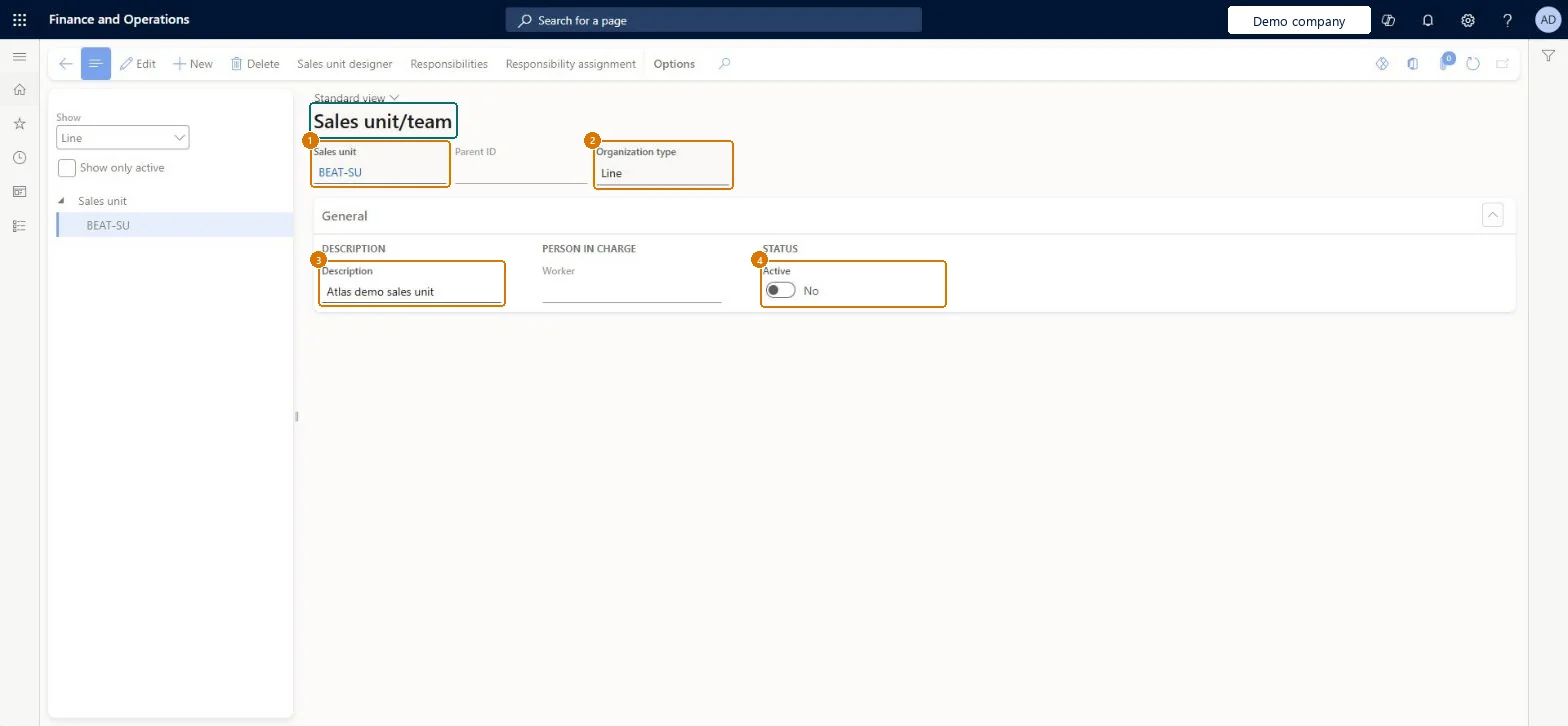
Screen 1
Create a sales unit
Go to Sales and marketing > Setup > Sales management > Sales unit/team
Select New
In Sales management units, enter the sales unit and description, and select a parent ID for a team under another unit
Select OK
Select a worker in charge and turn on Active when the unit is in use
1Sales unit
BEAT-SU
2Organization type
Line
3Description
Sales unit
4Active
No
Parent ID
(none, top level)
Show the full screen page title tab to open what to set or check
How to use it
Go to Sales and marketing > Setup > Sales management > Sales unit/team.
Select New and enter the Sales unit, the Parent ID (empty for a top-level unit) and the Organization type.
In the General section, enter the Description and the Worker in charge, and set Active to Yes.
Select Sales unit designer to place the unit in the structure, then Responsibility assignment to add its members.
Open Sales targets and check that the unit can be selected.
Source: Checked in Dynamics 365
Fields on the page
Field
What it means
Example
Table column
Sales unit
The ID of the sales unit or team.Checked in Dynamics 365
EAST
SalesUnitId
Description
A short description of the sales unit.Checked in Dynamics 365
Sales unit
Description
Parent ID
The ID of the sales unit that this unit reports to; leave it empty for a top-level unit.Checked in Dynamics 365
EAST
ParentId
Organization type
The type of organization unit that the sales unit represents, chosen from a fixed list on the page.Checked in Dynamics 365
Line
UnitType
Active
Whether the sales unit is in use.Checked in Dynamics 365
Yes
Active
Common errors and fixes
Message
What to do
A unit doesn't appear where expected in the sales structure
Check its Parent ID. A unit with an empty Parent ID is a top-level unit. Checked in Dynamics 365
Test checklist
Create sales unit EAST with a worker in charge and Active = Yes, and sub-unit EAST-RETAIL with Parent ID EAST.
Open the Sales unit designer and check that EAST-RETAIL appears under EAST.
Check that the list on the left shows 2 units with EAST-RETAIL's Parent ID = EAST.
One top-level unit per sales region or channel, with sub-units through Parent ID only where targets are really set at that level; deactivate units instead of deleting them.The unit structure is what sales targets and assignments hang on; a flat, stable structure keeps targets comparable over time.
On the live system, Information technology manager and Sales manager use this page.
Checked in Dynamics 365
Solution architect
5Design impact
Shared or per company
Per company: each legal entity has its own sales units, so a sales organization spanning companies is set up in each of them. Microsoft data model
Can it be undone
Reversible: Units can be re-parented or set inactive at any time.
If you change it later
Changing the parent of a unit moves it and its sub-units in the sales structure; targets and assignments made for the unit stay with the unit ID. Where leads and opportunities are worked in Dynamics 365 Sales through prospect-to-cash, the sales structure is usually kept there instead. Microsoft Learn
Technical architect
6Technical
Menu item
smmSalesUnitChecked in Dynamics 365
Form
smmSalesUnitChecked in Dynamics 365
Table
smmSalesUnitShown as “Sales management units” in Record infoKey field: SalesUnitId, ParentId, UnitTypeChecked in Dynamics 365
PrivilegesMaintain sales unit/teams smmSalesUnitMaintainView sales unit/teams smmSalesUnitViewDutiesEnable the Sales and marketing process smmCRMProcessEnableInquire into Sales and marketing reference data smmCRMReferenceDataInquire2 security rolesInformation technology manager SysServerITManagerSales manager TradeSalesManagerChecked in Dynamics 365
Roles to set it up and use it
To set it up or change itSales manager TradeSalesManagerInformation technology manager SysServerITManagerGive people one of these roles. On this system, 2 roles can open this page.Checked in Dynamics 365
Actions on the page
Options: Personalize, Page options, ShareChecked in Dynamics 365
SalesUnitEntity (Sales units): loaded for each company, in Microsoft's default template 330 - Sales and marketing.Load order: Microsoft's default template 330 - Sales and marketing loads Sales units at execution unit 1, level 40, sequence 10. Lower levels load first, and entities at the same level load in sequence order.Load first: the default templates at lower levels (System setup to dependency bands 30 to 90)Microsoft Learn
Checked in a working Dynamics 365 system, version 10.0.49: the menu item, form, table and security, the page, the demo records and the values in the screenshots.
To cite this step: SM-SETUP-030, Set up Sales unit/team. Beyond ERP Atlas Hub, 2026-11-11. https://www.beyonderp.cloud/atlas/step/SM-SETUP-030