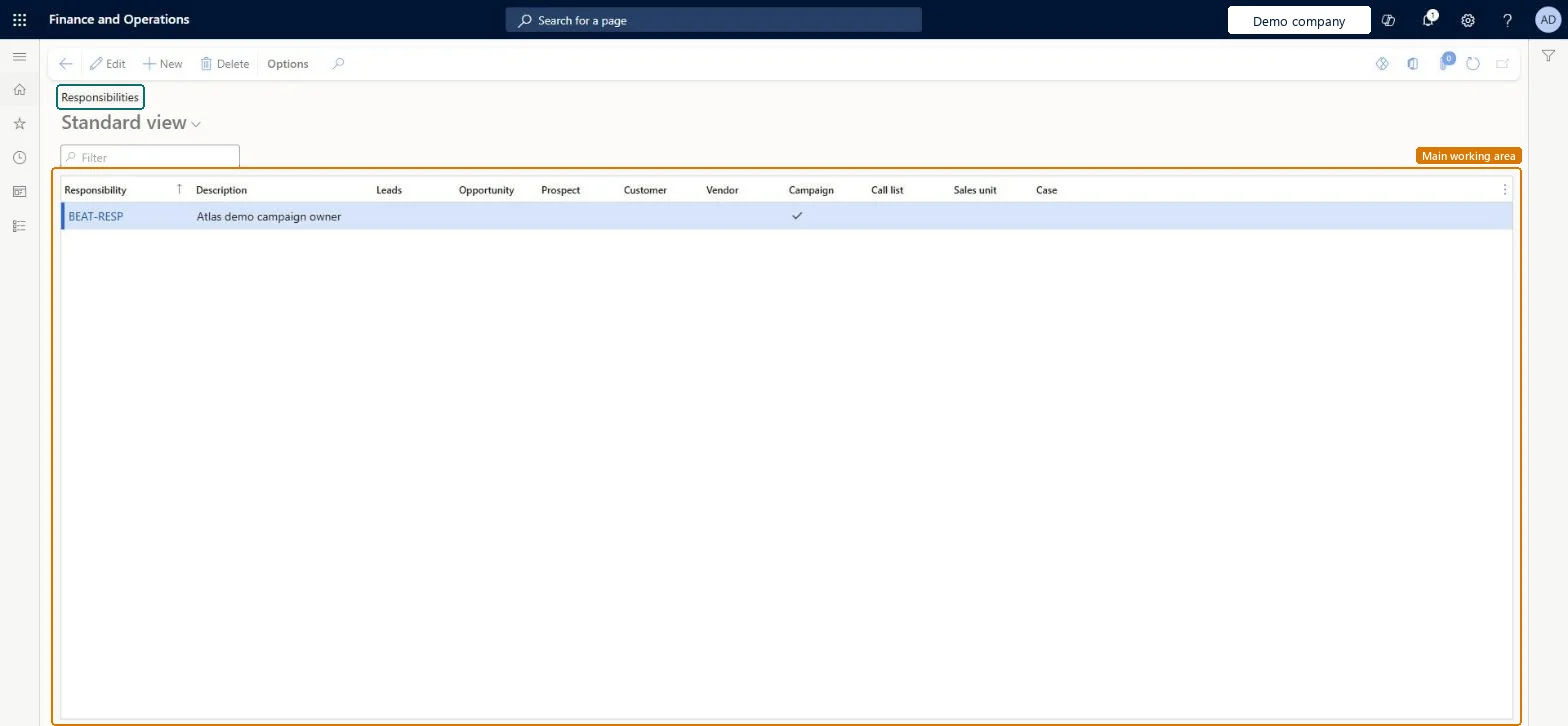
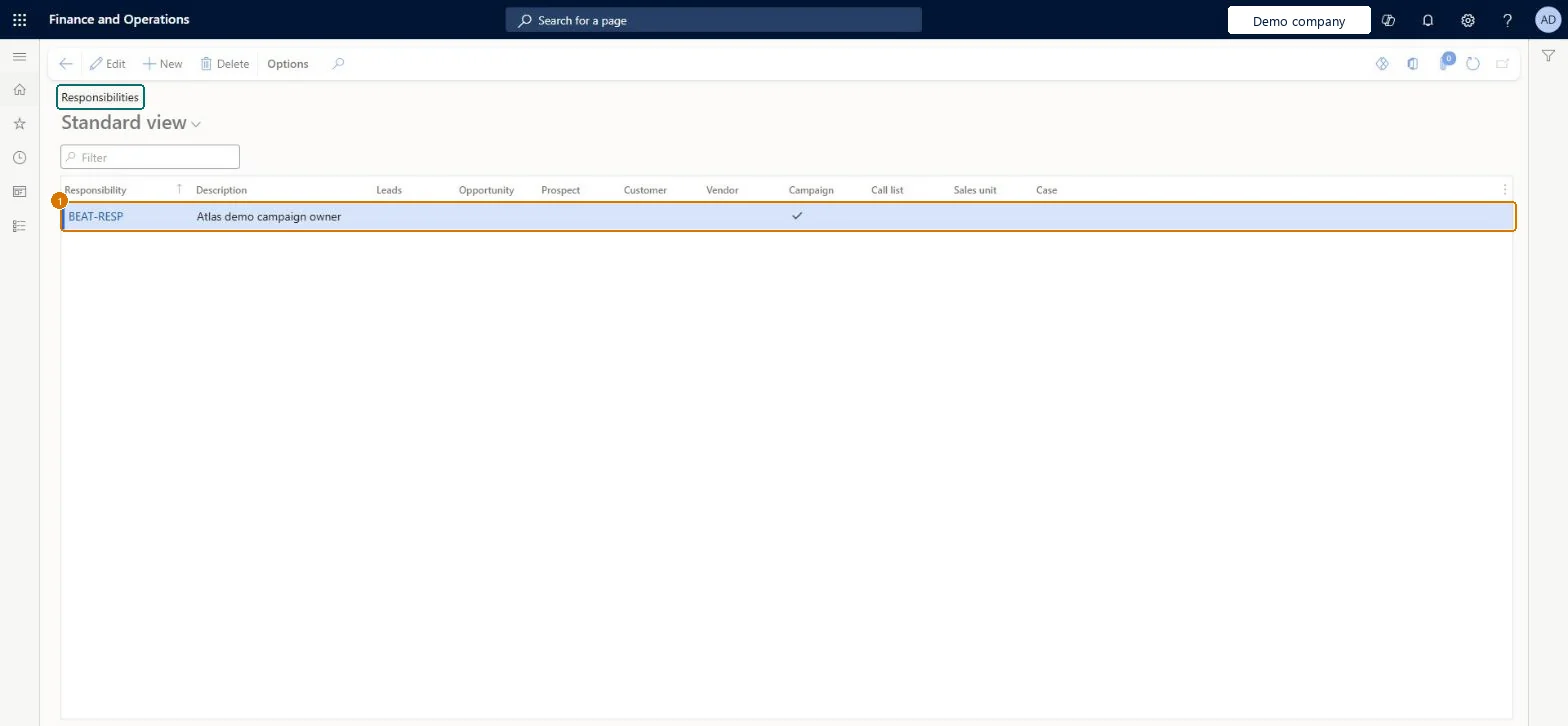
A setup list of responsibilities: each line names a job responsibility (such as campaign owner or sales manager) and has check boxes for the record types it applies to, such as campaigns, leads and opportunities.
PAGE GUIDEWhat the page does and how to use it8 sections. Choose a role to highlight what matters to you.
Everyone
1What it is and why
What it is
A setup list of responsibilities: each line names a job responsibility (such as campaign owner or sales manager) and has check boxes for the record types it applies to, such as campaigns, leads and opportunities.
What you do here
Use it so that the right person is assigned automatically to campaigns, leads and opportunities, based on the responsibility they hold in the sales unit.
Example
BEAT creates responsibility MANAGER with the description Sales manager and selects the Opportunity check box. Every opportunity in sales unit EAST, such as OP-000512 for 32,000.00, then gets the EAST sales manager assigned.
The page in Dynamics 365. page title tab to open what to set or check
About the examples: Examples and screenshots in this guide use BEAT, a demo company in a Dynamics 365 test environment. Use your own company's codes and values instead of copying them.
Step by step, with screenshots
Set up Responsibilities1 screen
Use this page to assign the right staff to tasks such as developing and running marketing campaigns.
Screen 1
Create a responsibility
Go to Sales and marketing > Setup > Sales management > Responsibilities
Select New
Enter the responsibility and description
Select the record types it can be used for, such as Campaign
Select Save
1Responsibility
BEAT-RESP
Description
Campaign owner
Campaign
Yes
Show the full screen page title tab to open what to set or check
Steps from Microsoft
Go to Sales and marketing > Setup > Sales management > Responsibilities.
Select New and enter the Responsibility, for example MANAGER, and a Description of the person, for example Sales manager.
Select the check box for each record type the responsibility applies to, such as Campaign, Lead or Opportunity.
Open Sales unit/team, select Responsibility assignment and assign the responsibility to a worker in the unit.
The name of the responsibility, such as Marketing.Microsoft Learn
MANAGER
ResponsibilityId
Description
A description of the person who holds the responsibility, such as Marketing manager.Microsoft Learn
Campaign owner
Description
Campaign
Select it to apply this responsibility to campaigns, so the person who holds it in the sales unit is assigned to them.Microsoft Learn
Yes
IsCampaign
Common errors and fixes
Message
What to do
No one is assigned to new opportunities
Select the Opportunity check box on the responsibility, and assign that responsibility to a worker of the sales unit in Responsibility assignment. Microsoft Learn
Test checklist
Create responsibility MANAGER and select Opportunity.
In Sales unit/team, assign MANAGER to a worker of unit EAST.
Create an opportunity for unit EAST and check that the worker is listed as responsible on it.
One responsibility per sales role that should be assigned automatically (for example MANAGER for opportunities, CAMPAIGN for campaigns), each with only the record types that role owns.The check boxes decide which record types a responsibility is assigned to, so a role selected for every type ends up on every record.
Reversible: Clear or select record-type check boxes at any time; existing records keep their assignments. Microsoft Learn
If you change it later
Responsibilities decide who is assigned to records of the selected types; records already created keep the people assigned to them. The setup matters only where campaigns, leads and opportunities are run in Supply Chain Management rather than in Dynamics 365 Sales with prospect-to-cash. Microsoft Learn
Technical architect
6Technical
Menu item
smmResponsibilityGroupChecked in Dynamics 365
Form
smmResponsibilityGroupChecked in Dynamics 365
Table
smmResponsibilityGroupShown as “Responsibility table” in Record infoChecked in Dynamics 365
PrivilegesMaintain responsibilities smmResponsibilityGroupMaintainView responsibilities smmResponsibilityGroupViewDutiesEnable the Sales and marketing process smmCRMProcessEnableInquire into Sales and marketing reference data smmCRMReferenceDataInquire2 security rolesInformation technology manager SysServerITManagerSales manager TradeSalesManagerChecked in Dynamics 365
Roles to set it up and use it
To set it up or change itSales manager TradeSalesManagerInformation technology manager SysServerITManagerGive people one of these roles. On this system, 2 roles can open this page.Checked in Dynamics 365
Actions on the page
Options: Personalize, Page options, ShareChecked in Dynamics 365
smmSalesRoleResponsibilityEntity (Sales role responsibilities): loaded for each company.Load order: Load responsibilities before the responsibility assignments of the sales units that use them.Load first: Sales unit/teamChecked in Dynamics 365
Checked in a working Dynamics 365 system, version 10.0.49: the menu item, form, table and security, the page, the demo records and the values in the screenshots.