Accounts payable manager, Accounts receivable clerk, Accounts receivable manager and 8 more roles
Business process
Manage blanket sales orders
Menu item
SalesAgreementClassification
Main table
AgreementClassification
Data entity
SalesAgreementClassificationEntity
Setup steps
2 on this page
Show what matters for
SETUP GUIDEHow to set it up8 sections. Choose a role to highlight what matters to you.
Everyone
1What it is and why
What it is
A setup list of sales agreement classifications. Every sales agreement is created in a classification, which groups agreements for search and reporting. The page is shared with Accounts receivable and stored in the same table as purchase agreement classifications.
What you do here
Use it to create the classifications that users choose from when they create a sales agreement.
Example
BEAT creates the classifications ANNUAL-VOL for yearly volume commitments and PROJECT for one-off projects. Sales agreement SA-000087 for customer CUS-000214, a value commitment of 120,000.00, is created in ANNUAL-VOL so it can be found with the other annual deals.
The page in Dynamics 365. page title tab to open what to set or check
About the examples: Examples and screenshots in this guide use BEAT, a demo company in a Dynamics 365 test environment. Use your own company's codes and values instead of copying them.
Step by step, with screenshots
Plan sales agreement classifications
Decide the small set of classifications that every sales agreement is created in.
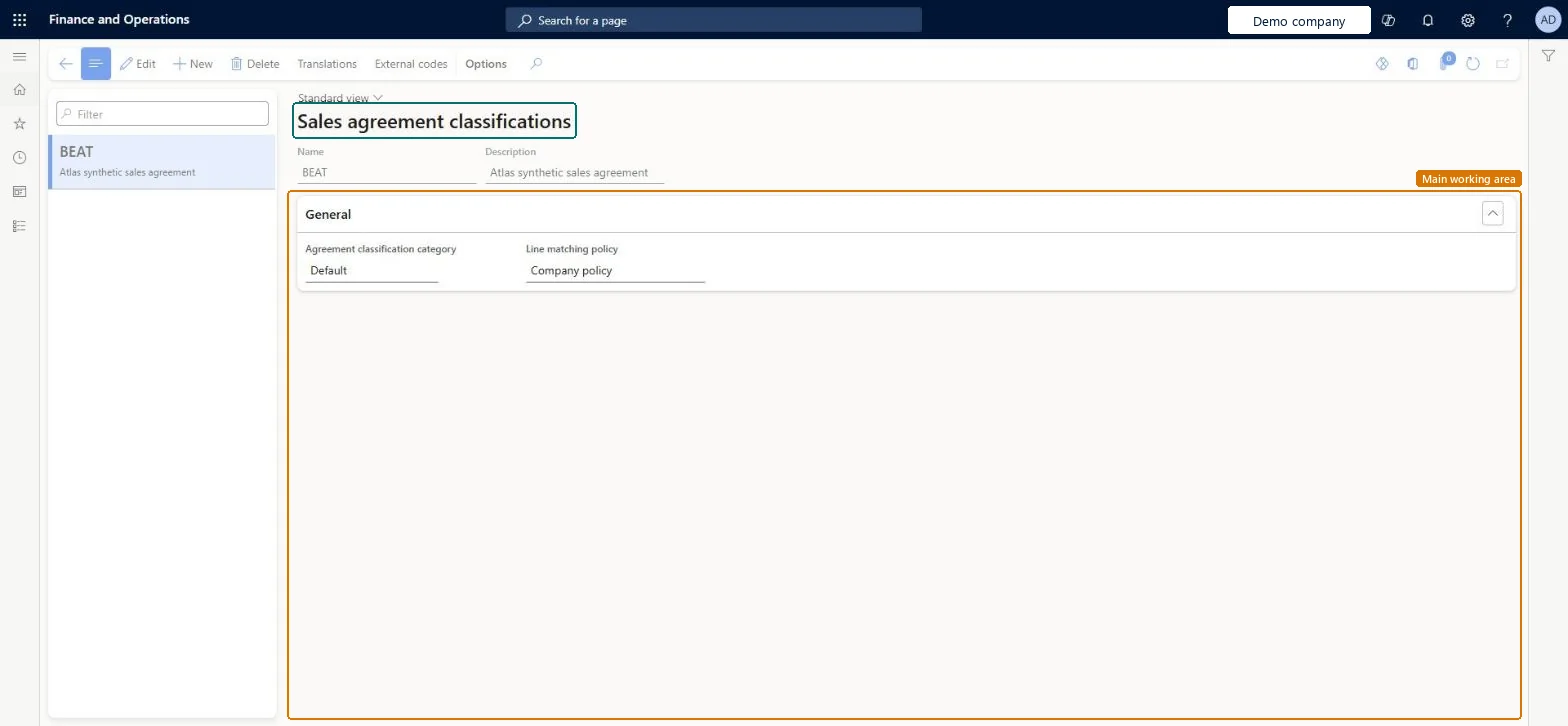
Set up Sales agreement classifications1 screen
Defines the categories that every sales agreement must be assigned to when it is created, optionally carrying the number sequence and associated purchase classification for agreements of that type.
Screen 1
Create the sales agreement classification
Go to Accounts receivable > Setup > Sales agreement classifications
Select New and enter the name and description
On the General FastTab, set the classification category and line matching policy
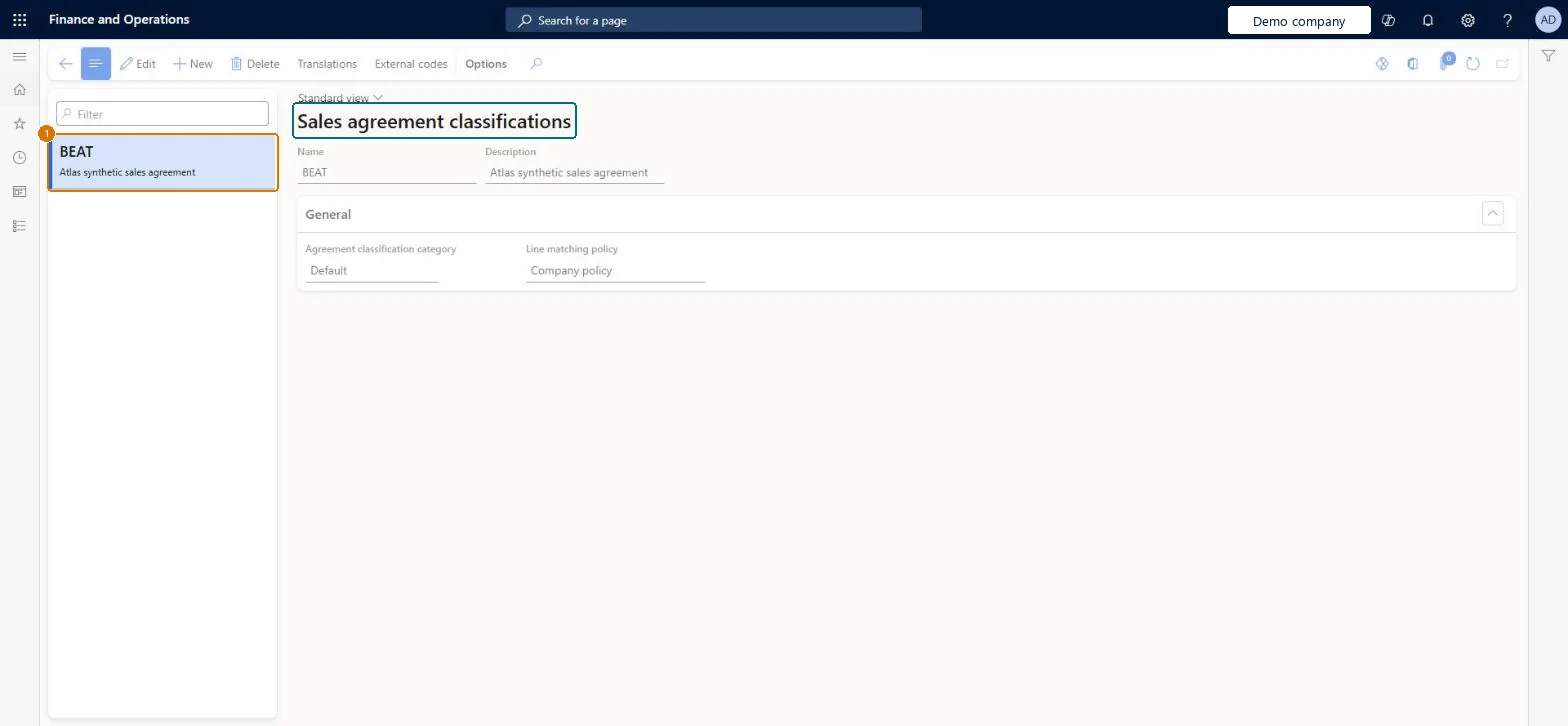
1Name
BEAT
Description
Sales agreement
Agreement classification category
Default
Line matching policy
Company policy
Show the full screen page title tab to open what to set or check
Steps from Microsoft
Go to Sales and marketing > Setup > Sales agreements > Sales agreement classifications.
Select New and enter the Name and Description of the classification, for example ANNUAL-VOL.
In the Russian localization only, set Associated classification and Number sequence code on the General FastTab.
Create a sales agreement and check that the classification can be selected in the Sales agreement classification field.
Russian localization only: the purchase agreement classification related to this sales agreement classification.Microsoft Learn
ANNUAL-PUR
Number sequence code
Russian localization only: the number sequence used to number agreements in this classification; agreements are then numbered within the classification.Microsoft Learn
SAgr_RU
Name
The name of the agreement classification.Checked in Dynamics 365
Annual volume
Name
Description
A description of the agreement classification.Checked in Dynamics 365
Sales agreement
Description_PSN
Agreement classification category
The category of the agreement classification, read from the page.Checked in Dynamics 365
Default
ClassificationCategory
Line matching policy
The line matching policy stored with the classification, read from the page.Checked in Dynamics 365
Company policy
MatchingPolicy
Common errors and fixes
Message
What to do
A classification can't be deleted
A classification used on existing agreements can't be deleted. Keep it, or use a new classification for new agreements. Microsoft Learn
Test checklist
Create classification ANNUAL-VOL.
Create sales agreement SA-000087 for customer CUS-000214 and select ANNUAL-VOL in Sales agreement classification.
Filter the sales agreement list on ANNUAL-VOL and check that SA-000087 is listed.
Try to delete ANNUAL-VOL and check that the system doesn't allow it.
A short list of classifications by agreement type (for example ANNUAL-VOL and PROJECT), created before the first agreement; no test classifications in the live company.Every sales agreement is created in a classification, and a classification that is used on agreements can't be deleted. Outside the Russian localization the classification groups agreements; numbering per classification is a Russian localization extension.
One classification per type of sales agreement, each with its Associated classification and its own Number sequence code.Every sales agreement belongs to a classification, and the Sales agreement ID is set from the number sequence on the classification. Separate classifications give separate numbering and grouping per agreement type.
Creating test classifications in the live company and using them on agreements. A classification that's used on existing agreements can't be deleted.
Feature management and licence
Licence or add-in
On the live system, Sales manager, Purchasing manager, the Accounts receivable roles (clerk, manager, payments clerk, centralized payments clerk), Accounts payable manager, Retail service and the Rental roles use this page.
Checked in Dynamics 365
Solution architect
5Design impact
Shared or per company
Shared: classifications are stored once for all legal entities, in the same table as purchase agreement classifications, and are maintained from Sales and marketing and Accounts receivable. Microsoft data model
Can it be undone
Hard to reverse: A classification used on an agreement can't be deleted.
If you change it later
A classification used on existing agreements can't be deleted, so the list grows with every classification that is used. In the Russian localization the number sequence on the classification decides the Sales agreement ID of new agreements. Microsoft Learn
Technical architect
6Technical
Menu item
SalesAgreementClassificationChecked in Dynamics 365
Form
AgreementClassificationChecked in Dynamics 365
Table
AgreementClassificationShown as “Agreement classification” in Record infoKey field: RecIdChecked in Dynamics 365
Data entities
SalesAgreementClassificationEntitySales agreement classification Microsoft data model PurchAgreementClassificationEntityPurchase agreement classification Microsoft data model
Who can open it
PrivilegesMaintain sales agreement classifications SalesAgreementClassificationMaintainView sales agreement classifications SalesAgreementClassificationViewDutiesEnable purchase order to invoice process PurchOrderToInvoiceProcessEnableEnable quotation to sales order process RentalSalesQuotationToSlsOrdProcessEnableEnable quotation to sales order process SalesQuotationToSalesOrderProcessEnableInquire into quotation to sales order reference data SalesQuotationToSalesOrderRefDataInquir11 security rolesAccounts receivable clerk CustInvoiceAccountsReceivableClerkAccounts receivable manager CustInvoiceAccountsReceivableManagerAccounts receivable centralized payments clerk PaymAccountsReceivableCentralPaymClerkAccounts receivable payments clerk PaymAccountsReceivablePaymentsClerkRental coordinator agent RentalCoordinatorAgentRental manager RentalManagerRental sales manager RentalSalesManagerRetail service RetailServicePurchasing manager TradePurchasingManagerSales manager TradeSalesManagerAccounts payable manager VendInvoiceAccountsPayableManagerChecked in Dynamics 365
Roles to set it up and use it
To set it up or change itSales manager TradeSalesManagerRental manager RentalManagerRental coordinator agent RentalCoordinatorAgentRental sales manager RentalSalesManagerAccounts receivable manager CustInvoiceAccountsReceivableManagerTo use itAccounts receivable clerk CustInvoiceAccountsReceivableClerkAccounts receivable centralized payments clerk PaymAccountsReceivableCentralPaymClerkAccounts receivable payments clerk PaymAccountsReceivablePaymentsClerkGive people one of these roles. On this system, 11 roles can open this page.Checked in Dynamics 365
Actions on the page
Options: Personalize, Page options, ShareChecked in Dynamics 365
SalesAgreementClassificationEntity (Sales agreement classification): shared by all companies, in Microsoft's default template 330 - Sales and marketing.PurchAgreementClassificationEntity (Purchase agreement classification): shared by all companies, in Microsoft's default template 320 - Procurement and sourcing.Load order: Microsoft's default template 330 - Sales and marketing loads Sales agreement classification at execution unit 1, level 30, sequence 10. Lower levels load first, and entities at the same level load in sequence order.Load first: the default templates at lower levels (System setup to General ledger)Microsoft Learn
Checked in a working Dynamics 365 system, version 10.0.49: the menu item, form, table and security, the page, the demo records and the values in the screenshots.
To cite this step: SM-SETC-010, Plan sales agreement classifications. Beyond ERP Atlas Hub, 2026-11-11. https://www.beyonderp.cloud/atlas/step/SM-SETC-010