Project manager, Retail service, Sales clerk and 1 more role
Business process
Manage blanket sales orders
Menu item
SalesAgreementListPage
Main table
SalesAgreementHeader
Data entity
SalesAgreementHeaderEntity
Setup steps
1 on this page
Show what matters for
SETUP GUIDEHow to set it up8 sections. Choose a role to highlight what matters to you.
Everyone
1What it is and why
What it is
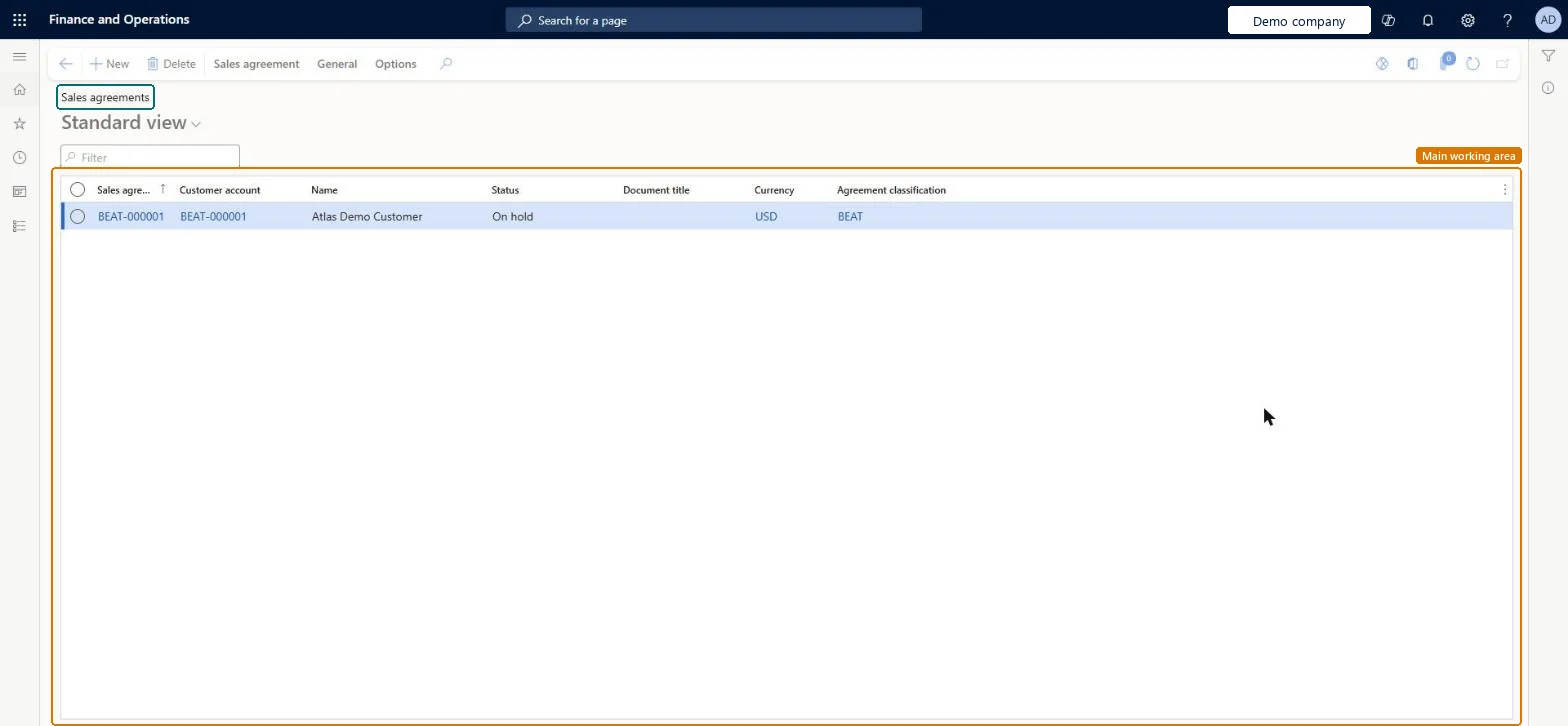
A list page where you create and manage sales agreements, which commit a customer to buy a quantity or an amount over time in return for special prices and discounts.
What you do here
Use this page to set up agreement terms, release sales orders from them and follow how much has been fulfilled.
Example
For example, BEAT agrees with BEAT-000123 a Product quantity commitment of 1,200.00 pcs of SPK-100 at 69.00 for 2027, with Max is enforced; each order released from the agreement counts on the Fulfillment tab.
The page in Dynamics 365. page title tab to open what to set or check
About the examples: Examples and screenshots in this guide use BEAT, a demo company in a Dynamics 365 test environment. Use your own company's codes and values instead of copying them.
Setup steps on this page
Set up sales agreements
Commit customers to quantities or amounts in return for agreed prices.
Steps from Microsoft
Go to Sales and marketing > Sales agreements > Sales agreements.
Select New, select the customer account and the sales agreement classification.
In Default commitment, select the commitment type, set the Effective date and Expiration date, and select OK.
Add lines with the item or category, quantity or amount, and prices or discounts; set Max is enforced and Price and discount is fixed as agreed.
Set the agreement to Effective and confirm it, then select Release order to create the first sales order.
The commitment type of new lines: Product quantity commitment, Product value commitment, Product category value commitment or Value commitment.Microsoft Learn
Product quantity commitment
Effective date
The first day of the agreement's validity period.Microsoft Learn
Stops linked order lines from going over the committed quantity or amount.Microsoft Learn
Price and discount is fixed
Keeps the order line price the same as the commitment price.Microsoft Learn
Minimum release amount
Sets the smallest value that must be sold on each order that uses the agreement.Microsoft Learn
Discount percent
The discount applied to linked sales order lines.Microsoft Learn
Fulfillment
Shows the totals of linked order lines and what remains to fulfill the commitment.Microsoft Learn
Common errors and fixes
Message
What to do
The order line no longer counts toward the agreement after a price change.
With Price and discount is fixed, a price change breaks the link. Keep the agreement price or create a link again. Microsoft Learn
Test checklist
Create a sales agreement with a Product quantity commitment line, set Effective date and Expiration date, select Price and discount is fixed, set it to Effective and confirm it.
Use Release order to create a sales order with a requested ship date inside the validity period.
Check the order line takes the agreement price and the Fulfillment tab shows the released quantity.
Change the unit price on the order line, answer the prompt, and check the line no longer counts on the Fulfillment tab.
Choose the commitment type per line and decide Max is enforced and Price and discount is fixed before confirming.These policies decide when order lines stop counting toward fulfillment.
Hard to reverse: Confirmed versions stay in history.
If you change it later
When the price and discount is fixed, changing the price on a linked order line breaks the link, and that line no longer counts toward fulfillment. Microsoft Learn
Technical architect
6Technical
Menu item
SalesAgreementListPageChecked in Dynamics 365
Form
SalesAgreementListPageChecked in Dynamics 365
Table
SalesAgreementHeaderShown as “Sales agreement” in Record infoChecked in Dynamics 365
PrivilegesView sales agreements SalesAgreementListViewDutiesInquire into sales agreement master AgreementSalesAgreementMasterInquireMaintain sales agreement master AgreementSalesAgreementMasterMaintainMaintain sales order release from agreements SalesAgreementReleaseSalesOrder5 security rolesMCRTestUserRoleProject manager ProjProjectManagerRetail service RetailServiceSales clerk TradeSalesClerkSales manager TradeSalesManagerChecked in Dynamics 365
Roles to set it up and use it
To use itSales manager TradeSalesManagerSales clerk TradeSalesClerkRetail service RetailServiceProject manager ProjProjectManagerGive people one of these roles. On this system, 4 roles can open this page.Checked in Dynamics 365
Actions on the page
Sales agreement: New, Generate, Intercompany, Related informationGeneral: Set upOptions: Personalize, Page options, ShareChecked in Dynamics 365