Accounts payable manager, Auditor, Accounts receivable clerk and 2 more roles
Business process
Process customer rebates
Menu item
PdsRebateType
Main table
PdsRebate
Data entity
SalesRebateProgramTypeEntity
Setup steps
1 on this page
Show what matters for
SETUP GUIDEHow to set it up8 sections. Choose a role to highlight what matters to you.
Everyone
1What it is and why
What it is
A setup page where you define the rebate program types that customer rebate agreements use, each with a type and default accrual and expense accounts. These are the older customer rebates of Sales and marketing. Microsoft describes Rebate management as the newer module for rebate deals, provisions and royalties; choose one of the two for a project.
What you do here
Use this page to set each program's type and its default accounts for rebate accruals and expenses.
Example
For example, BEAT sets up program VOLUME of type Rebate with default accrual account 220500 and default expense account 403100, so that processing volume rebate claims credits 220500 and debits 403100.
The page in Dynamics 365. page title tab to open what to set or check
About the examples: Examples and screenshots in this guide use BEAT, a demo company in a Dynamics 365 test environment. Use your own company's codes and values instead of copying them.
Step by step, with screenshots
Set up Rebate program types1 screen
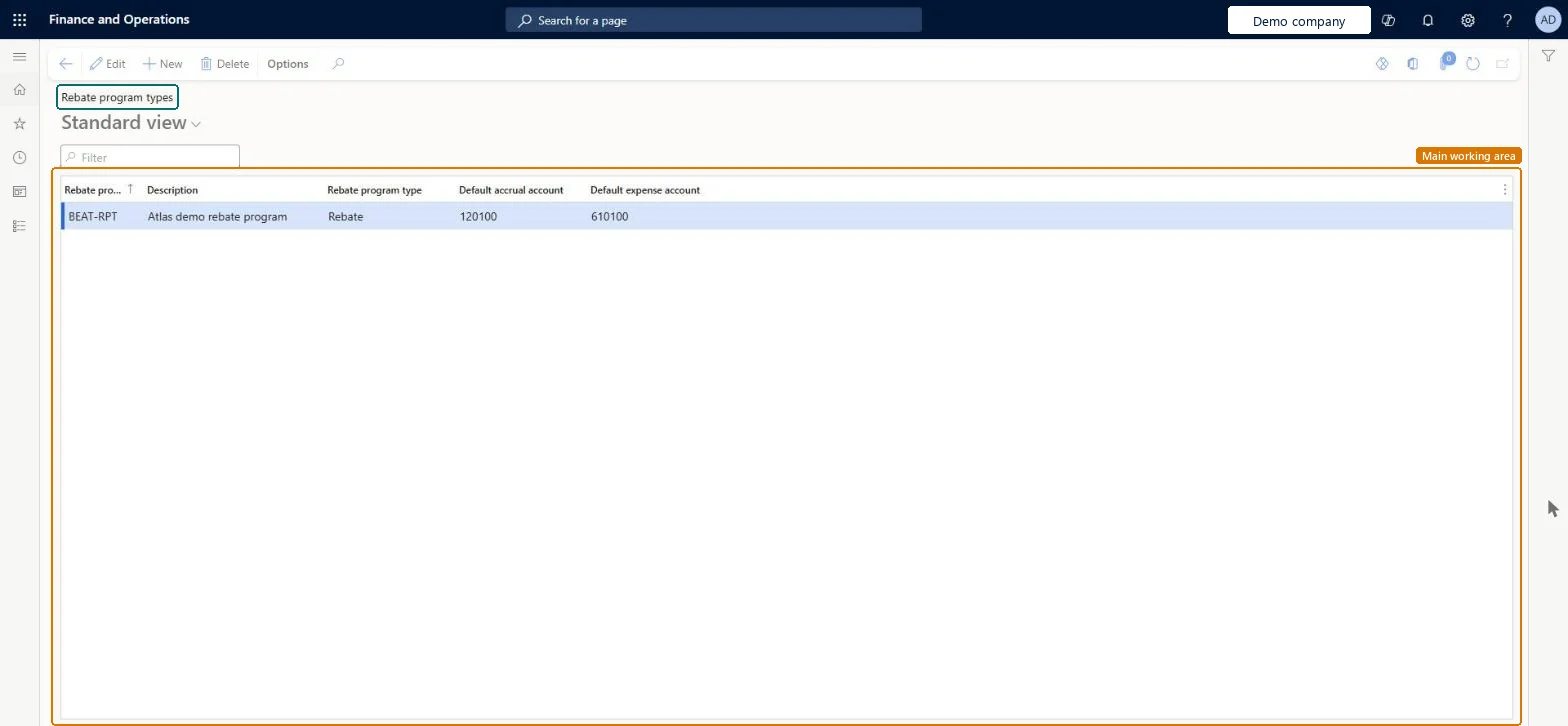
Use this page to set each program's type and its default accounts for rebate accruals and expenses.
Screen 1
Create a rebate program type
Go to Sales and marketing > Customer rebates > Rebate program types
Select New
Enter the rebate program ID and description
Select the rebate program type
Select the default accrual and expense accounts
Select Save
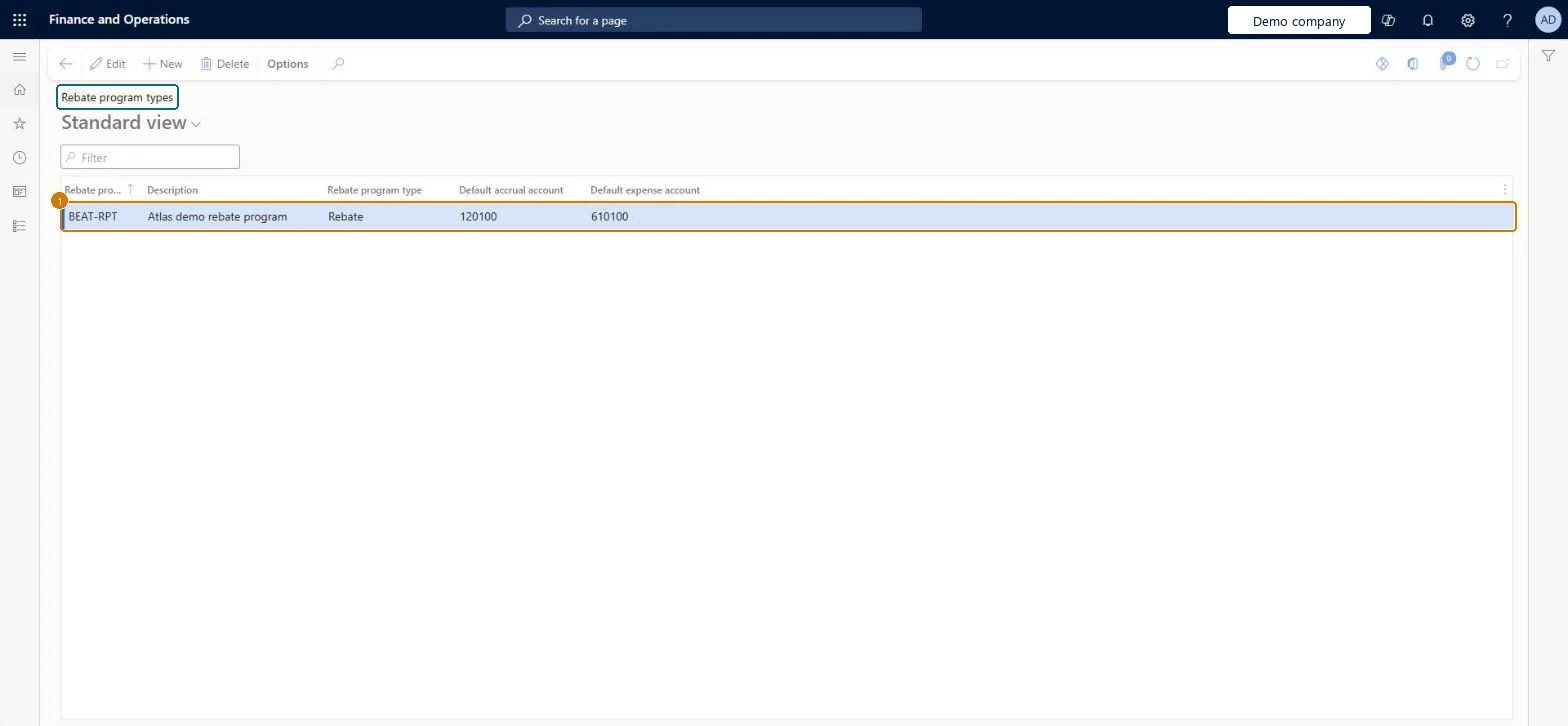
1Rebate program ID
BEAT-RPT
Description
Rebate program
Rebate program type
Rebate
Default accrual account
120100
Default expense account
610100
Show the full screen page title tab to open what to set or check
Steps from Microsoft
Go to Sales and marketing > Customer rebates > Rebate program types.
Select New.
Enter the ID and a short description of the rebate type.
In the Rebate program type field, select the type.
In the Default accrual account field, select the main account for accrued rebates.
In the Default expense account field, select the main account for rebate expenses.
The kind of rebate the program pays: Rebate (paid by check or deducted from the invoice), TMA (accrues until passed on, usually by credit note), Freight (reporting only) or Billback (not available for customer rebate agreements).Microsoft Learn
Rebate
PdsRebateProgramType
Default accrual account
The main account that accrued rebate amounts post to; processing claims credits it as the future liability to the customer.Microsoft Learn
220500
LedgerDimension
Default expense account
The main account that rebate claim expenses post to; processing claims debits it as the cost of the sales.Microsoft Learn
403100
OffsetLedgerDimension
Rebate program ID
The unique ID of the rebate program type.Checked in Dynamics 365
VOLUME
PdsRebateType
Description
A short description of the rebate program type.Checked in Dynamics 365
Rebate program
Description
Common errors and fixes
Message
What to do
A Billback program type can't be used for a customer rebate agreement.
Use type Rebate or TMA for customer rebate agreements; Billback rebates belong to trade allowance promotions for wholesalers and distributors. Microsoft Learn
Test checklist
Set Enable price details to Yes on Accounts receivable parameters.
Create and approve a customer rebate agreement that uses the program type.
Invoice a qualifying sales order and check claims appear on Sales and marketing > Customer rebates > Rebates.
Cumulate, approve and process the claims, then check the accrual account is credited and the expense account debited.
One rebate program type per kind of customer rebate program, with a default accrual account for the future liability to the customer and a default expense account for the rebate costWhen rebate claims are processed, the rebate accrual journal credits the rebate accrual account (future liability to the customer) and debits the rebate expense account (cost of the sales).
Choosing the wrong Rebate program type: Billback isn't available for customer rebate agreements, and Freight rebates are only used for reporting and aren't passed to the customer.Test: Processing claims posts to the program type's accounts
Feature management and licence
Licence or add-in
On the live system, Accounts receivable manager and Accounts receivable clerk (maintain), and Sales manager, Accounts payable manager and Auditor (view) use this page.
Reversible: Program types and their default accounts can be changed; accruals already posted when claims were processed keep their accounts.
If you change it later
When claims are processed, the Rebate accrual journal credits the rebate accrual account and debits the rebate expense account. A change to the defaults affects agreements and claims from then on; journals already posted keep their accounts. Microsoft Learn
Technical architect
6Technical
Menu item
PdsRebateTypeChecked in Dynamics 365
Form
PdsRebateChecked in Dynamics 365
Table
PdsRebateShown as “Rebate program types” in Record infoChecked in Dynamics 365
PrivilegesMaintain rebate types PdsRebateTypeMaintainView rebate types PdsRebateTypeViewDutiesViews customer rebate agreements PdsRebateAgreementViewProcesses customer rebates PdsRebateProcessInquire into purchase order to invoice policies PurchOrderToInvoicePoliciesInquire5 security rolesAuditor AuditPolicyManagerAccounts receivable clerk CustInvoiceAccountsReceivableClerkAccounts receivable manager CustInvoiceAccountsReceivableManagerSales manager TradeSalesManagerAccounts payable manager VendInvoiceAccountsPayableManagerChecked in Dynamics 365
Roles to set it up and use it
To set it up or change itAccounts receivable manager CustInvoiceAccountsReceivableManagerAccounts receivable clerk CustInvoiceAccountsReceivableClerkTo use itSales manager TradeSalesManagerAccounts payable manager VendInvoiceAccountsPayableManagerAuditor AuditPolicyManagerGive people one of these roles. On this system, 5 roles can open this page.Checked in Dynamics 365
Actions on the page
Options: Personalize, Page options, ShareChecked in Dynamics 365
SalesRebateProgramTypeEntity (Sales rebate program types): loaded for each company, in Microsoft's default template 330 - Sales and marketing.Load order: Microsoft's default template 330 - Sales and marketing loads Sales rebate program types at execution unit 1, level 30, sequence 10. Lower levels load first, and entities at the same level load in sequence order.Load first: the default templates at lower levels (System setup to General ledger)Microsoft Learn
Checked in a working Dynamics 365 system, version 10.0.49: the menu item, form, table and security, the page, the demo records and the values in the screenshots.
To cite this step: SM-REBATE-010, Set up Rebate program types. Beyond ERP Atlas Hub, 2026-11-11. https://www.beyonderp.cloud/atlas/step/SM-REBATE-010