Credit management clerk, Credit management manager, Materials manager and 8 more roles
Business process
Process outbound goods
Menu item
WMSPickingRegistration
Main table
WMSPickingRoute
Setup steps
1 on this page
Show what matters for
SETUP GUIDEHow to set it up8 sections. Choose a role to highlight what matters to you.
Everyone
1What it is and why
What it is
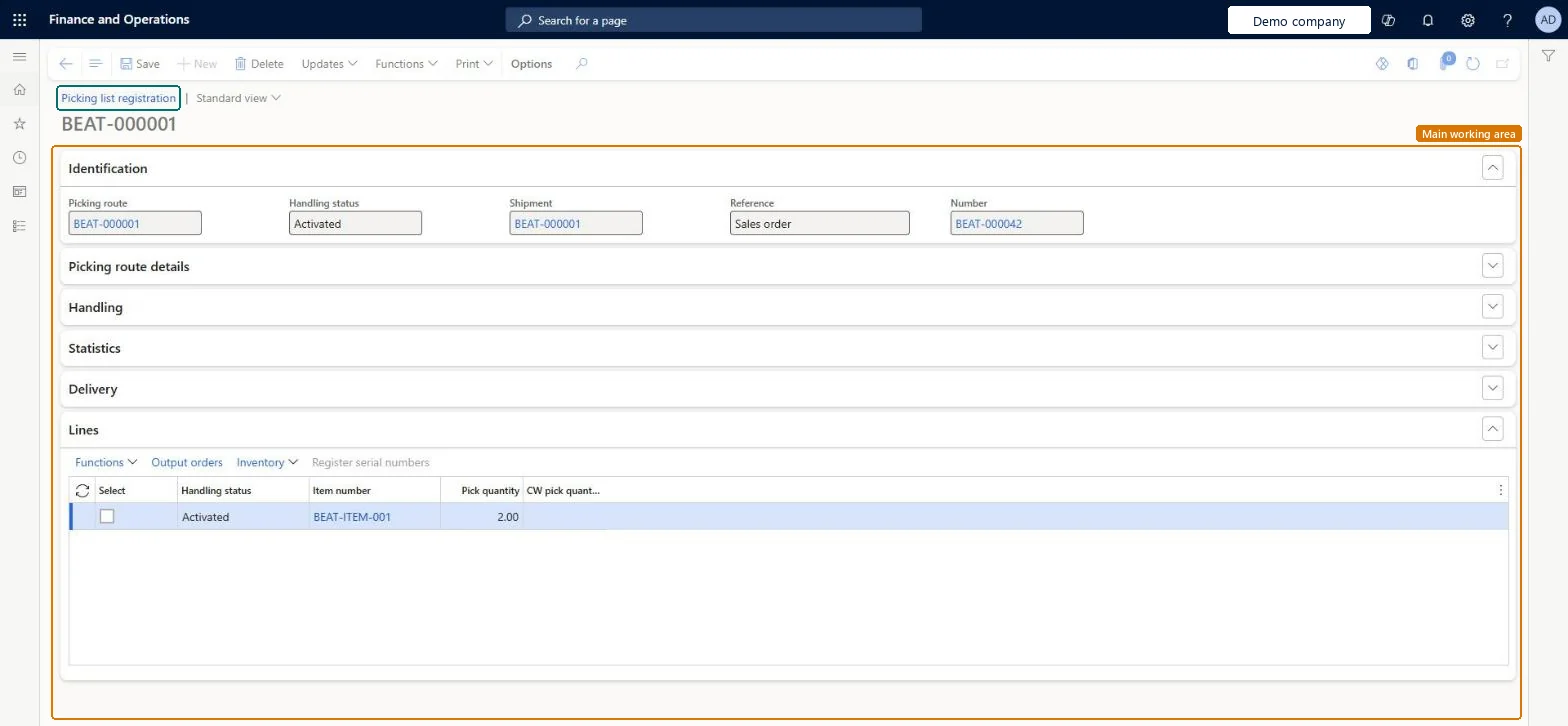
A page where you register the picking of picking list lines so that the shipment can be completed.
What you do here
Use this page to report what was picked before the packing slip is posted.
Example
For example, with Picking route status Activated, the warehouse picks picking list PL-000331 for SO-001234 (20.00 and 6.00 pcs), registers both lines here, and the shipment is completed so the packing slip can be posted with Quantity = Picked.
The page in Dynamics 365. page title tab to open what to set or check
About the examples: Examples and screenshots in this guide use BEAT, a demo company in a Dynamics 365 test environment. Use your own company's codes and values instead of copying them.
Setup steps on this page
Register picking
Report what was picked so the shipment completes.
Steps from Microsoft
Go to Sales and marketing > Sales orders > Order shipping > Picking list registration.
Filter on the picking route of the order.
Check the Handling status and Shipment of the picking list.
Register the picked quantity on each line; lower it if less was picked.
When all lines are registered, post the packing slip with Quantity = Picked.
Register the actual picked quantity; set End output inventory order according to whether short picks should go back to the order.The shipment completes only when all picking lines are picked; short quantities follow the End output inventory order setting.
Reversible with effort: Short picks can be released again.
If you change it later
With End output inventory order set to Yes, quantities that weren't picked go back to the order when the picking list is updated; otherwise they stay as open output order quantities. Microsoft Learn
Technical architect
6Technical
Menu item
WMSPickingRegistrationChecked in Dynamics 365
Form
WMSPickingRegistrationChecked in Dynamics 365
Table
WMSPickingRouteShown as “Picking route” in Record infoKey field: pickingRouteIDChecked in Dynamics 365
Who can open it
PrivilegesMaintain picking list WMSPickingRegistrationMaintainView picking list WMSPickingRegistrationViewActivate picking routes WMSPickingRouteActivateProcessDutiesInquire into shipping progress InventShippingProgressInquireThis duty only include privileges that are accessible by the project manager and it does not contain the privileges related to sales order and purchase order ProjProjectItemTasksMaintainMaintain release of sales picking list SalesPickingListReleaseMaintain activation of shipments, picking routes and pallet transports WMSShipmentPickingTransportActivateInquire into warehouse operation progress WMSWarehouseOperationProgressInquireMaintain warehouse picking operations WMSWarehousePickingOperationMaintain12 security rolesCredit management clerk CredManClerkCredit management manager CredManManagerMaterials manager InventMaterialsManagerQuality control clerk InventQualityControlClerkQuality control manager InventQualityControlManagerReceiving clerk InventReceivingClerkShipping clerk InventShippingClerkMCRTestUserRoleProject manager ProjProjectManagerSales clerk TradeSalesClerkWarehouse manager WMSWarehouseManagerWarehouse worker WMSWarehouseWorkerChecked in Dynamics 365
Roles to set it up and use it
To set it up or change itProject manager ProjProjectManagerShipping clerk InventShippingClerkWarehouse worker WMSWarehouseWorkerTo use itSales clerk TradeSalesClerkCredit management clerk CredManClerkCredit management manager CredManManagerWarehouse manager WMSWarehouseManagerMaterials manager InventMaterialsManagerGive people one of these roles. On this system, 11 roles can open this page.Checked in Dynamics 365
Actions on the page
Options: Personalize, Page options, Edit, ShareChecked in Dynamics 365
Load order: Picking list registration has no data entity in Data management. No entity in the Common Data Model is built on its table (WMSPickingRoute); picking lists are created by Generate picking list on migrated orders.Microsoft data model