SETUP GUIDEHow to set it up8 sections. Choose a role to highlight what matters to you.
Everyone
1What it is and why
What it is
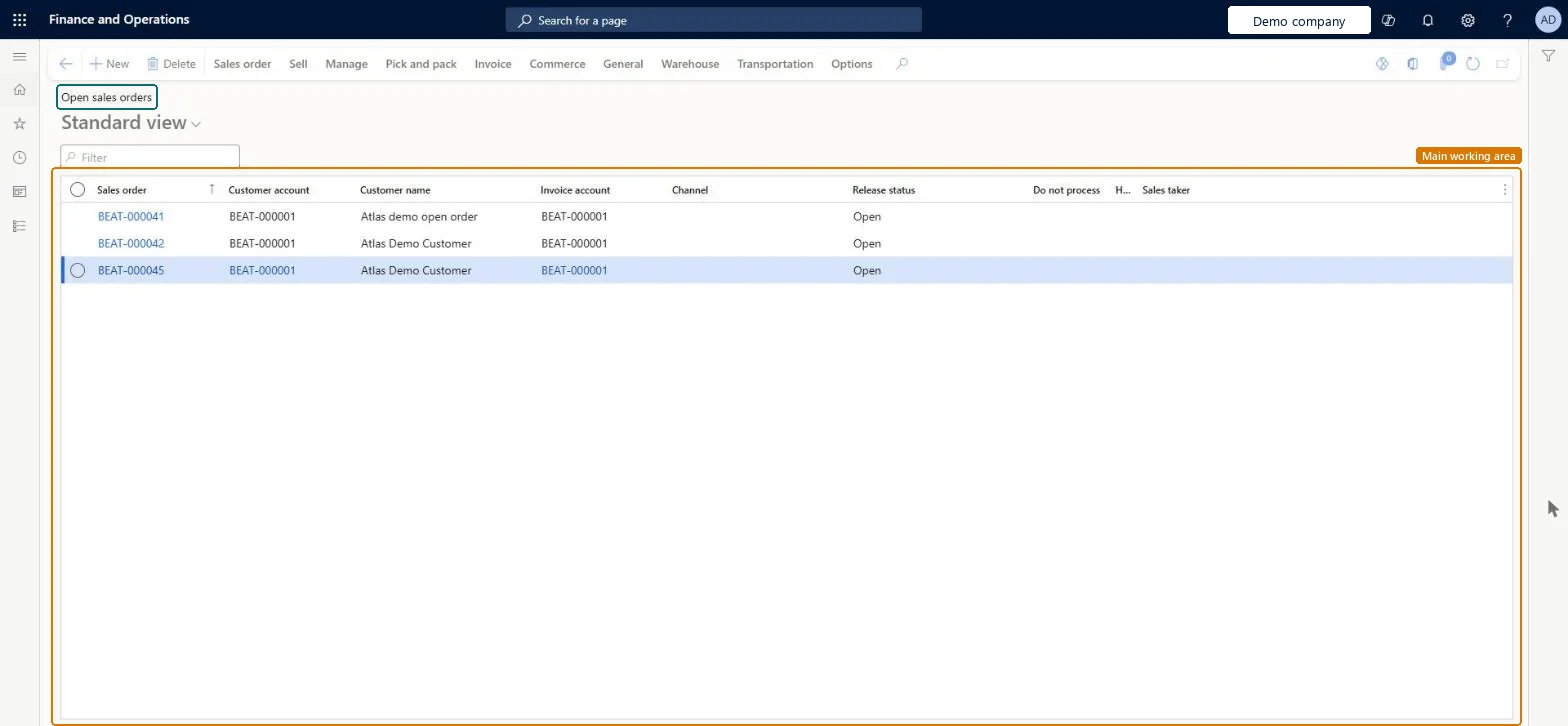
A list page of sales orders filtered to the orders that are still open, with their customer, invoice account, channel, release status and hold flag.
What you do here
Use this page to follow up on sales orders that are still in progress and to open the next step for each.
Example
For example, at month end BEAT's sales manager filters Open sales orders on customer BEAT-000123 and finds SO-001198 still open with 3.00 pcs not shipped, worth 225.00, and asks the warehouse to ship it before closing.
The page in Dynamics 365. page title tab to open what to set or check
About the examples: Examples and screenshots in this guide use BEAT, a demo company in a Dynamics 365 test environment. Use your own company's codes and values instead of copying them.
Setup steps on this page
Follow up open sales orders
Find orders that still have quantity to ship.
Steps from Microsoft
Go to Sales and marketing > Sales orders > Open orders > Open sales orders.
Filter by Sales order, Customer account or Customer name.
Check the Release status and Do not process columns to see which orders are released or held.
Open an order to see which lines are still not delivered.
From the Pick and pack tab, post the packing slip for what has shipped.
Open order until all lines are fully shipped; a partly shipped order stays Open order.Microsoft Learn
Open order
Document status
The last document that was updated and printed for the order.Microsoft Learn
Do not process
Marked when the order is on hold, so it can't be processed further.Microsoft Learn
No
MCROrderStopped
Release status
How much of the order is released to the warehouse; it applies only to lines whose items use warehouse management processes.Microsoft Learn
Released
Common errors and fixes
Message
What to do
Unable to post packing slip when stopping a sales order line after confirming the outbound shipment A quantity cannot be picked.
On the related lines set Stopped to No (Line details FastTab, General tab), post the packing slip, then handle the customer's cancellation as a return. Microsoft Learn
Test checklist
Create an order of 10.00 pcs and post a packing slip for 4.00 pcs.
Open Open sales orders and check the order is listed.
Post a packing slip for the remaining 6.00 pcs.
Check the order no longer shows as open (Status Delivered).
Filter first on customer or on Do not process, so held orders and shippable orders are handled separately.Held orders can't be picked or packed, so mixing them with shippable orders hides what the warehouse can act on.
On the live system, Sales clerk, Sales manager, Sales representative and Accounts receivable clerk use this page.
Checked in Dynamics 365
Solution architect
5Design impact
Shared or per company
Per company: sales orders belong to the legal entity they're created in. An intercompany chain creates a separate order in each legal entity. Microsoft Learn
Can it be undone
Reversible: The list changes no data.
If you change it later
A list only. An order leaves it when all lines are fully shipped and its status changes from Open order to Delivered. Microsoft Learn
Technical architect
6Technical
Menu item
SalesTableListPageOpenChecked in Dynamics 365
Form
SalesTableListPageChecked in Dynamics 365
Table
SalesTableShown as “Sales orders” in Record infoChecked in Dynamics 365
Data entities
SalesOrderHeaderV2EntitySales order headers V2 Microsoft data model SalesOrderHeaderV2ExistAddrReadOnlyEntitySales order headers V2 readonly with the delivery address Microsoft data model ReturnOrderHeaderEntityReturn order headers Microsoft data model CustCollectionsBISalesOnHoldSales orders on hold for customers Microsoft data model
Roles to set it up and use it
To set it up or change itRental manager RentalManagerRental coordinator agent RentalCoordinatorAgentRental sales manager RentalSalesManagerSales representative TradeSalesRepresentativeSales clerk TradeSalesClerkTo use itSales manager TradeSalesManagerAccounts receivable clerk CustInvoiceAccountsReceivableClerkAccounts receivable manager CustInvoiceAccountsReceivableManagerRental representative RentalRepresentativeAccounts receivable centralized payments clerk PaymAccountsReceivableCentralPaymClerkGive people one of these roles. On this system, 28 roles can open this page.Checked in Dynamics 365
SalesOrderHeaderV2Entity Sales order headers V2: loaded for each company, before Sales order lines V2.Load order: Load customers, items and released products first, then Sales order headers V2, then Sales order lines V2 (SalesOrderLineV2Entity).Load first: Customers V3, Released productsMicrosoft Learn