Invoice sales orders in Dynamics 365 Supply Chain Management
Menu item
CustInvoiceSalesLinkCorrection
Main table
CustInvoiceSalesLink
Setup steps
1 on this page
Show what matters for
SETUP GUIDEHow to set it up8 sections. Choose a role to highlight what matters to you.
Everyone
1What it is and why
What it is
A data-correction tool that lists the links between sales orders and customer invoices and lets you delete a wrong link.
What you do here
Use it only to remove a link that ties a customer invoice to the wrong sales order, after the case has been analysed and tested in a copy.
Example
For example, BEAT invoice INV-000789 is linked to SO-001234 and to SO-001240 by mistake; after support confirms the cause in a copy, the link to SO-001240 is deleted here and the change is logged.
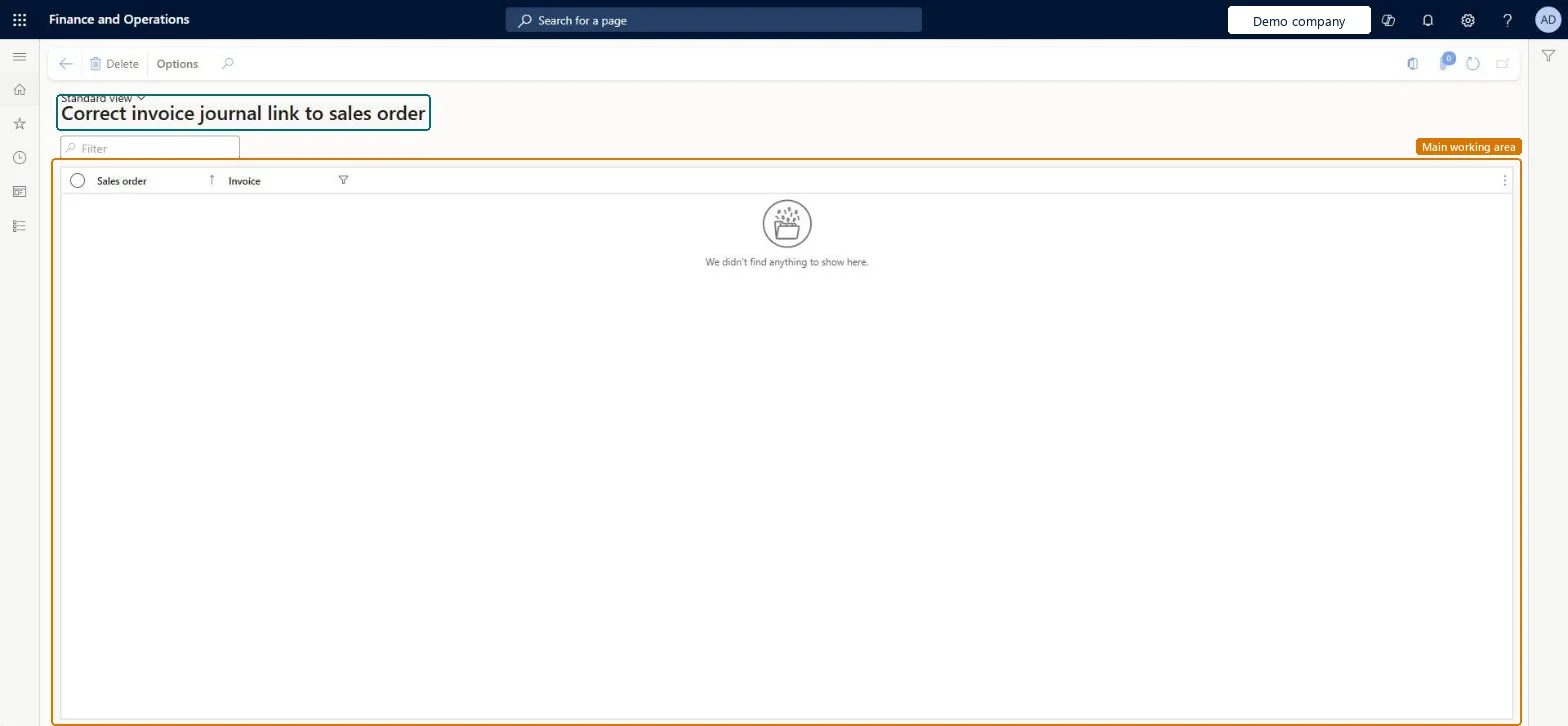
The page in Dynamics 365. page title tab to open what to set or check
About the examples: Examples and screenshots in this guide use BEAT, a demo company in a Dynamics 365 test environment. Use your own company's codes and values instead of copying them.
When to run it
When to run it
Only when a customer invoice is linked to the wrong sales order and the link must be removed.
How often
On demand, only when a wrong link is found.
Source: Checked in Dynamics 365
Setup steps on this page
Restrict invoice link correction
Remove a wrong invoice-to-order link without losing the trace of correct ones.
How to use it
Go to Sales and marketing > Periodic tasks > Clean up > Correct invoice journal link to sales order.
Reproduce the wrong link in a copy of production and agree the correction with the accounts receivable owner.
Filter on the invoice number and review the Sales order and Invoice of each link.
Select only the wrong link and select Delete.
Open the invoice journal and check that the invoice is still there and is no longer linked to that sales order.
Source: Checked in Dynamics 365
Fields on the page
Field
What it means
Example
Sales order
The sales order of the link.Checked in Dynamics 365
SO-001240
Invoice
The customer invoice of the link.Checked in Dynamics 365
INV-000789
Common errors and fixes
Message
What to do
Delete removed a link that was correct.
The page has no undo; filter on one invoice, check both the sales order and the invoice, and try the deletion in a copy first. Checked in Dynamics 365
Test checklist
In a copy, filter on the invoice with the wrong link.
Delete the wrong link.
Check that 1 link fewer is listed for that invoice and the invoice is still in the invoice journal.
Give the duty only to named accounts receivable support users; filter on one invoice, check the link in a copy, then delete it and log the change.Delete removes the link record immediately and the page has no undo.
On the live system, no standard role holds the Maintain invoice journal link to sales order duty; give it only to the few users who repair invoice data.
Checked in Dynamics 365
Solution architect
5Design impact
Shared or per company
Per company: links between customer invoices and sales orders are kept per legal entity. Microsoft data model
Can it be undone
Irreversible: A deleted link can't be restored on the page.
If you change it later
Deletes the record that ties a customer invoice to a sales order; the invoice and the order themselves stay. On the live system no standard role has the Maintain invoice journal link to sales order duty. Checked in Dynamics 365
Technical architect
6Technical
Menu item
CustInvoiceSalesLinkCorrectionChecked in Dynamics 365
Form
CustInvoiceSalesLinkCorrectionChecked in Dynamics 365
Table
CustInvoiceSalesLinkShown as “Customer invoice - sales order relation table” in Record infoChecked in Dynamics 365
Who can open it
PrivilegesMaintain invoice journal link to sales order CustInvoiceSalesLinkCorrectionDutiesMaintain invoice journal link to sales order CustInvoiceSalesLinkCorrectionChecked in Dynamics 365
Roles to set it up and use it
To set it up or change itMaintain invoice journal link to sales order CustInvoiceSalesLinkCorrectionGive people a role that holds these duties. On this system, 0 roles give access to this page.Checked in Dynamics 365
Actions on the page
Options: Page options, ShareChecked in Dynamics 365
Load order: Correct invoice journal link to sales order has no data entity in Data management. The links are created when invoices are posted; they aren't migrated.Checked in Dynamics 365