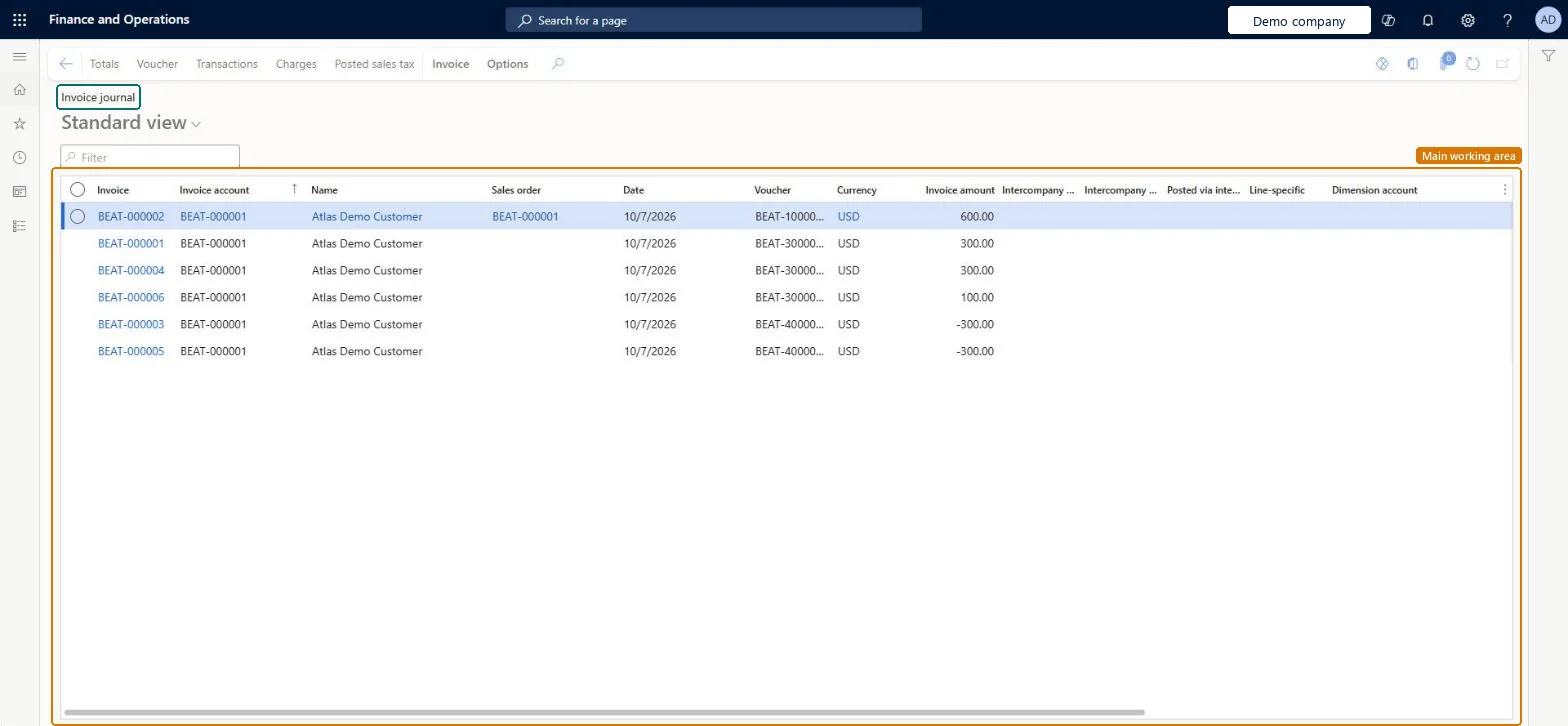
About the examples: Examples and screenshots in this guide use BEAT, a demo company in a Dynamics 365 test environment. Use your own company's codes and values instead of copying them.
How to use it
Go to Accounts receivable > Inquiries and reports > Invoices > Invoice journal.
Type in the Filter box to find an invoice by its number, invoice account, name or sales order.
Review the grid, which shows Invoice, Invoice account, Name, Sales order, Date, Voucher, Currency and Invoice amount.
Select an invoice, then select Totals, Voucher, Transactions, Charges or Posted sales tax in the Action Pane to look at that detail.
Open the Invoice tab to reach Accounting, Ship, Details, Intercompany, Document and Properties.
To set it up or change itAccounts receivable clerk CustInvoiceAccountsReceivableClerkAccountant LedgerAccountantTo use itAccounts receivable manager CustInvoiceAccountsReceivableManagerAccounting manager LedgerAccountingManagerCollections manager CollectionLetterCollectionsManagerAccounts receivable payments clerk PaymAccountsReceivablePaymentsClerkAccounts receivable centralized payments clerk PaymAccountsReceivableCentralPaymClerkGive people one of these roles. On this system, 17 roles can open this page.Checked in Dynamics 365
Actions on the page
Invoice: Accounting, Ship, Details, Intercompany, Document, PropertiesChecked in Dynamics 365