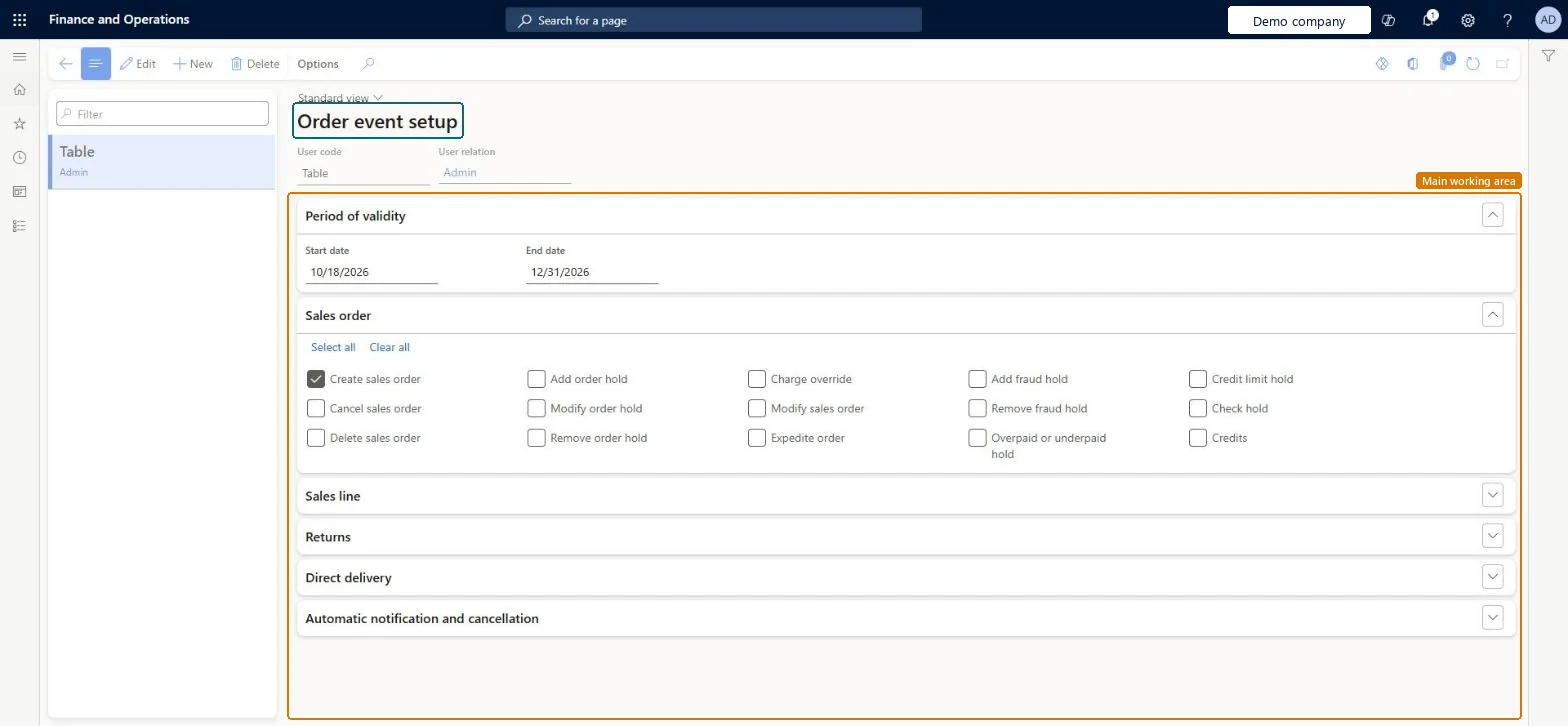
A setup page where you choose, per user or for all users and for a date range, which actions on sales orders, returns and quotations are recorded as order events.
PAGE GUIDEWhat the page does and how to use it8 sections. Choose a role to highlight what matters to you.
Everyone
1What it is and why
What it is
A setup page where you choose, per user or for all users and for a date range, which actions on sales orders, returns and quotations are recorded as order events.
What you do here
Use this page to track actions on orders for auditing, to review an order's history, or to follow what a specific user does.
Example
For example, BEAT records Create sales order, the order hold events and Sales line price override for all users from 01/01/2027 to 12/31/2027, so the service manager can see who overrode the price on order SO-001234.
The page in Dynamics 365. page title tab to open what to set or check
About the examples: Examples and screenshots in this guide use BEAT, a demo company in a Dynamics 365 test environment. Use your own company's codes and values instead of copying them.
Step by step, with screenshots
Set up Order events1 screen
Use this page to track actions on orders for auditing, to review an order's history, or to follow what a specific user does.
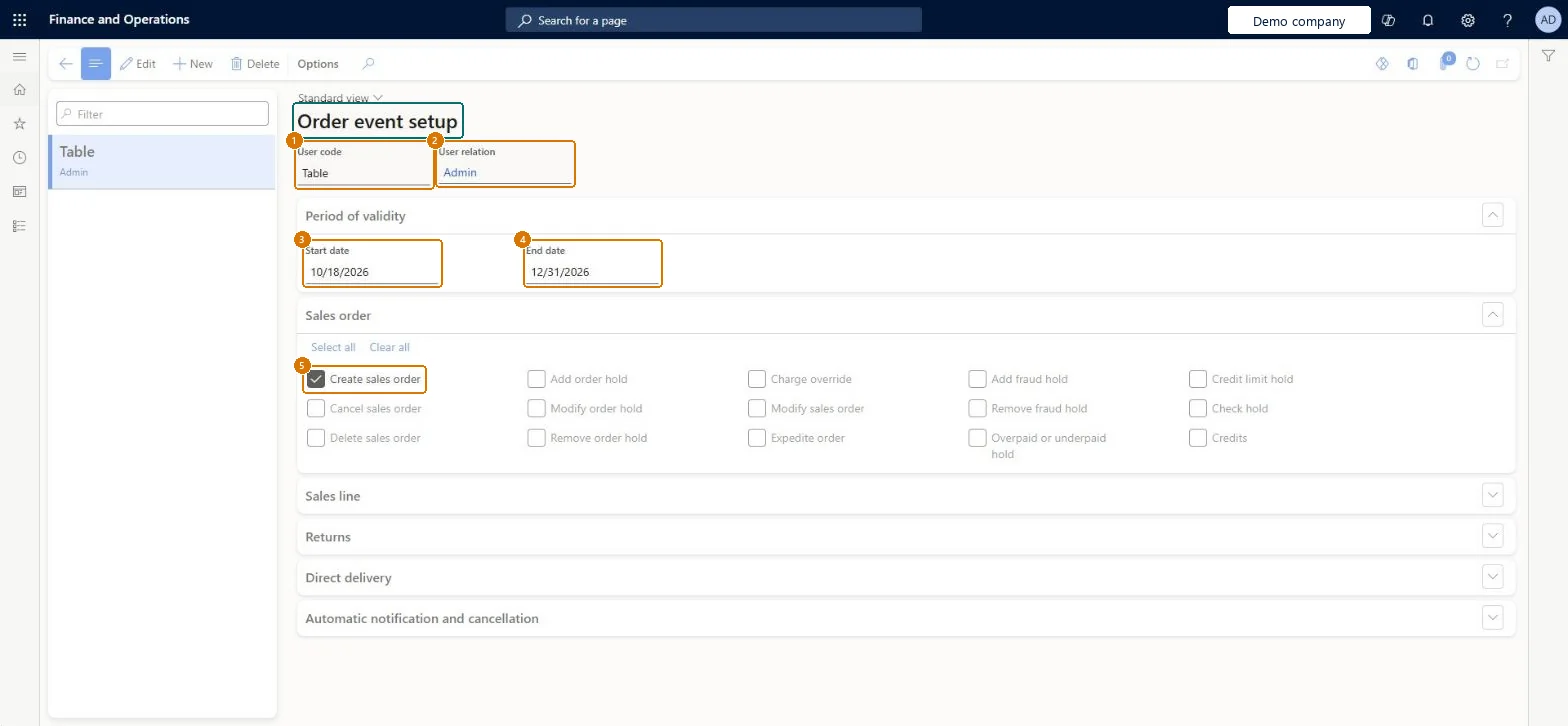
Screen 1
Set up order event tracking
Go to Sales and marketing > Setup > Events > Order events
Select New
Select the user code (Table for one user, Group for a user group, or All) and the user relation
Under Period of validity, enter the start and end dates
Under Sales order, Sales line, Returns and the other sections, select the actions to track
Select Save
1User code
Table
2User relation
Admin
3Start date
10/18/2026
4End date
12/31/2026
5Create sales order
Yes
Show the full screen page title tab to open what to set or check
Steps from Microsoft
Go to Sales and marketing > Setup > Events > Order events.
Create a new record and, in the User code field, choose who it applies to; if needed, select the user in User relation.
Enter the start and end dates during which events are recorded.
On each FastTab, select the actions that create an event, or select Select all.
Review the recorded events on Inquiries and reports > History > Order events, and plan Order events cleanup.
Records an event when a sales order is created. Other check boxes record, for example, Delete sales order, Modify delivery address, order holds and price overrides.Microsoft data model
Yes
CreateSalesOrder
Common errors and fixes
Message
What to do
The order events history keeps growing.
Run Order events cleanup, then open the Order event setup page and clear the check boxes for events that aren't required. Microsoft Learn
Test checklist
On Order events, select Create sales order for your user with today in the date range and save.
Create a sales order as that user.
Open Inquiries and reports > History > Order events and check that 1 creation event is listed for the order.
Select only the order events your audit or service team will actually review, and leave the rest cleared.Logged order events accumulate and Learn provides a separate Order events cleanup routine, after which you open the Order event setup page and clear the check boxes for events that aren't required.
Which order events are recorded?Turning on every event 'just in case'. The log keeps growing until someone runs Order events cleanup, and the events still need to be cleared on the setup page afterwards.Test: Selected event is recorded
Feature management and licence
Licence or add-in
On the live system, Sales manager can maintain this page.
Reversible: Clearing an event stops new logging. Events already recorded are removed only by the Order events cleanup routine. Microsoft Learn
If you change it later
Only actions selected here, for the users and dates set, are recorded from then on; nothing is recorded for past actions. Microsoft data model
Technical architect
6Technical
Menu item
MCROrderEventSetupChecked in Dynamics 365
Form
MCROrderEventSetupChecked in Dynamics 365
Table
MCROrderEventSetupShown as “Order event setup” in Record infoChecked in Dynamics 365
Data entities
SalesDocumentEventTrackingSetupEntitySales document event tracking setup Microsoft data model
Who can open it
PrivilegesMaintain order event setup MCROrderEventSetupMaintainDutiesEnable call center events and letters MCREventMaintain1 security roleSales manager TradeSalesManagerChecked in Dynamics 365
Roles to set it up and use it
To set it up or change itSales manager TradeSalesManagerGive people one of these roles. On this system, 1 role can open this page.Checked in Dynamics 365
Actions on the page
Options: Personalize, Page options, ShareChecked in Dynamics 365
SalesDocumentEventTrackingSetupEntity (Sales document event tracking setup): the setup on this page, loaded for each company.Load order: Load the event setup after users exist, because each line can point to a user in User relation.Load first: UsersMicrosoft Learn
Checked in a working Dynamics 365 system, version 10.0.49: the menu item, form, table and security, the page, the demo records and the values in the screenshots.