Marketing coordinator, Marketing manager, Rental coordinator agent and 5 more roles
Business process
Pursue opportunities
Menu item
smmOpportunitiesListPage_MyNew
Main table
smmOpportunityTable
Setup steps
1 on this page
Show what matters for
SETUP GUIDEHow to set it up8 sections. Choose a role to highlight what matters to you.
Everyone
1What it is and why
What it is
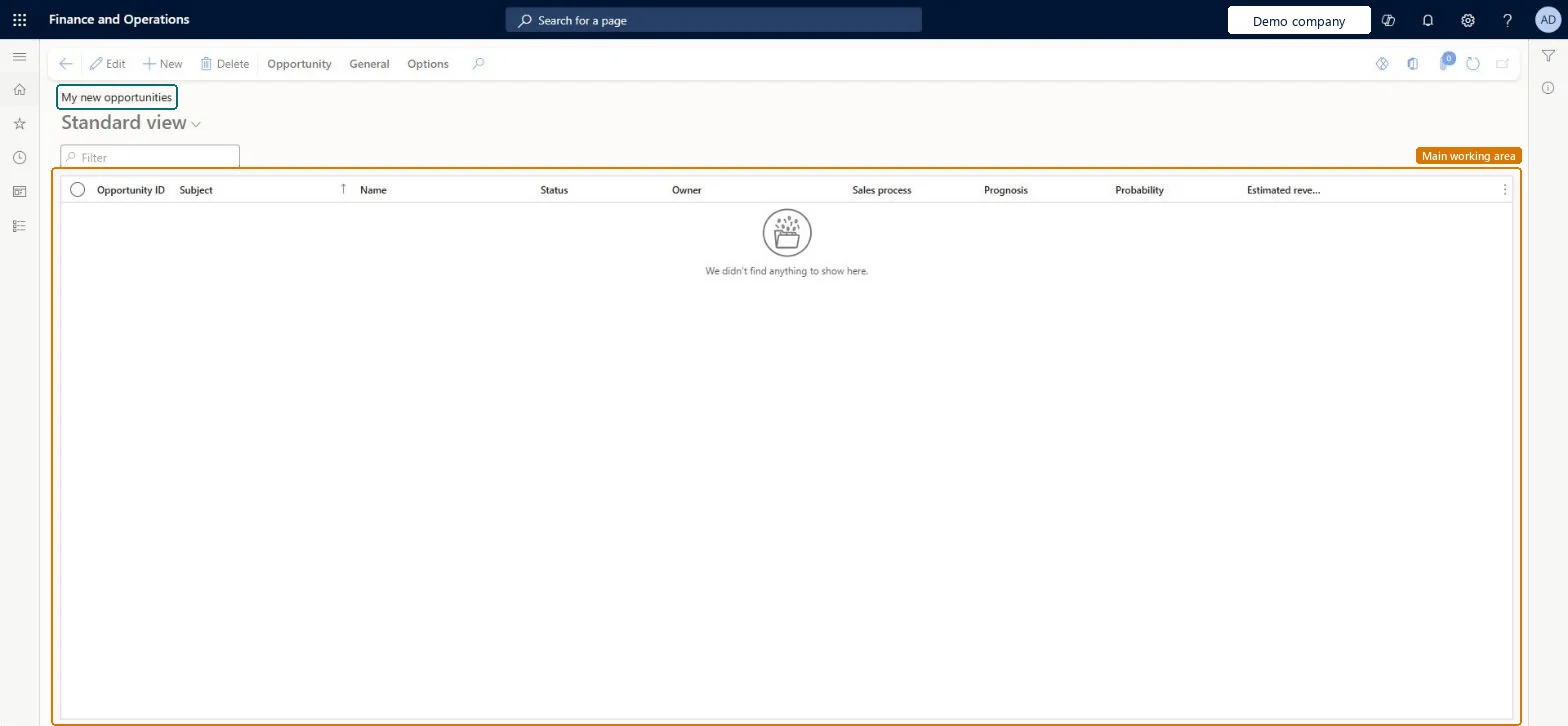
A list page of opportunity records, filtered to the new opportunities you own.
What you do here
Use this page to pick up the new opportunities that are yours and start each one with a sales process and a probability.
Example
For example, Ana Ruiz finds 2 new opportunities in My new opportunities, sets Probability 30 and estimated revenue 9,800.00 USD on OPP-000140 and books the first meeting.
The page in Dynamics 365. page title tab to open what to set or check
About the examples: Examples and screenshots in this guide use BEAT, a demo company in a Dynamics 365 test environment. Use your own company's codes and values instead of copying them.
Setup steps on this page
Use My new opportunities for pipeline follow-up
Use this page to pick up the new opportunities that are yours and start each one with a sales process and a probability.
Steps from Microsoft
Go to Sales and marketing > Relationships > Opportunities > My new opportunities.
Search on Opportunity ID, Subject or Name to find an opportunity that was just given to you.
Read Status and Sales process to see where each of your new opportunities starts.
Select Edit to enter Probability and Estimated revenue once you know them.
The chance, as a percentage, that the opportunity becomes a sale; quotations created from the opportunity inherit it for master planning.Microsoft Learn
A quotation is ignored by master planning although it is likely to be won.
Master planning uses the probability of the opportunity a quotation was created from. Create the quotation from the opportunity (Opportunity tab > New > Sales quotation), or set the master plan's Probability % to 0 to include all quotations. Microsoft Learn
Test checklist
Create a new opportunity you own.
Check it shows in My new opportunities.
Set Probability, create a quotation and check its Opportunity ID.
Enter Probability and Estimated revenue on each of your new opportunities before you create a quotation.Quotations take their probability from the opportunity at creation; entering it first means planning sees the quotation from the start.
On the live system, the roles that use this page include Sales manager, Sales representative, Marketing manager, Marketing coordinator, Customer service representative and Rental manager.
Checked in Dynamics 365
Solution architect
5Design impact
Shared or per company
Per company: each legal entity has its own opportunities; quotations created from them belong to the same company. Microsoft data model
Can it be undone
Reversible with effort: The list only shows opportunities; edits can be changed again.
If you change it later
A filtered view on the same opportunities as All opportunities. Probability changes made here flow to the quotations created from the opportunity and to the next master planning run. Microsoft Learn
Technical architect
6Technical
Menu item
smmOpportunitiesListPage_MyNewChecked in Dynamics 365
Form
smmOpportunityTableChecked in Dynamics 365
Table
smmOpportunityTableShown as “Opportunities” in Record infoKey field: OpportunityId, Party, Party_NameChecked in Dynamics 365
Who can open it
PrivilegesMaintain my new opportunities smmOpportunitiesListPage_MyNewMaintainView my new opportunities smmOpportunitiesListPage_MyNewViewDutiesInquire into leads and opportunities RentalsmmLeadsAndOpportunitiesInquireInquire into leads and opportunities smmLeadsAndOpportunitiesInquireMaintain leads and opportunities smmLeadsAndOpportunititiesMaintain8 security rolesMarketing coordinator CRMMarketingCoordinatorMarketing manager CRMMarketingManagerRental coordinator agent RentalCoordinatorAgentRental manager RentalManagerRental representative RentalRepresentativeCustomer service representative TradeCustomerServiceRepresentativeSales manager TradeSalesManagerSales representative TradeSalesRepresentativeChecked in Dynamics 365
Roles to set it up and use it
To set it up or change itSales manager TradeSalesManagerSales representative TradeSalesRepresentativeMarketing coordinator CRMMarketingCoordinatorTo use itRental manager RentalManagerRental coordinator agent RentalCoordinatorAgentMarketing manager CRMMarketingManagerCustomer service representative TradeCustomerServiceRepresentativeRental representative RentalRepresentativeGive people one of these roles. On this system, 8 roles can open this page.Checked in Dynamics 365
Actions on the page
Opportunity: Maintain, New, Process, Accounts, AttachmentsGeneral: Set up, Generate, Related information, ActivitiesOptions: Personalize, Page options, ShareChecked in Dynamics 365
Load order: My new opportunities has no data entity in Data management: Microsoft's list of standard Sales and marketing entities has entities for opportunity setup but none for opportunities. Open opportunities are entered on All opportunities during cutover, or loaded through a custom data entity.Microsoft data model
Checked in a working Dynamics 365 system, version 10.0.49: the menu item, form, table and security, the page.
To cite this step: SM-CRM-180, Use My new opportunities for pipeline follow-up. Beyond ERP Atlas Hub, 2026-11-11. https://www.beyonderp.cloud/atlas/step/SM-CRM-180