Accounts payable manager, Product designer, Product design manager and 14 more roles
Business process
Administer system features
Menu item
SelfHealingWorkspace
Setup steps
1 on this page
Show what matters for
SETUP GUIDEHow to set it up8 sections. Choose a role to highlight what matters to you.
Everyone
1What it is and why
What it is
A workspace that shows improvement opportunities found by checking module setup and business data against best practice rules.
What you do here
Use this workspace to find problems in module setup and business data, and to fix them directly from the workspace.
Example
For example, a rule that finds BEAT isn't really using Master planning lists an opportunity; the administrator reads More information and turns off the planning processes with Take action.
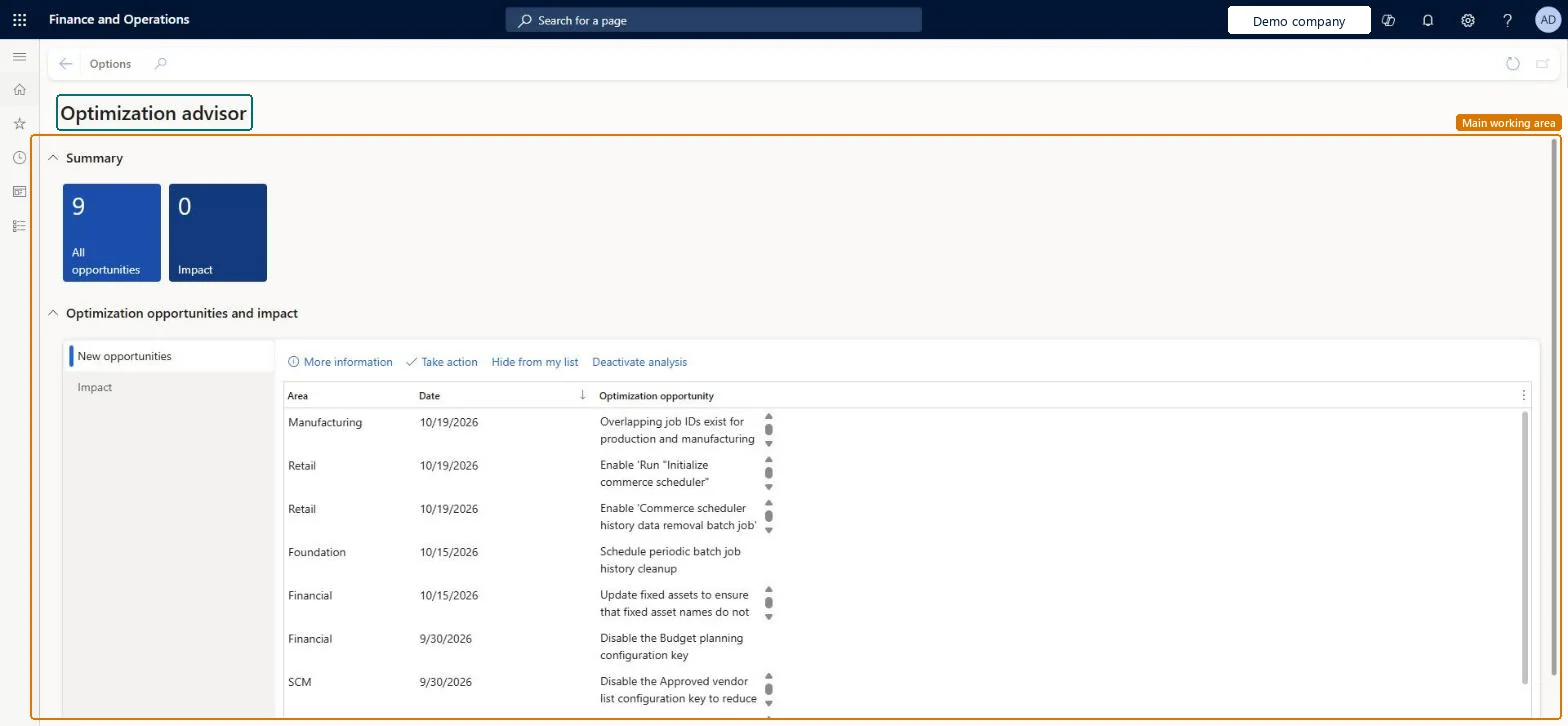
The page in Dynamics 365. page title tab to open what to set or check
About the examples: Examples and screenshots in this guide use BEAT, a demo company in a Dynamics 365 test environment. Use your own company's codes and values instead of copying them.
Setup steps on this page
Review opportunities in Optimization advisor
Use the workspace to act on the setup and data problems that the validation rules find.
Steps from Microsoft
Go to System administration > Workspaces > Optimization advisor.
Select a tile under Summary, such as All opportunities or Impact.
Under Optimization opportunities and impact, select New opportunities or Impact.
Select an opportunity in the list, which shows Area, Date and Optimization opportunity.
Select More information, Take action, Hide from my list or Deactivate analysis.
Schedule the validation rules in batch and review new opportunities each month with the owner of each areaOpportunities appear only after the rules run, and Take action changes setup, so the area owner should decide.
On this system the page opens for Information technology manager, Production planner, Budget manager, Production manager and Sales manager. Managers in each area review the opportunities for their module. No Feature management feature needs to be turned on for this page.
Rules evaluate the company you are signed in to, so an opportunity belongs to one legal entity. Microsoft Learn
Can it be undone
Reversible: Hidden or deactivated items can be shown again; changes made with Take action are reversed on the changed page.
If you change it later
Take action changes setup or data directly from the workspace, so read More information before you act. Microsoft Learn
Technical architect
6Technical
Menu item
SelfHealingWorkspaceChecked in Dynamics 365
Form
SelfHealingWorkspaceChecked in Dynamics 365
Who can open it
PrivilegesGrants access to opportunities, actions and impact within the relevant workspace and forms SelfHealingWorkspaceDutiesGrants access to opportunities, actions and impact within the relevant workspace and forms SelfHealingWorkspaceMaintain17 security rolesProduct designer BOMProductDesignerProduct design manager BOMProductDesignManagerBudget manager BudgetBudgetManagerInventory accountant InventCostAccountantAccounting manager LedgerAccountingManagerAccounting supervisor LedgerAccountingSupervisorProduction manager ProdProductionManagerProduction supervisor ProdProductionSupervisorProduction planner ReqProductionPlannerProcess engineer RouteProcessEngineerProcess engineering manager RouteProcessEngineeringManagerInformation technology manager SysServerITManagerPurchasing manager TradePurchasingManagerSales manager TradeSalesManagerAccounts payable manager VendInvoiceAccountsPayableManagerWarehouse planner WHSWarehousePlannerWarehouse manager WMSWarehouseManagerChecked in Dynamics 365
Roles to set it up and use it
To set it up or change itInformation technology manager SysServerITManagerProduction planner ReqProductionPlannerBudget manager BudgetBudgetManagerProduction manager ProdProductionManagerSales manager TradeSalesManagerGive people one of these roles. On this system, 17 roles can open this page.Checked in Dynamics 365
Actions on the page
Options: Personalize, Page options, ShareChecked in Dynamics 365
Load order: The Optimization advisor workspace has no data entity in Data management, so it can't be loaded from a file or a configuration template. Opportunities are created by the validation rules in each environment; schedule the rules again after a move instead of copying results.Checked in Dynamics 365