SETUP GUIDEHow to set it up8 sections. Choose a role to highlight what matters to you.
Everyone
1What it is and why
What it is
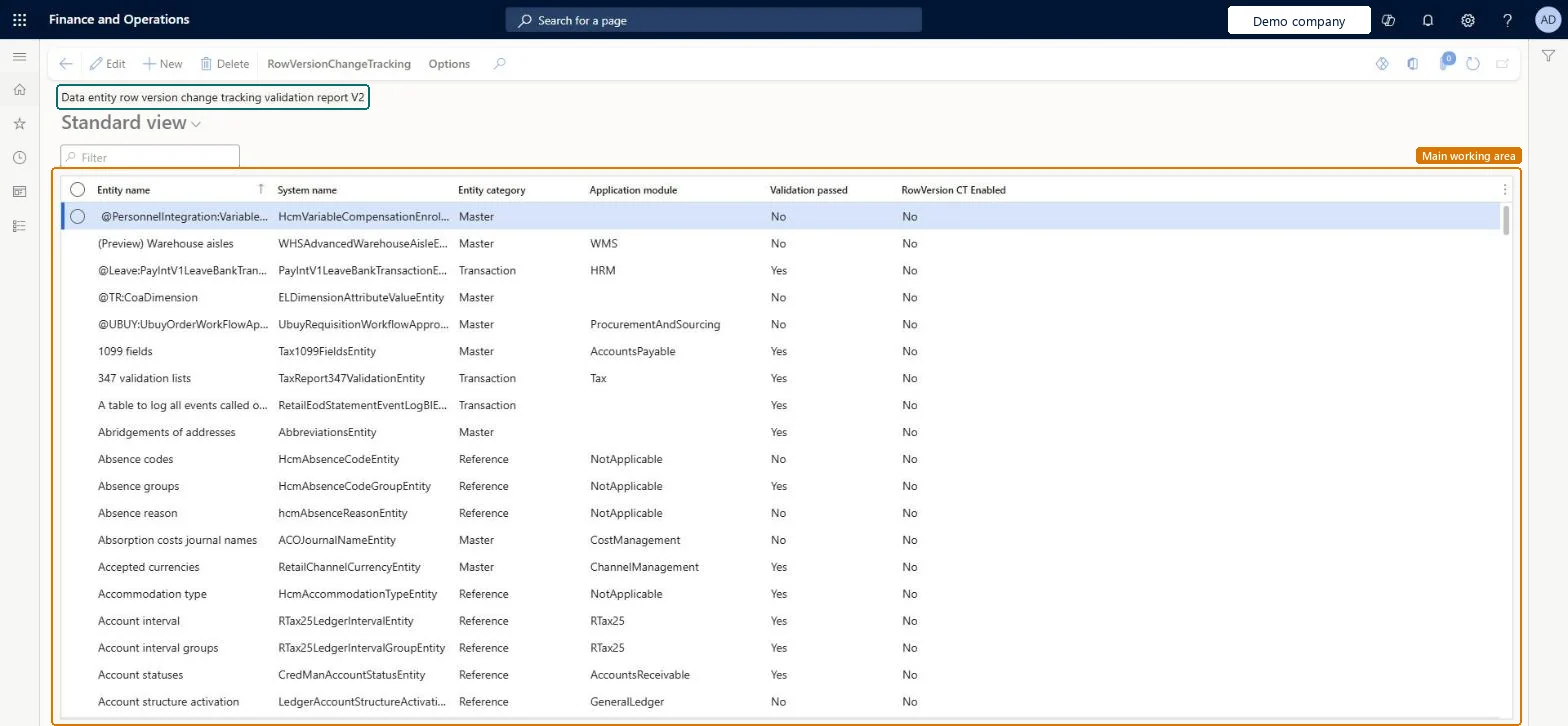
A report that lists data entities with their entity category and application module, and shows whether each one passes validation and whether row version change tracking is enabled.
What you do here
Use this report to see which data entities pass the row version change tracking validation rules, and to enable row version change tracking for the entities that pass.
Example
For example, before BEAT adds finance and operations entities to Azure Synapse Link, an administrator runs the report, enables change tracking for the entities that show Validation passed = Yes, and for an entity that fails chooses the tables behind it instead.
The page in Dynamics 365. page title tab to open what to set or check
About the examples: Examples and screenshots in this guide use BEAT, a demo company in a Dynamics 365 test environment. Use your own company's codes and values instead of copying them.
When to run it
When to run it
Before you add finance and operations entities to Azure Synapse Link, or when Track changes can't be turned on for an entity's virtual table in Power Apps.
How often
On demand, when you choose entities for Synapse Link or other features that need change tracking.
What the output shows
A list of data entities with Entity category, Application module, Validation passed and RowVersion CT Enabled. An entity that shows Validation passed as No can't be tracked until its design is changed; Enable change tracking isn't possible for it.
Run the row version change tracking validation report
Use this report to see which data entities can be change-tracked and to enable tracking for them.
Steps from Microsoft
Go to System administration > Setup > Row version change tracking > Data entity row version change tracking validation report.
Search for the data entity by its Entity name or System name.
Read Validation passed to see whether the entity meets the row version change tracking validation rules, and RowVersion CT Enabled to see whether tracking is already on.
For an entity that passes, select it and choose Enable change tracking on the RowVersionChangeTracking tab.
For an entity that fails, review the entity validation rules with a developer, or use the tables behind the entity instead.
Whether the entity meets the row version change tracking validation rules; an entity showing No can't be tracked until its design changes.Microsoft Learn
Yes
RowVersion CT Enabled
Whether row version change tracking is already on for the entity.Microsoft Learn
No
Entity category / Application module
The entity's category and the module it belongs to, to find entities by area.Checked in Dynamics 365
Common errors and fixes
Message
What to do
chosen entity doesn't pass the validation rules
Run this report to see which entities pass. For an entity that fails, review the entity validation rules with a developer, or choose the tables that hold the entity's data in Azure Synapse Link instead. Microsoft Learn
Run the report before choosing entities for Azure Synapse Link and enable change tracking only for entities that pass validationEntities that fail the validation rules can't be change-tracked, and Synapse Link needs change tracking to use finance and operations entities.
From version 10.0.34 the Sql row version change tracking configuration key must be on (License configuration, in maintenance mode). No Feature management feature needs to be turned on for this page.
Environment-wide: row version change tracking is set on the data entity itself (Allow Row Version Change Tracking), not per legal entity. Microsoft Learn
Can it be undone
Reversible: Reading the report changes nothing; enabling change tracking on an entity is a separate action.
If you change it later
Enable change tracking turns on row version change tracking for the selected entity, which Azure Synapse Link and other features rely on. Microsoft Learn
Technical architect
6Technical
Menu item
AifDataEntityRowVersionChangeTrackingValidationReportDisplayChecked in Dynamics 365
Form
AifDataEntityRowVersionChangeTrackingValidationReportChecked in Dynamics 365
Table
AifDataEntityRowVersionChangeTrackingValidationReportChecked in Dynamics 365
Load order: The Data entity row version change tracking validation report has no data entity in Data management, so it can't be loaded from a file or a configuration template. It reads the entity definitions; enable change tracking per entity in each environment.Checked in Dynamics 365
Checked in a working Dynamics 365 system, version 10.0.49: the menu item, form, table and security, the page.
To cite this step: SA-SETUP-730, Run the row version change tracking validation report. Beyond ERP Atlas Hub, 2026-11-11. https://www.beyonderp.cloud/atlas/step/SA-SETUP-730