SETUP GUIDEHow to set it up8 sections. Choose a role to highlight what matters to you.
Everyone
1What it is and why
What it is
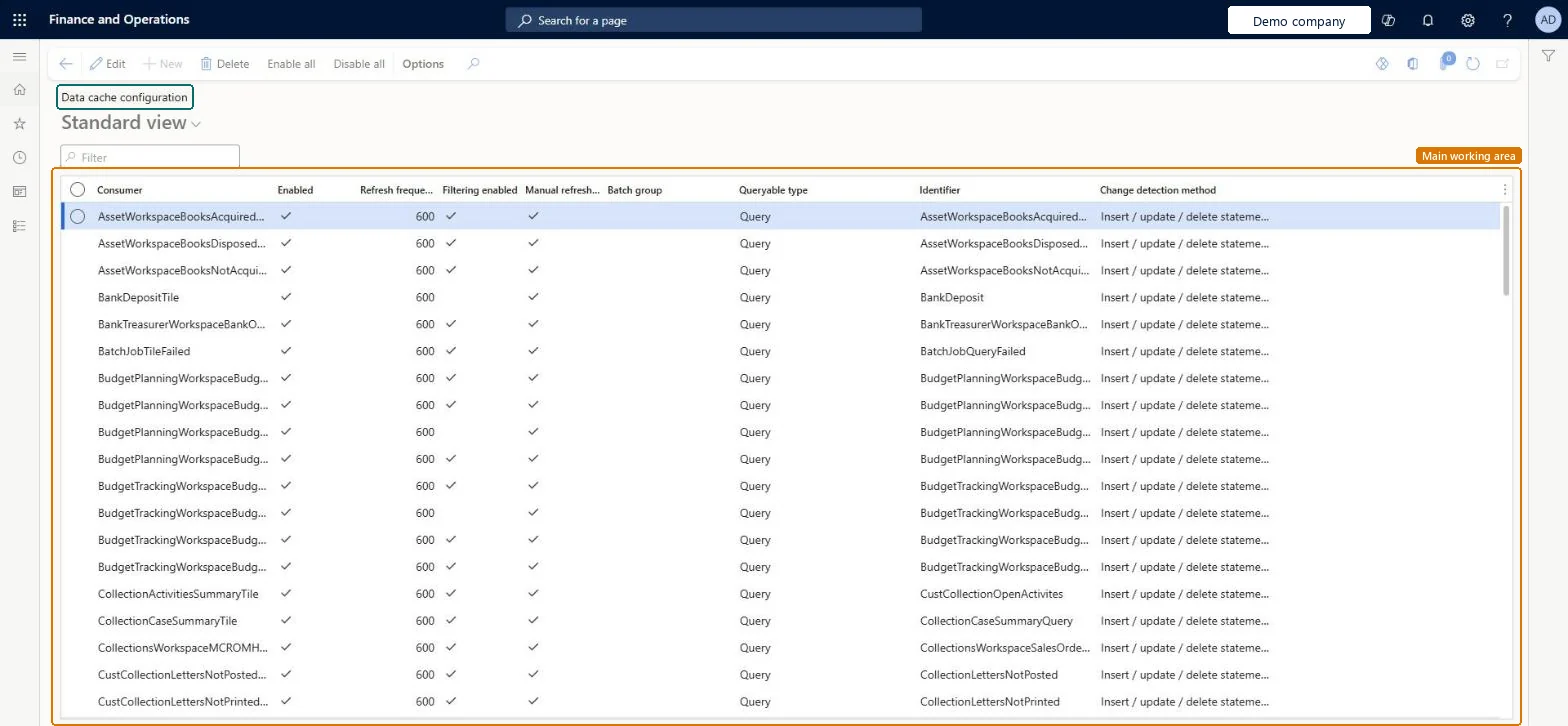
A setup page where a system administrator changes how the data behind workspace count tiles is cached while the system runs.
What you do here
Use this page to turn a tile's data cache on or off, change how often it refreshes, and allow or block manual refresh of the tile.
Example
For example, a count tile whose query runs in about 20 ms can refresh as fast as permissible (5 seconds), while a tile whose query takes about 200 ms in BEAT is set to 10 minutes so it doesn't load the system.
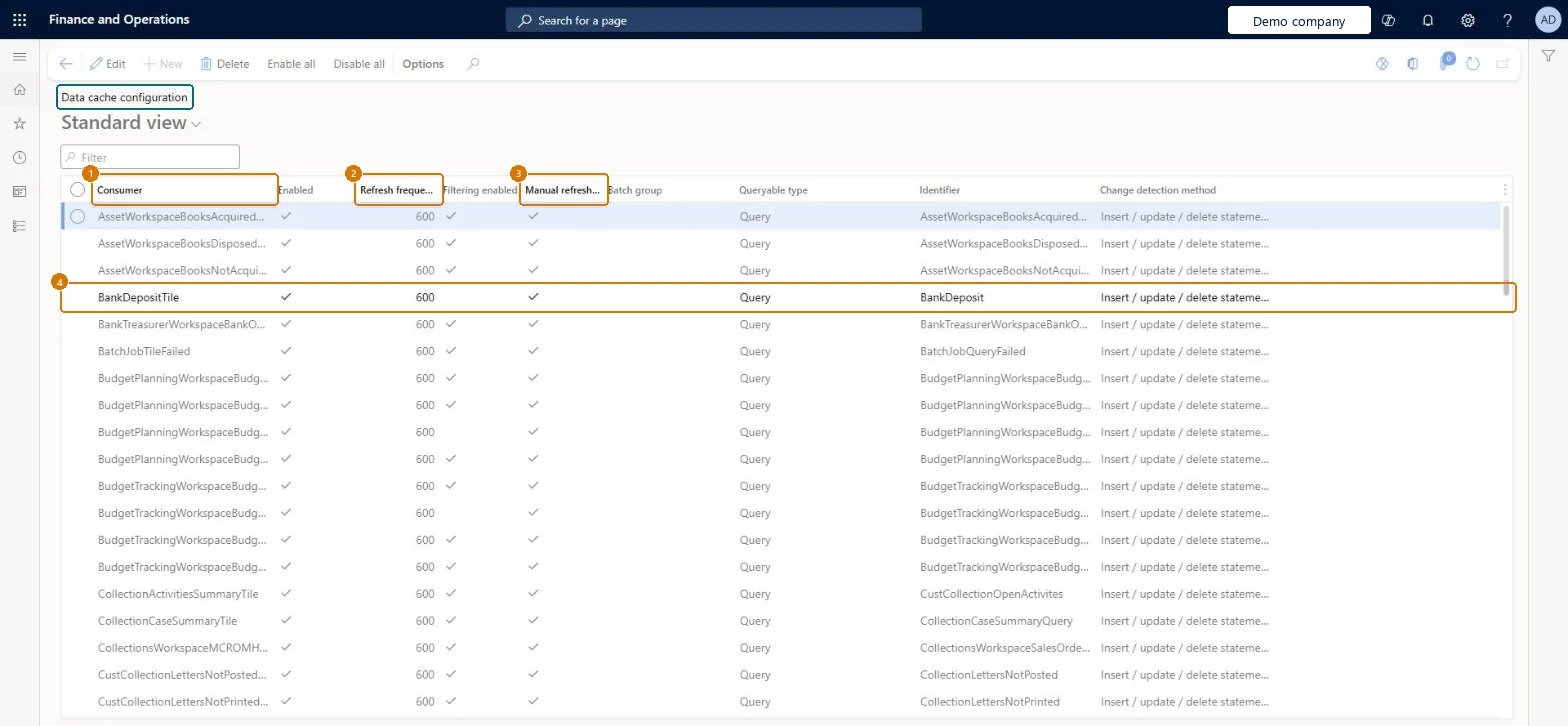
The page in Dynamics 365. page title tab to open what to set or check
About the examples: Examples and screenshots in this guide use BEAT, a demo company in a Dynamics 365 test environment. Use your own company's codes and values instead of copying them.
Step by step, with screenshots
Set up Tile data cache configuration1 screen
Use this page to turn a tile's data cache on or off, change how often it refreshes, and allow or block manual refresh of the tile.
Screen 1
Review the tile data cache configuration
Go to System administration > Setup > Data cache > Tile data cache configuration
Find the tile in the list
Select Edit
Turn the tile data cache on or off, change how often it refreshes, and allow or block a manual refresh
Select Save
Show the full screen page title tab to open what to set or check
How to use it
Go to System administration > Setup > Data cache > Tile data cache configuration.
Use the Filter box to find a tile in the Consumer column.
Select Edit, then change Enabled, Refresh frequency, Filtering enabled or Manual refresh for the tile.
Select Enable all or Disable all to change all the tiles at once.
Select Delete to remove a selected record.
Source: Checked in Dynamics 365
Fields on the page
Field
What it means
Table column
Refresh frequency
How often the count on the tile is updated automatically.Microsoft Learn
RefreshFrequency
Common errors and fixes
Message
What to do
A tile isn't in the list
Open a page that shows the tile once; tile caches are registered the first time the tile is shown. Microsoft Learn
Test checklist
Open the workspace that shows the tile so its cache is registered.
On Tile data cache configuration, find the tile and change its refresh frequency.
Change data that the tile counts, and check the count updates within the new interval.
Use the i button on the tile to check when the data was last refreshed.
Match each tile's refresh frequency to how fast its query runs: the fastest refresh only for queries of about 25 ms or less, 10 minutes or 24 hours for slower onesLearn's guidance for count tiles ties the refresh frequency to query execution time, so fast refresh doesn't load the system with slow queries.
Reversible: The cache, its refresh frequency and manual refresh can be changed at any time.
If you change it later
A tile appears in the list only after a page that shows the tile has been opened for the first time. Microsoft Learn
Technical architect
6Technical
Menu item
TileDataCacheConfigurationChecked in Dynamics 365
Form
SysDataCacheConfigurationChecked in Dynamics 365
Table
SysDataCacheConfigurationTableShown as “Data cache configuration” in Record infoChecked in Dynamics 365
Who can open it
PrivilegesSysDataCacheConfigurationDutiesMaintain system settings SysServerSettingsMaintain1 security roleInformation technology manager SysServerITManagerChecked in Dynamics 365
Roles to set it up and use it
To set it up or change itInformation technology manager SysServerITManagerGive people one of these roles. On this system, 1 role can open this page.Checked in Dynamics 365
Actions on the page
Options: Personalize, Page options, ShareChecked in Dynamics 365
Load order: Tile data cache configuration has no data entity in Data management, so it can't be loaded from a file or a configuration template. Rows appear when a tile is first shown; change refresh settings by hand in each environment.Checked in Dynamics 365
Checked in a working Dynamics 365 system, version 10.0.49: the menu item, form, table and security, the page, the demo records and the values in the screenshots.
To cite this step: SA-SETUP-300, Set up Tile data cache configuration. Beyond ERP Atlas Hub, 2026-11-11. https://www.beyonderp.cloud/atlas/step/SA-SETUP-300