Setup step on the Entity Store page · System administration
Set up Entity Store
Use this page to refresh aggregate measurements in Entity store, on demand or on a schedule, so that analytical workspaces and Power BI reports show current data.
SETUP GUIDEHow to set it up8 sections. Choose a role to highlight what matters to you.
Everyone
1What it is and why
What it is
A setup page that lists the aggregate measurements that can be deployed to Entity store, the data store used for reporting and analytics.
What you do here
Use this page to refresh aggregate measurements in Entity store, on demand or on a schedule, so that analytical workspaces and Power BI reports show current data.
Example
For example, to see data in the Financial analysis workspace, an administrator updates entities such as Financial reporting transaction data version 3 and Sales cube.
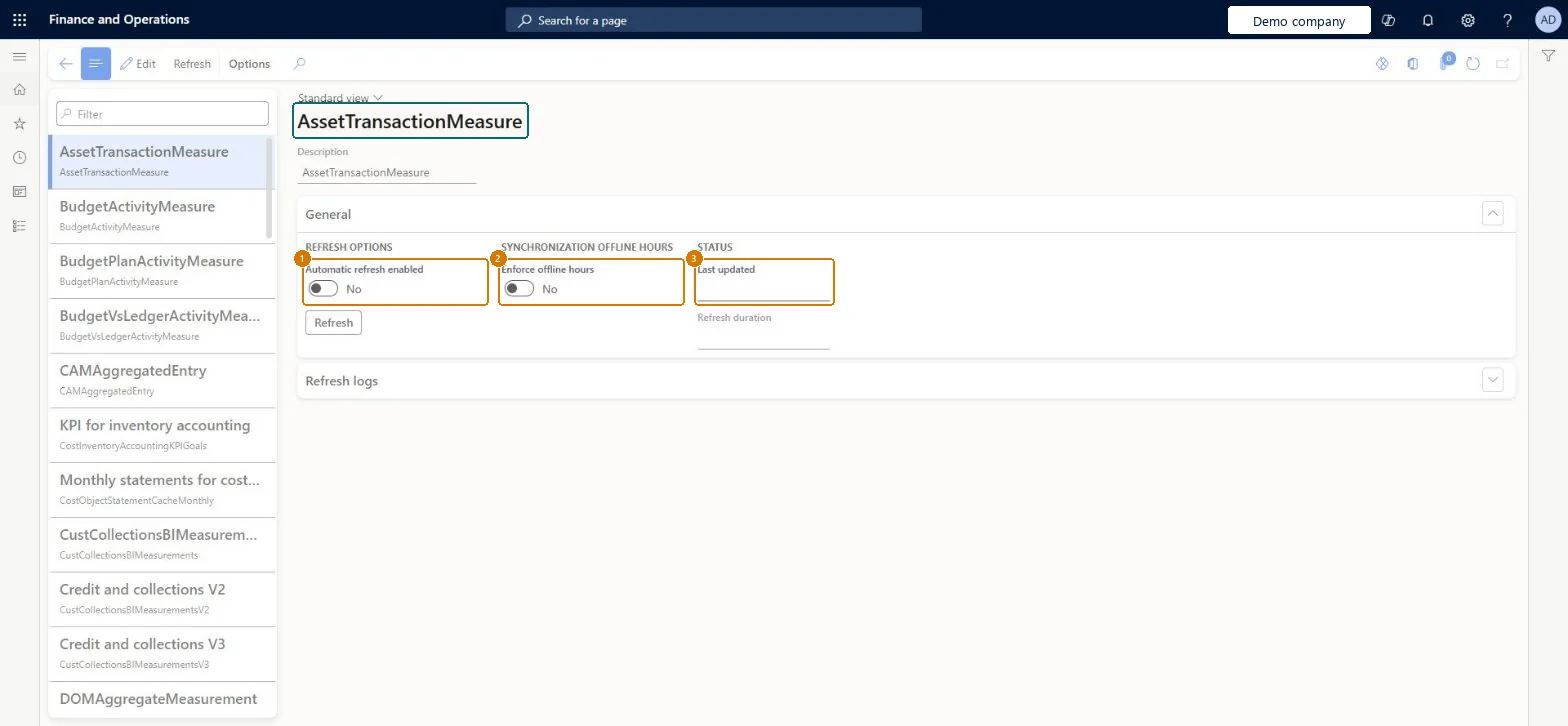
The page in Dynamics 365. page title tab to open what to set or check
About the examples: Examples and screenshots in this guide use BEAT, a demo company in a Dynamics 365 test environment. Use your own company's codes and values instead of copying them.
Step by step, with screenshots
Set up Entity Store1 screen
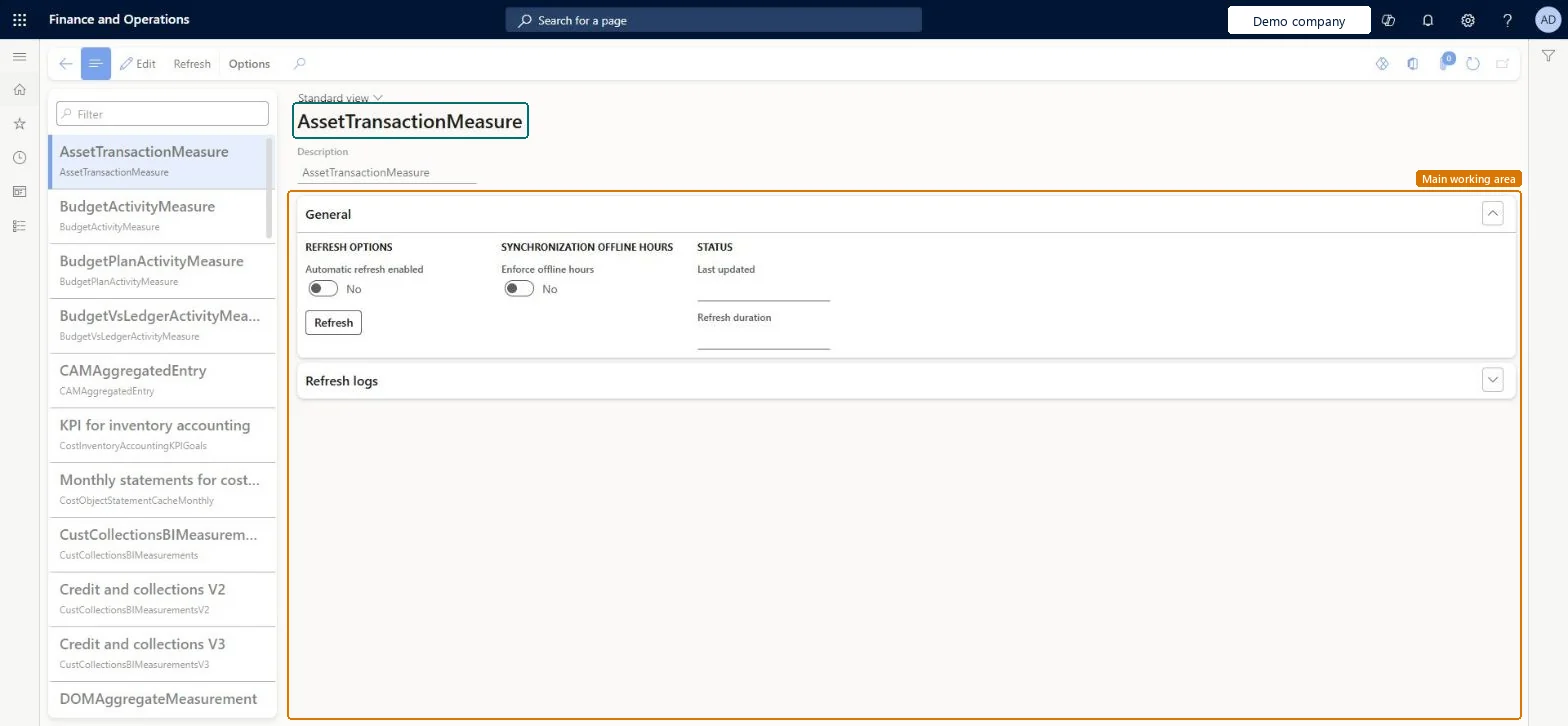
Use this page to refresh aggregate measurements in Entity store, on demand or on a schedule, so that analytical workspaces and Power BI reports show current data.
Screen 1
Review the Entity store measurements
Go to System administration > Setup > Entity Store
Select an aggregate measurement in the list on the left
Review the refresh options and when it was last updated
Select Edit and turn on Automatic refresh enabled to refresh it on a schedule, or select Refresh to refresh it now
Show the full screen page title tab to open what to set or check
Steps from Microsoft
Go to System administration > Setup > Entity Store.
Select the aggregate measurements that need to be refreshed.
A measurement that can be deployed to Entity store and refreshed.Microsoft Learn
Sales cube
Refresh interval
With automated refresh, how often the measurement is refreshed: every hour, twice a day, once a day or once a week.Microsoft Learn
Once a day
Common errors and fixes
Message
What to do
The credentials provided for the SQL source are invalid.
Refresh the Entity store measurements, then redeploy the affected report from Deploy Power BI files (export any PowerBI.com customizations first). Microsoft Learn
Test checklist
On Entity Store, check that the automated refresh experience is shown.
Check that every measurement used by an analytical workspace has a refresh interval set.
Select a measurement and select Refresh.
Open the related analytical workspace and check that it shows current data.
Switch to Automated Entity store refresh and set a refresh interval (every hour, twice a day, once a day or once a week) on each aggregate measurement that reports useWith automated refresh the system schedules and manages Entity store refresh, so administrators don't have to schedule or monitor refresh batch jobs.
On this system the page opens for Information technology manager. IT administrators refresh measurements. Automated Entity store refresh is turned on with Switch now on this page, not in Feature management, and can't be turned back. No Feature management feature needs to be turned on for this page.
One-way: Warning: Switching to Automated Entity store refresh can't be reversed; you can't go back to the old refresh experience.
If you change it later
Switching to Automated Entity store refresh can't be undone, and afterwards the refresh intervals of the aggregate measurements should be checked. Microsoft Learn
Technical architect
6Technical
Menu item
BIMeasurementDeployManagementEntityStoreMenuItemChecked in Dynamics 365
Form
BIMeasurementDeployManagementEntityStoreChecked in Dynamics 365
Table
BIMeasurementShown as “Measurement” in Record infoChecked in Dynamics 365
To set it up or change itInformation technology manager SysServerITManagerGive people one of these roles. On this system, 1 role can open this page.Checked in Dynamics 365
Actions on the page
Options: Personalize, Page options, ShareChecked in Dynamics 365
Load order: Entity Store has no data entity in Data management, so it can't be loaded from a file or a configuration template. Entity store is filled by refreshing the measurements in each environment.Checked in Dynamics 365
Checked in a working Dynamics 365 system, version 10.0.49: the menu item, form, table and security, the page, the demo records and the values in the screenshots.
To cite this step: SA-SETUP-070, Set up Entity Store. Beyond ERP Atlas Hub, 2026-11-11. https://www.beyonderp.cloud/atlas/step/SA-SETUP-070