SETUP GUIDEHow to set it up8 sections. Choose a role to highlight what matters to you.
Everyone
1What it is and why
What it is
A setup page where administrators create and change security roles, duties and privileges, and then publish the changes.
What you do here
Use this page to build or adjust security objects, for example to give a role access to a custom data entity.
Example
For example, an administrator duplicates a role with a license filter such as Team Members, so the copy keeps only the duties and privileges that license covers.
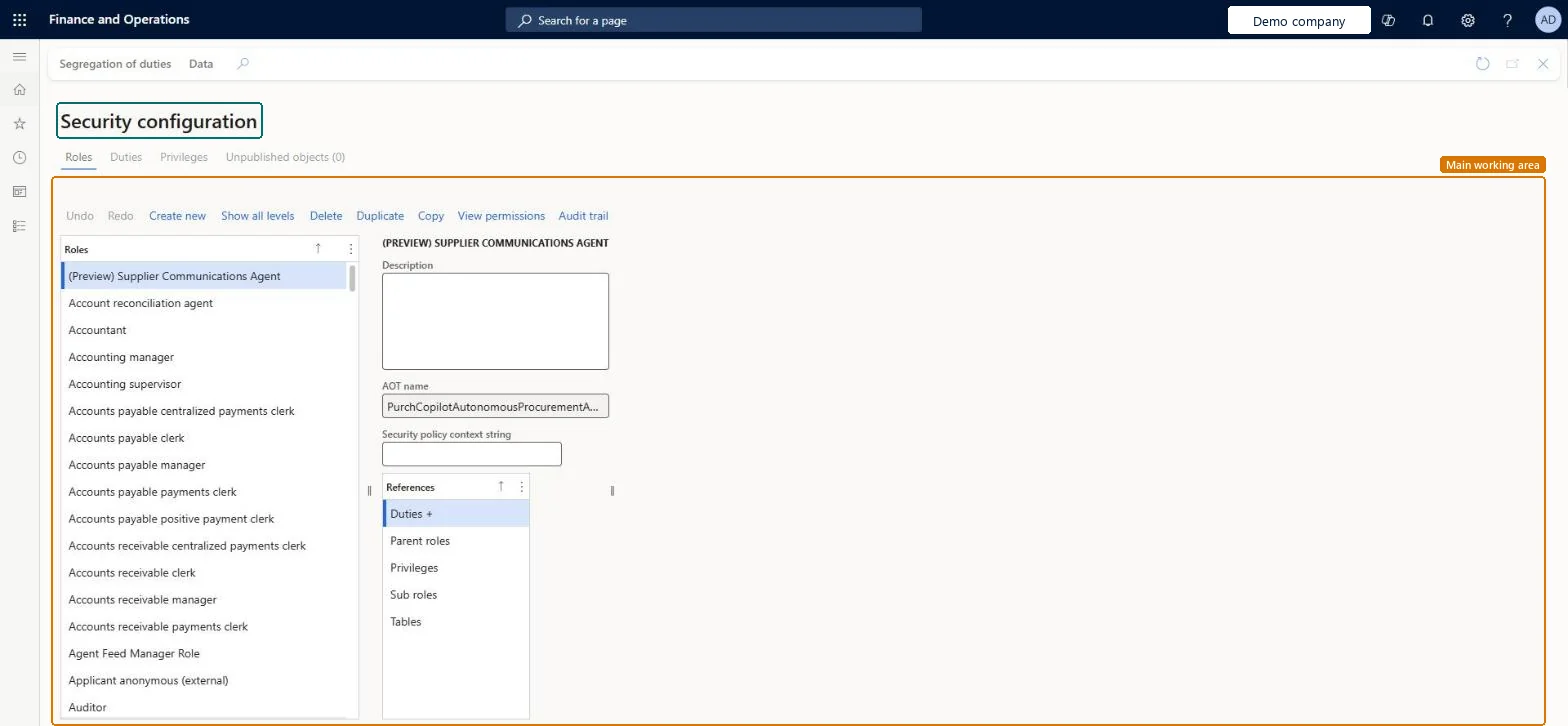
The page in Dynamics 365. page title tab to open what to set or check
About the examples: Examples and screenshots in this guide use BEAT, a demo company in a Dynamics 365 test environment. Use your own company's codes and values instead of copying them.
Step by step, with screenshots
Set up Security configuration1 screen
Use this page to build or adjust security objects, for example to give a role access to a custom data entity.
Screen 1
Review the security objects of a role
Go to System administration > Security > Security configuration
Select a role on the Roles tab
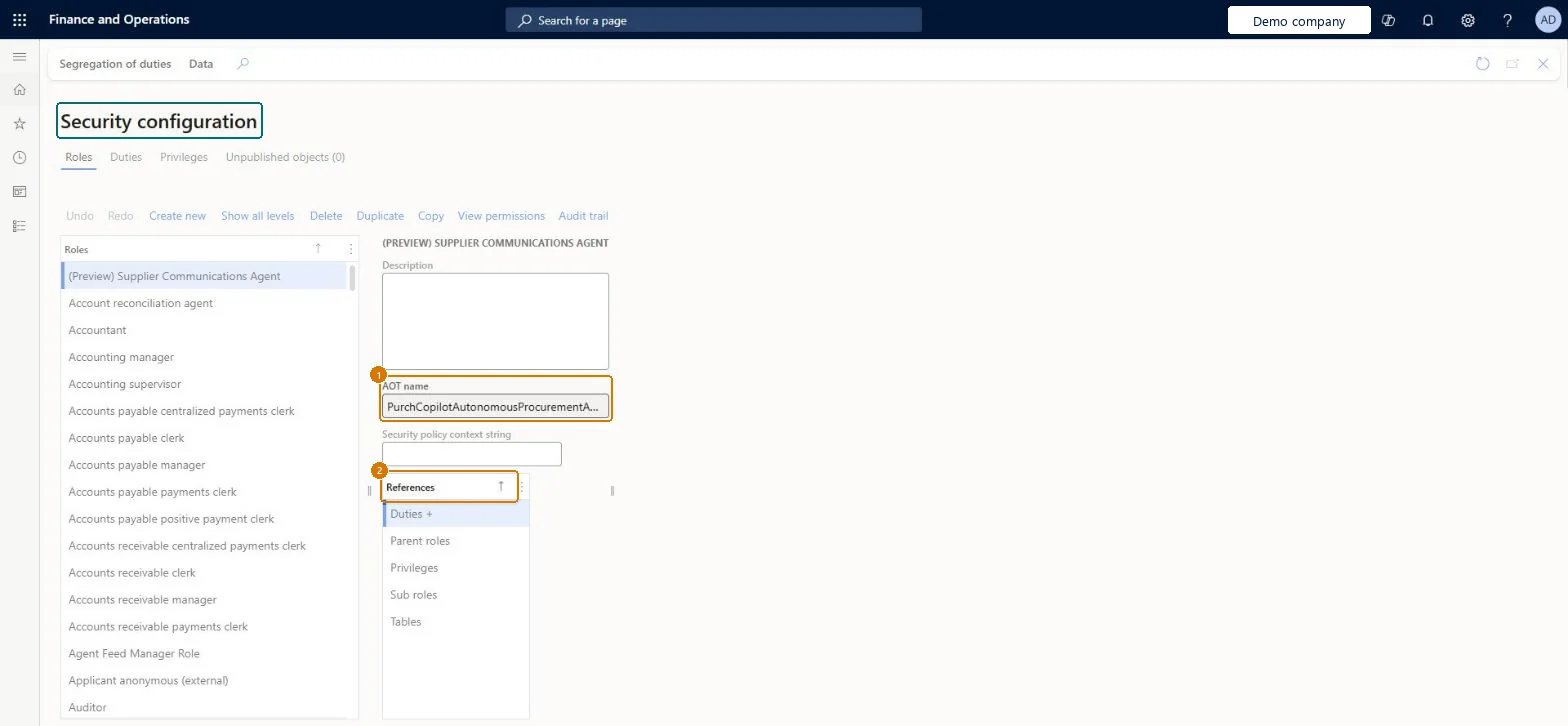
Review its AOT name and the duties, privileges and tables it references
Use Create new or Duplicate when you need to build a new security object
Show the full screen page title tab to open what to set or check
Steps from Microsoft
Go to System administration > Security > Security configuration.
On the Privileges tab, select Create new, enter a name, and select OK.
With the new privilege selected, select Entities, then Add references, and pick the entity and access level.
Select Duties, then Add references, and add the privilege to the right duty.
The three levels of the security model: a role holds duties, a duty holds privileges, a privilege grants access to menu items, tables and fields.Microsoft Learn
Unpublished objects
Changes that are saved but not yet active; Publish all makes them active.Microsoft Learn
Duplicate with license filter
Copies a role and keeps only what the chosen license covers.Microsoft Learn
Team Members
Common errors and fixes
Message
What to do
A duty can't be added to a role
It conflicts with a segregation of duties rule; roles can't hold conflicting duties. Change the role design or the rule. Microsoft Learn
A custom role is missing after a database refresh from production
Export the customizations from the source with the security metadata customization entities and import them, privileges first, then duties, then roles. Microsoft Learn
Test checklist
Create or change a role and publish the change.
Assign the role to a test user on Assign users to roles.
Sign in as the test user and check that the entry points granted by the role's privileges open with the expected access (read, update, create, delete).
If the role came from Security governance, run Synchronize on Security process role maintain and check that the change appears there.
Build position-based roles from duties and privileges through Security governance, and run Synchronize after any change made directly in Security configurationSecurity governance builds roles from the business process hierarchy, which helps optimize license cost and data security. Roles, duties and privileges edited directly in Security configuration no longer match Security governance until you synchronize.
On this system the page opens for Security administrator. Security administrators maintain roles. No Feature management feature needs to be turned on for this page.
Shared: roles, duties and privileges are defined once for the environment. Microsoft Learn
Can it be undone
Hard to reverse: The process hierarchy behind the roles can be changed later, but Learn notes that changing it takes a significant amount of work.
If you change it later
If you edit here a role, duty or privilege that came from Security governance, it no longer matches the version on the Security governance pages. Microsoft Learn
Technical architect
6Technical
Menu item
SysSecConfigurationChecked in Dynamics 365
Form
SysSecConfigurationChecked in Dynamics 365
Data entities
SystemSecurityPrivilegeCustomizationsEntitySecurity privilege metadata customizations entity (only privileges added or changed on this page) SystemSecurityDutyCustomizationsEntitySecurity duty metadata customizations entity (only duties added or changed on this page) SystemSecurityRoleCustomizationsEntitySecurity role metadata customizations entity (only roles added or changed on this page)
Roles to set it up and use it
To set it up or change itSecurity administrator SysSecSecurityAdministratorGive people one of these roles. On this system, 1 role can open this page.Checked in Dynamics 365
SystemSecurityPrivilegeCustomizationsEntity (Security privilege metadata customizations): load first.SystemSecurityDutyCustomizationsEntity (Security duty metadata customizations): load second.SystemSecurityRoleCustomizationsEntity (Security role metadata customizations): load last.Load order: Export the three customization entities in one data package and keep the sequence privileges, then duties, then roles; import the package in the target and publish.Load first: Standard security objects shipped with the versionMicrosoft Learn
Checked in a working Dynamics 365 system, version 10.0.49: the menu item, form, table and security, the page, the demo records and the values in the screenshots.
To cite this step: SA-SEC-020, Set up Security configuration. Beyond ERP Atlas Hub, 2026-11-11. https://www.beyonderp.cloud/atlas/step/SA-SEC-020