Batch job manager, Scale unit administrator, Information technology manager
Business process
Administer system features
Menu item
BatchJob
Main table
BatchJob
Data entity
BatchJobEntity
Setup steps
1 on this page
Show what matters for
SETUP GUIDEHow to set it up8 sections. Choose a role to highlight what matters to you.
Everyone
1What it is and why
What it is
A list page of batch jobs, where each job is a group of tasks that the server processes automatically.
What you do here
Use this page to run work such as printing reports, maintenance or sending electronic documents in the background, so it doesn't slow the system during working hours.
Example
For example, a batch job can be set up with a recurrence so that invoices are processed automatically at the end of every month.
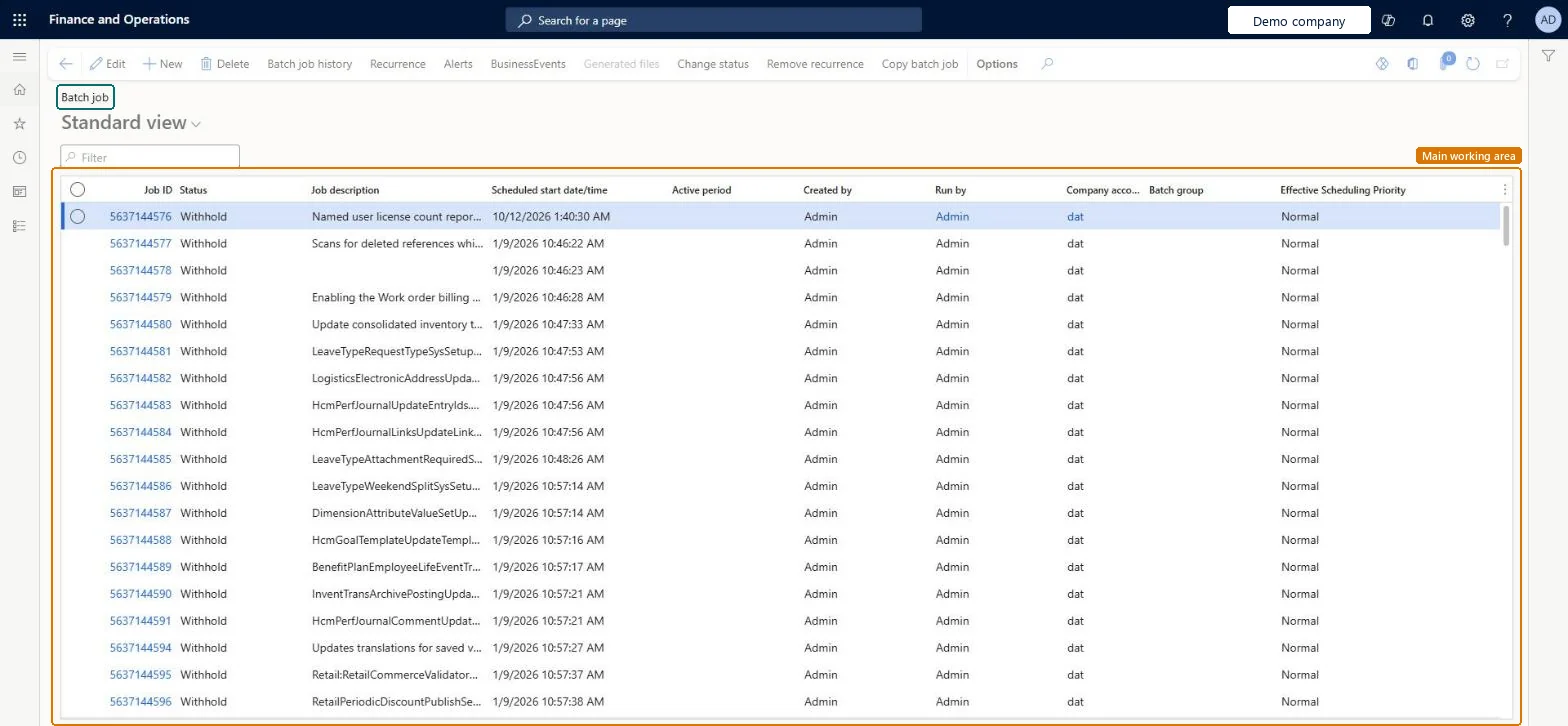
The page in Dynamics 365. page title tab to open what to set or check
About the examples: Examples and screenshots in this guide use BEAT, a demo company in a Dynamics 365 test environment. Use your own company's codes and values instead of copying them.
Setup steps on this page
Set how batch jobs keep history and retry
Use this page to create, schedule, stop and restart batch jobs and to decide what history each job keeps.
Steps from Microsoft
Go to System administration > Inquiries > Batch jobs.
Select New.
In the Job description field, describe the job.
In the Scheduled start date/time field, enter when the job should run.
Select Save.
To repeat the job, select Batch job > Recurrence and set the range and pattern.
To be told about the result, select Batch job > Alerts.
Select View tasks and add the tasks, with their company and class name.
How many times a task is retried before it counts as failed; best kept at 5 or less.Microsoft Learn
1
Save Jobs to History
Whether job history is always kept, kept only for errors, or never kept.Microsoft Learn
Errors Only
Common errors and fixes
Message
What to do
A recurring job shows Waiting again right after a failed run
This is by design: recurring jobs go back to Waiting after each run, failed or not, so the next run can finish pending work. Open the job's history and log to find the error. Microsoft Learn
A job never starts at its scheduled time
Check that its status is Waiting, not Withhold; that its active period allows that hour; and that its batch group's Max concurrency isn't -1, which pauses every job in the group. Microsoft Learn
A job with thousands of tasks shows only part of its history
From version 10.0.39, a job with more than 5,000 tasks keeps only the first 2,500 tasks in history (errors first). Set Save Jobs to History to Errors Only or Never for such jobs. Microsoft Learn
Test checklist
Create a batch job with one task, a Scheduled start date/time a few minutes ahead and Save Jobs to History = Errors Only.
Wait for the start time and check that the job status moves to Executing and then Ended.
Select Batch job > Functions > Change status, set a waiting recurring job to Withhold and check that it doesn't start at its next time.
Set it back to Waiting and check that it starts at the following recurrence.
Save Jobs to History = Errors Only for jobs with many tasks, and Maximum retries no higher than 5 on each taskHistory for jobs with many tasks fills the batch history tables; Learn advises Errors Only or Never for them. The highest allowed Maximum retries is 5, and a task is retried for any error or a batch server restart.
On this system the page opens for Information technology manager, Scale unit administrator and Batch job manager. Administrators use it to create, schedule and stop jobs. No Feature management feature needs to be turned on for this page.
Shared: batch jobs aren't stored per company (the BatchJob table has no company field); each task names the company it runs in, in Company accounts. Microsoft Learn
Can it be undone
Reversible: Status, history setting and retries can be changed at any time; work a task already did isn't undone.
If you change it later
Recurring batch jobs always go back to the Waiting status after each run, whether the run failed or succeeded. Microsoft Learn
Technical architect
6Technical
Menu item
BatchJobChecked in Dynamics 365
Form
BatchJobEnhancedChecked in Dynamics 365
Table
BatchJobShown as “Batch job” in Record infoKey field: Caption, MonitoringCategoryChecked in Dynamics 365
PrivilegesCreate batch jobs BatchJobCreateEdit batch jobs BatchJobEditMaintain batch jobs BatchJobMaintainView batch jobs BatchJobViewDutiesMaintain batch jobs BatchJobMaintainMaintain the runtime of scale units. ScaleUnitRuntimeMaintainMaintain system settings SysServerSettingsMaintain3 security rolesBatch job manager BatchJobManagerScale unit administrator ScaleUnitRuntimeAdminInformation technology manager SysServerITManagerChecked in Dynamics 365
Roles to set it up and use it
To set it up or change itInformation technology manager SysServerITManagerScale unit administrator ScaleUnitRuntimeAdminBatch job manager BatchJobManagerGive people one of these roles. On this system, 3 roles can open this page.Checked in Dynamics 365
Actions on the page
Options: Personalize, Page options, ShareChecked in Dynamics 365
BatchJobEntity (Batch job): shared by all companies.Load order: BatchJobEntity (Batch job) is enabled in Data management but isn't in any of Microsoft's default templates in BEAT, so add it to your own data project when you move this setup. Load batch groups first, because each job names a batch group.Load first: Batch groups (BatchGroupEntity)Checked in Dynamics 365
Checked in a working Dynamics 365 system, version 10.0.49: the menu item, form, table and security, the page.
To cite this step: SA-INQ-610, Set how batch jobs keep history and retry. Beyond ERP Atlas Hub, 2026-11-11. https://www.beyonderp.cloud/atlas/step/SA-INQ-610