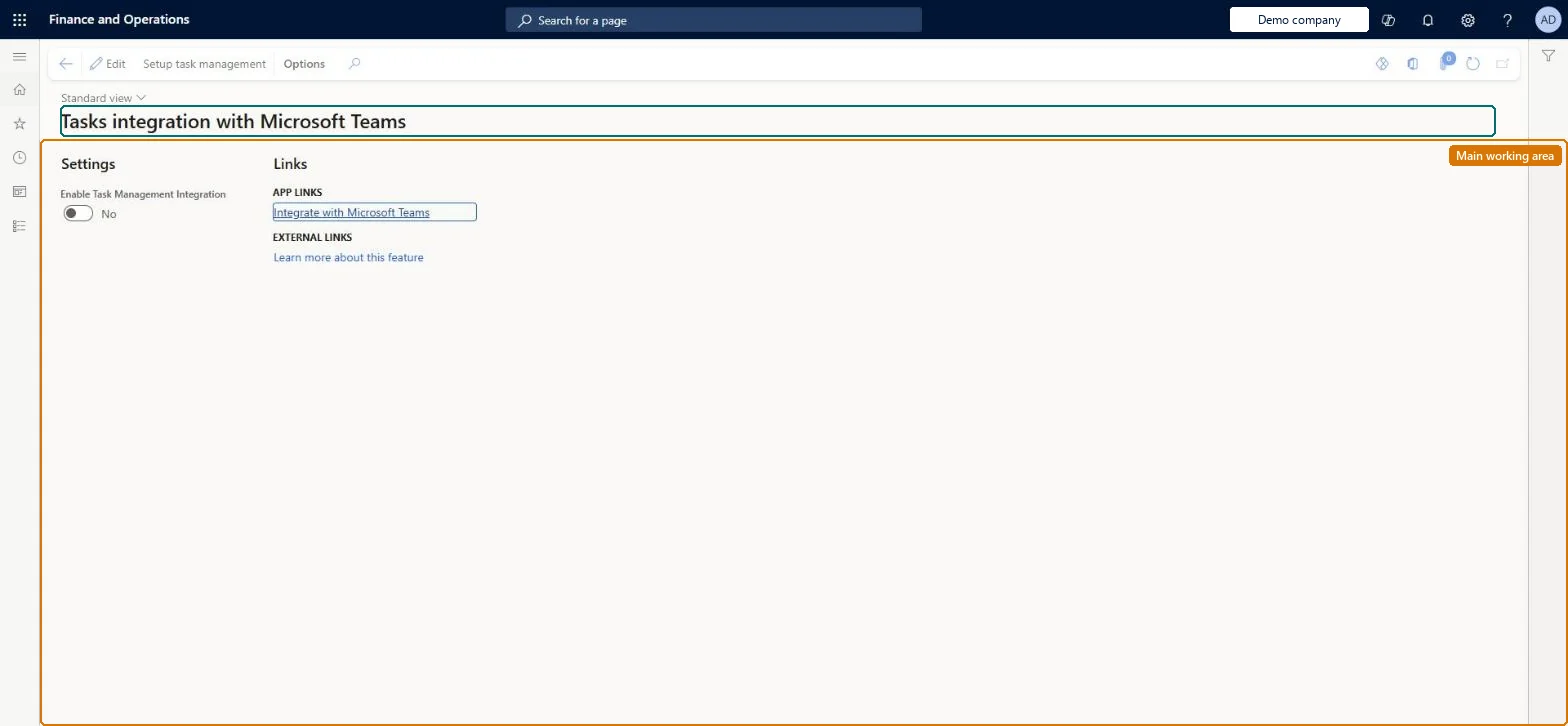
Setup step on the Tasks integration with Microsoft Teams page · Retail and Commerce
Set up Tasks integration with Microsoft Teams
Use this page to enable task management integration and select Setup task management, which creates the Teams provision batch job; after it finishes, run CDX job 1070 so the plan ID and store references reach Retail Server and tasks published in Teams appear in POS.
Retail catalog manager, Retail merchandising manager, Retail operations manager and 7 more roles
Business process
Manage sales channels
Menu item
RetailStaffTasksIntegrationConfig
Main table
RetailStaffTasksIntegrationConfig
Setup steps
1 on this page
Show what matters for
SETUP GUIDEHow to set it up8 sections. Choose a role to highlight what matters to you.
Everyone
1What it is and why
What it is
A setup page where you turn on task management synchronization between Commerce POS and Microsoft Teams and run the setup that provisions Teams with a Planner plan for each store team.
What you do here
Use this page to enable task management integration and select Setup task management, which creates the Teams provision batch job; after it finishes, run CDX job 1070 so the plan ID and store references reach Retail Server and tasks published in Teams appear in POS.
Example
For example, a communications manager publishes a task list in Teams Tasks by Planner and store workers see the same tasks on the POS Tasks tile.
The page in Dynamics 365. page title tab to open what to set or check
About the examples: Examples and screenshots in this guide use BEAT, a demo company in a Dynamics 365 test environment. Use your own company's codes and values instead of copying them.
Setup steps on this page
Set up Tasks integration with Microsoft Teams
Use this page to enable task management integration and select Setup task management, which creates the Teams provision batch job; after it finishes, run CDX job 1070 so the plan ID and store references reach Retail Server and tasks published in Teams appear in POS.
Steps from Microsoft
Go to Retail and Commerce > Task management > Tasks integration with Microsoft Teams.
On the Action Pane, select Edit.
Set Enable Task Management Integration to Yes.
On the Action Pane, select Save.
Select Setup task management and note the Teams provision batch job that is created.
Go to System administration > Inquiries > Batch jobs and wait for the Teams provision job to finish.
Run CDX job 1070 (Channel configuration) to publish the plan ID and store references to Retail Server.
Enable Task Management Integration = Yes, then Setup task management, wait for the Teams provision batch job to finish, then run CDX job 1070Planner holds the tasks, and the link to each store team is a plan ID. The Teams provision job creates it, and job 1070 publishes the plan ID and store references to Retail Server.
Skipping the general Teams integration setup (app registration and Microsoft Teams integration configuration) or not running job 1070 after provisioning. Tasks published in Teams then don't appear in POS.Test: Teams task reaches POS
Solution architect
5Design impact
Can it be undone
Reversible: Teams integration can be turned off again. After that, POS terminals no longer show tasks published from Teams.
If you change it later
Turning the Teams integration off stops POS terminals from showing tasks published from Teams. Microsoft Learn
Technical architect
6Technical
Menu item
RetailStaffTasksIntegrationConfigChecked in Dynamics 365
Form
RetailStaffTasksIntegrationConfigChecked in Dynamics 365
Table
RetailStaffTasksIntegrationConfigShown as “TASKS INTEGRATION CONFIGURATION” in Record infoChecked in Dynamics 365
Who can open it
PrivilegesMaintain Teams Integration RetailTeamsIntegrationMaintainView Teams Integration RetailTeamsIntegrationViewDutiesMaintain retail channels RetailChannelsMaintainView retail channels RetailChannelsViewMaintain task management process RetailTaskManagementMaintainView task management process RetailTaskManagementView10 security rolesRetail catalog manager RetailCatalogManagerRetail merchandising manager RetailMerchandisingManagerRetail operations manager RetailOperationsManagerRetail service RetailServiceRetail store IT RetailStoreITRetail store manager RetailStoreManagerRetail task manager RetailTaskManagerRetail warehouse clerk RetailWarehouseClerkRetail warehouse manager RetailWarehouseManagerInformation technology manager SysServerITManagerChecked in Dynamics 365
Roles to set it up and use it
To set it up or change itRetail service RetailServiceRetail operations manager RetailOperationsManagerRetail store manager RetailStoreManagerRetail store IT RetailStoreITRetail task manager RetailTaskManagerTo use itRetail merchandising manager RetailMerchandisingManagerInformation technology manager SysServerITManagerRetail catalog manager RetailCatalogManagerRetail warehouse clerk RetailWarehouseClerkRetail warehouse manager RetailWarehouseManagerGive people one of these roles. On this system, 10 roles can open this page.Checked in Dynamics 365
Actions on the page
(Action Pane without tabs): Setup task managementChecked in Dynamics 365
Checked in a working Dynamics 365 system, version 10.0.49: the menu item, form, table and security, the page.
To cite this step: RC-TASK-010, Set up Tasks integration with Microsoft Teams. Beyond ERP Atlas Hub, 2026-11-11. https://www.beyonderp.cloud/atlas/step/RC-TASK-010