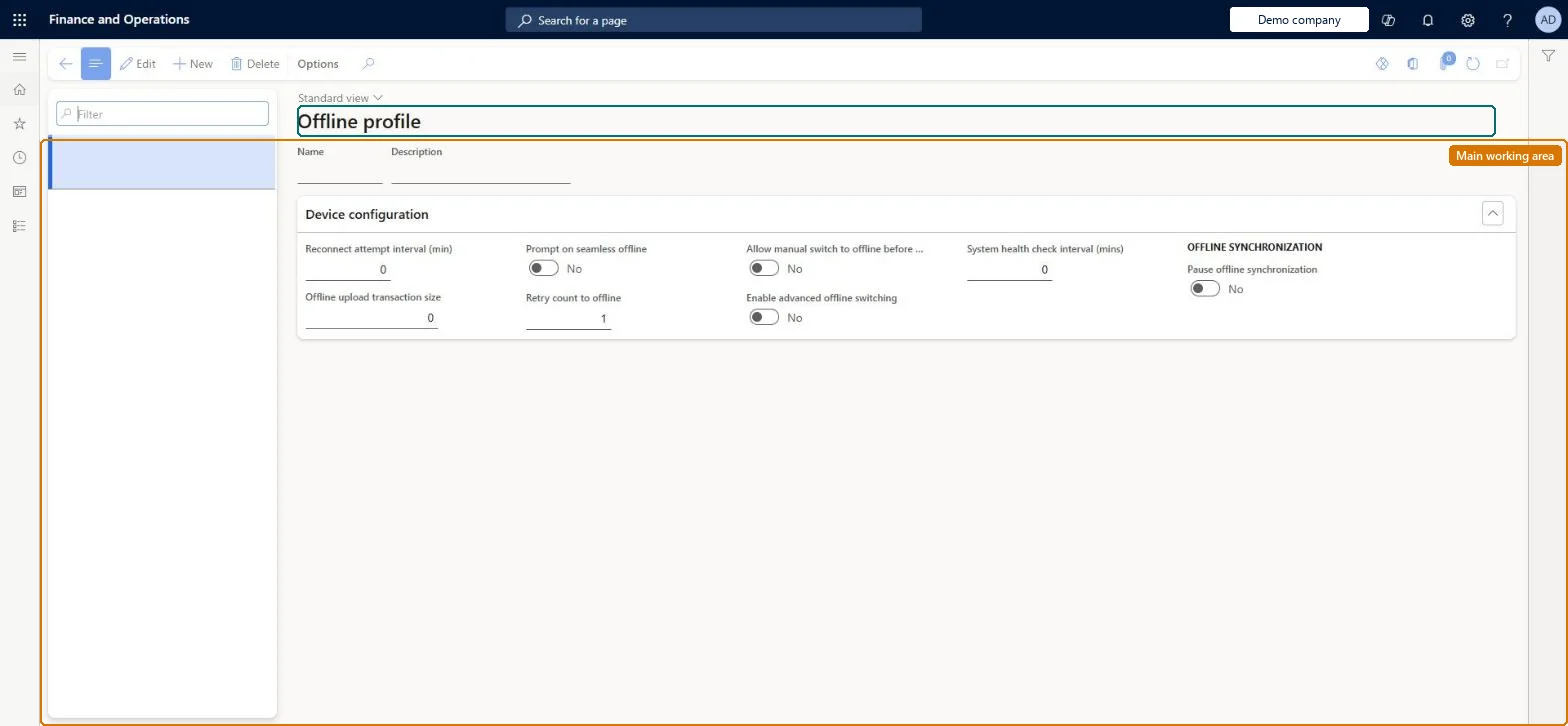
Setup step on the Offline profiles page · Retail and Commerce
Set up Offline profiles
Use this page to set the timeout and reconnection attempt interval, and to turn on advanced offline options such as manual switch to offline before sign-in, advanced offline switching and the system health check interval.
Retail and CommerceChannel setupPOS setupPOS profiles
RetailOfflineProfile
Used by
Retail operations manager, Retail service, Information technology manager
Business process
Manage sales channels
Menu item
RetailOfflineProfile
Main table
RetailOfflineProfile
Data entity
RetailOfflineProfileEntity
Setup steps
1 on this page
Show what matters for
SETUP GUIDEHow to set it up8 sections. Choose a role to highlight what matters to you.
Everyone
1What it is and why
What it is
A setup page, assigned at store level, that controls how a POS register behaves when it loses its connection: the timeout before switching to the offline database, the reconnection interval, transaction upload settings and advanced offline switching options.
What you do here
Use this page to set the timeout and reconnection attempt interval, and to turn on advanced offline options such as manual switch to offline before sign-in, advanced offline switching and the system health check interval.
Example
For example, where speed matters more than online-only features such as gift card payment, you enable advanced offline switching so the register goes offline more readily.
The page in Dynamics 365. page title tab to open what to set or check
About the examples: Examples and screenshots in this guide use BEAT, a demo company in a Dynamics 365 test environment. Use your own company's codes and values instead of copying them.
Setup steps on this page
Set up Offline profiles
Use this page to set the timeout and reconnection attempt interval, and to turn on advanced offline options such as manual switch to offline before sign-in, advanced offline switching and the system health check interval.
How to use it
Go to Retail and Commerce > Channel setup > POS setup > POS profiles > Offline profiles.
Use the Filter box to find a profile.
Select New and enter the Name and Description.
Under Device configuration, set the Reconnect attempt interval (min), Offline upload transaction size, Retry count to offline and System health check interval (mins), and switch Prompt on seamless offline, Allow manual switch to offline before reconnect and Enable advanced offline switching as needed.
Under Offline synchronization, set Pause offline synchronization to Yes only while synchronization must stop, then select Save.
Source: Checked in Dynamics 365
Fields on the page
Field
What it means
Table column
Timeout interval
How long a data request may take before the POS switches to the offline database.Microsoft Learn
Reconnection attempt interval
How long the app waits before trying to reconnect to the Commerce Scale Unit; tried only at the start of a transaction.Microsoft Learn
Allow manual switch to offline before sign in
Lets users switch to offline mode from the sign-in page.Microsoft Learn
AllowManualOfflineBeforeSignIn
Enable advanced offline switching
Lets the app switch to offline mode more easily and more often.Microsoft Learn
EnableAdvancedOfflineSwitching
System health check interval (mins)
How often the app checks whether online functionality is available again, independent of operations.Microsoft Learn
The device can't switch to offline mode; check the offline database is installed and configured correctly with the offline readiness health check. Microsoft Learn
Test checklist
Set the timeout and reconnection attempt intervals on the store's offline profile and run the distribution jobs.
Disconnect a test till from the network during a sale and check it switches to the offline database and completes the sale.
Reconnect and check the till returns online within the reconnection interval.
Check the offline transaction is uploaded to headquarters.
Leave Enable advanced offline switching off unless checkout speed matters more than online-only features; when on, set a System health check interval so tills return online quicklyAdvanced switching makes Store Commerce go offline more easily and more often, which takes online-only features such as gift card payment out of reach. The health check is a sub-setting that brings tills back online sooner.
Reversible: Offline profile settings can be changed at any time and apply after distribution.
If you change it later
Turning on advanced offline switching makes the register go offline more often, which can take online-only features such as gift card payment out of reach. Microsoft Learn
Technical architect
6Technical
Menu item
RetailOfflineProfileChecked in Dynamics 365
Form
RetailOfflineProfileChecked in Dynamics 365
Table
RetailOfflineProfileShown as “OFFLINE PROFILE” in Record infoKey field: NameChecked in Dynamics 365
PrivilegesMaintain retail POS offline profile RetailPOSOfflineProfileMaintainDutiesMaintain retail register profiles RetailTerminalProfilesMaintainMaintain terminal profiles for retail trial. RetailTrialTerminalProfilesMaintain3 security rolesRetail operations manager RetailOperationsManagerRetail service RetailServiceInformation technology manager SysServerITManagerChecked in Dynamics 365
Roles to set it up and use it
To set it up or change itRetail service RetailServiceRetail operations manager RetailOperationsManagerInformation technology manager SysServerITManagerGive people one of these roles. On this system, 3 roles can open this page.Checked in Dynamics 365
RetailOfflineProfileEntity (Offline profile): shared by all companies, in Microsoft's default template 500 - Retail.Load order: Microsoft's default template 500 - Retail loads Offline profile at execution unit 1, level 30, sequence 10. Lower levels load first, and entities at the same level load in sequence order.Load first: the default templates at lower levels (System setup to General ledger)Microsoft Learn