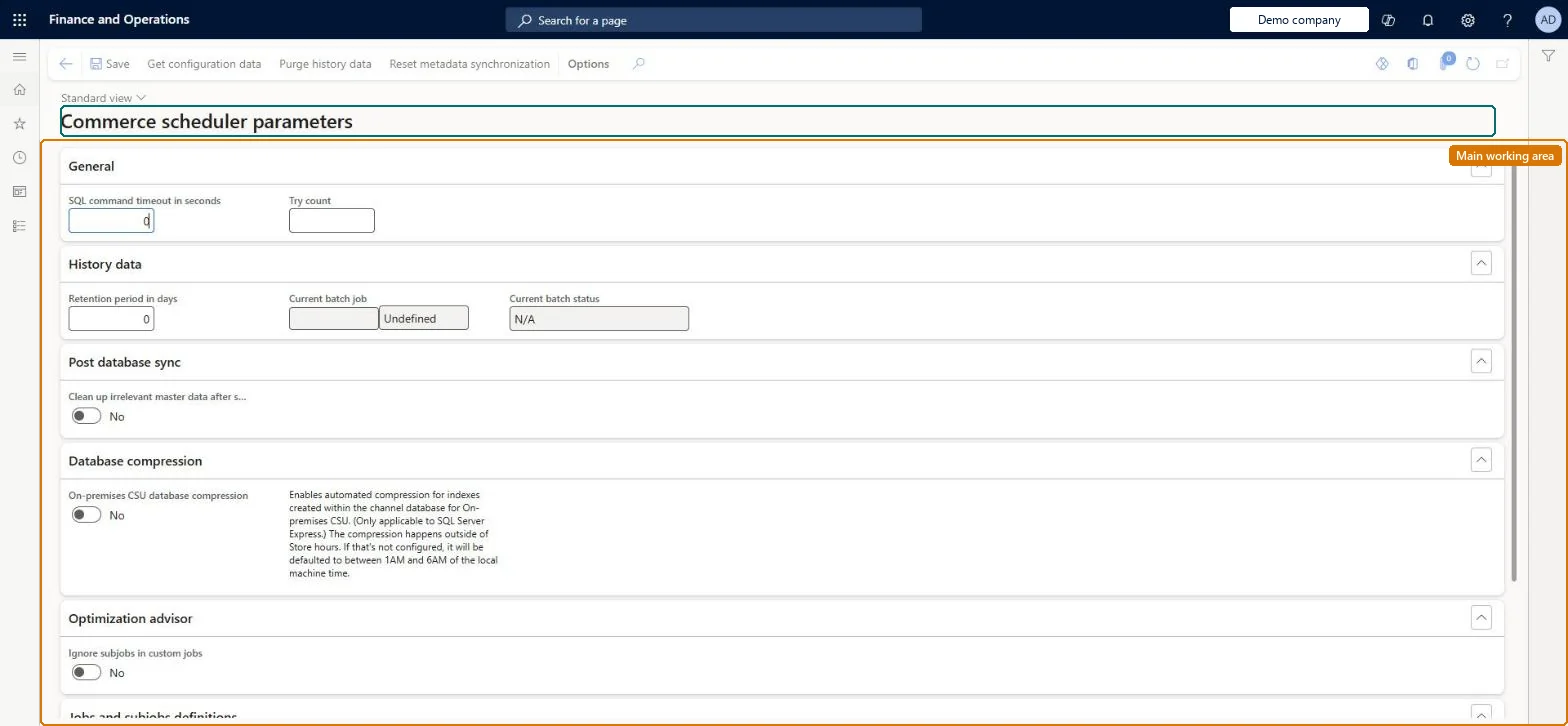
Setup step on the Commerce scheduler parameters page · Retail and Commerce
Set up Commerce scheduler parameters
Use this page to tune how CDX retries failed download sessions, whether full datasets are regenerated on a timer, and which clean-up and statistics steps run after each download session is applied.
Retail operations manager, Retail store IT, Retail store manager
Business process
Manage sales channels
Menu item
RetailConnParameters
Main table
RetailConnParameters
Setup steps
1 on this page
Show what matters for
SETUP GUIDEHow to set it up8 sections. Choose a role to highlight what matters to you.
Everyone
1What it is and why
What it is
A setup page holding the parameters that govern Commerce Data Exchange synchronization, such as the retry count for failed sessions, the full dataset generation interval, post database sync options and, for AX 2012 R3 channels, the headquarters message database connection.
What you do here
Use this page to tune how CDX retries failed download sessions, whether full datasets are regenerated on a timer, and which clean-up and statistics steps run after each download session is applied.
Example
For example, Microsoft recommends a Try count of 3 and a Full dataset generation interval in days of 0 so that full dataset generation only happens when something other than time requires it.
The page in Dynamics 365. page title tab to open what to set or check
About the examples: Examples and screenshots in this guide use BEAT, a demo company in a Dynamics 365 test environment. Use your own company's codes and values instead of copying them.
Setup steps on this page
Set up Commerce scheduler parameters
Use this page to tune how CDX retries failed download sessions, whether full datasets are regenerated on a timer, and which clean-up and statistics steps run after each download session is applied.
Steps from Microsoft
Go to Retail and Commerce > Headquarters setup > Parameters > Commerce scheduler parameters.
Set Try count to 3.
Verify that Full dataset generation interval in days is 0.
Under Post database sync, decide whether to enable Clean up irrelevant master data after sync and Optimize database statistics automatically.
Try count = 3 and Full dataset generation interval in days = 0Learn's CDX best practices give these values: full datasets are then only generated when something other than time needs them, which reduces errors and performance issues.
Setting Try count too high: download sessions might fail during periods of high usage. Turning on Clean up irrelevant master data after sync without testing in a sandbox can break custom SQL views.
Solution architect
5Design impact
Can it be undone
Reversible: Values can be changed at any time and apply to the next download sessions.
If you change it later
Setting Try count too high can make download sessions fail during busy periods, and the clean-up option should be tested in a sandbox because custom SQL views can introduce table dependencies it is not aware of. Microsoft Learn
Technical architect
6Technical
Menu item
RetailConnParametersChecked in Dynamics 365
Form
RetailConnParametersChecked in Dynamics 365
Table
RetailConnParametersShown as “SCHEDULER PARAMETERS” in Record infoChecked in Dynamics 365
Who can open it
PrivilegesMaintain retail parameters RetailParametersMaintainDutiesMaintain retail parameters RetailParametersMaintain3 security rolesRetail operations manager RetailOperationsManagerRetail store IT RetailStoreITRetail store manager RetailStoreManagerChecked in Dynamics 365
Roles to set it up and use it
To use itRetail operations manager RetailOperationsManagerRetail store manager RetailStoreManagerRetail store IT RetailStoreITGive people one of these roles. On this system, 3 roles can open this page.Checked in Dynamics 365
Actions on the page
(Action Pane without tabs): Get configuration data, Purge history data, Reset metadata synchronizationChecked in Dynamics 365
Checked in a working Dynamics 365 system, version 10.0.49: the menu item, form, table and security, the page.
To cite this step: RC-PARAM-020, Set up Commerce scheduler parameters. Beyond ERP Atlas Hub, 2026-11-11. https://www.beyonderp.cloud/atlas/step/RC-PARAM-020