SETUP GUIDEHow to set it up8 sections. Choose a role to highlight what matters to you.
Everyone
1What it is and why
What it is
A setup page where you define the number of days needed to transport goods between a vendor shipping point and a receiving point.
What you do here
Use this page to set transport days for pairs of shipping and receiving addresses. The system uses them to calculate requested ship dates on purchase orders.
Example
For example, a record of 20 days from Madrid to New York applies to a purchase order shipped from Madrid to New York, while a record of 30 days from Spain to the United States applies to an order from Valencia to New York.
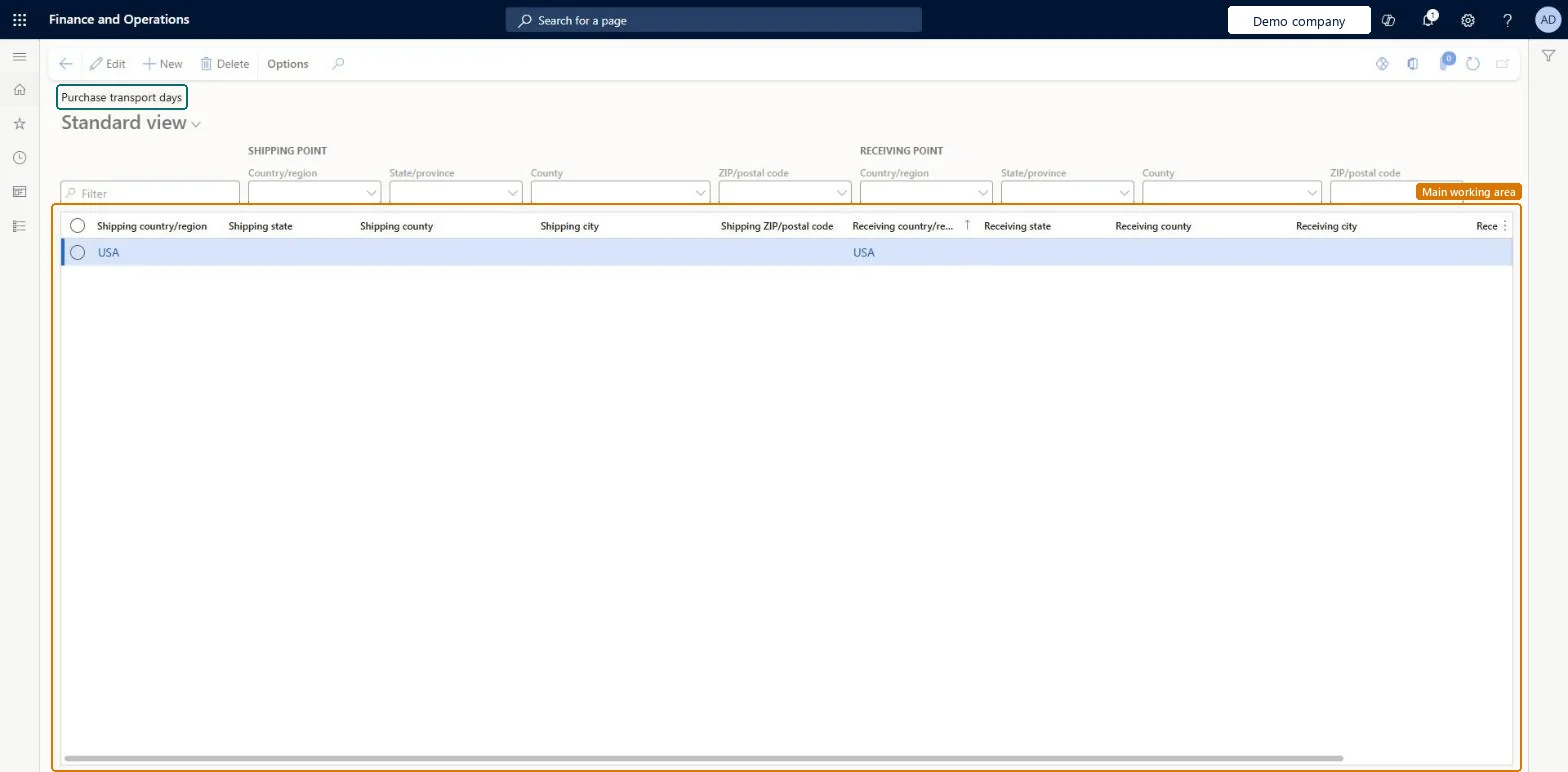
The page in Dynamics 365. page title tab to open what to set or check
About the examples: Examples and screenshots in this guide use BEAT, a demo company in a Dynamics 365 test environment. Use your own company's codes and values instead of copying them.
Step by step, with screenshots
Set up Purchase transport days1 screen
Screen 1
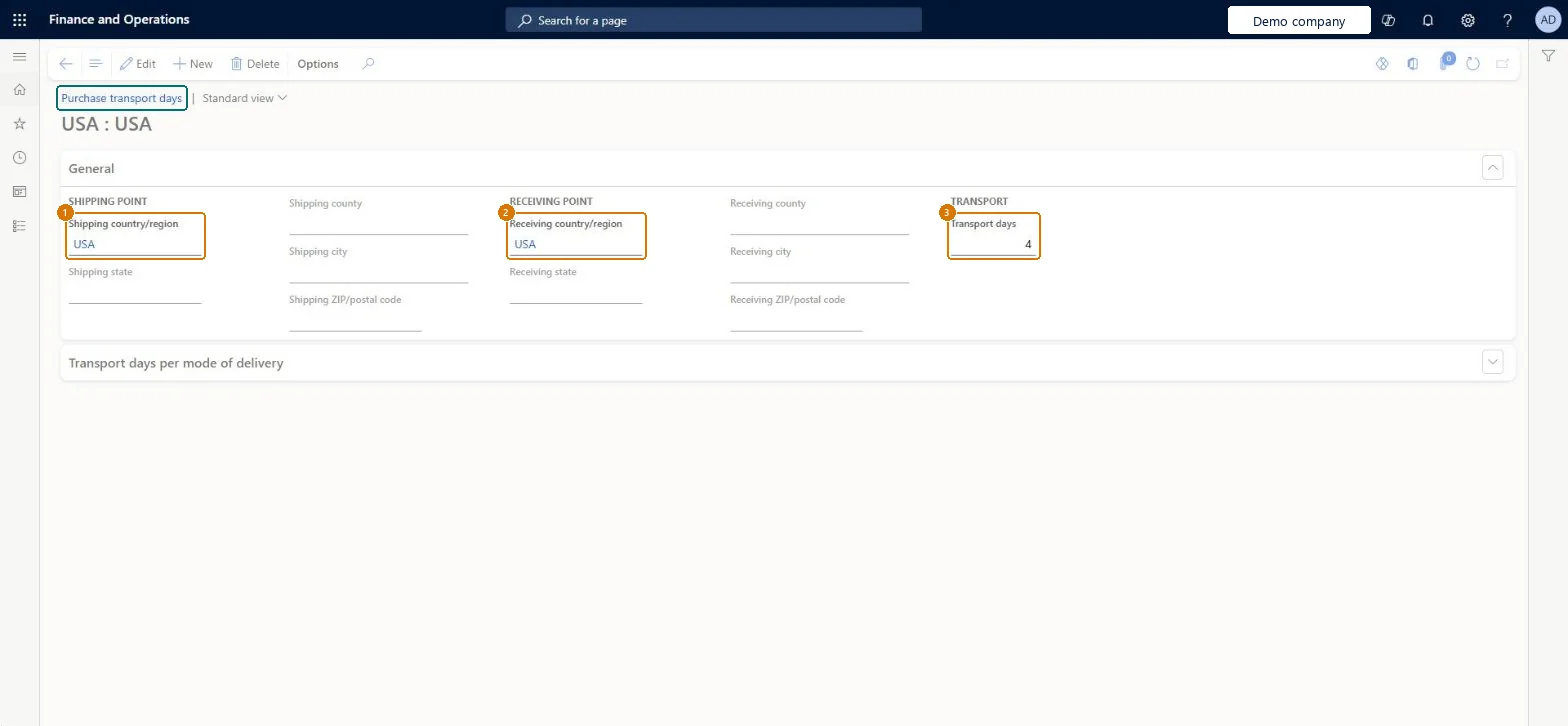
Enter the purchase transport days
Go to Procurement and sourcing > Setup > Distribution > Purchase transport days
Select New
Choose the shipping and receiving country/region
Enter the transport days
Select Save
1Shipping country/region
USA
2Receiving country/region
USA
3Transport days
4
Show the full screen page title tab to open what to set or check
How to use it
Go to Procurement and sourcing > Setup > Distribution > Purchase transport days.
Use the SHIPPING POINT and RECEIVING POINT filters (Country/region, State/province, County, ZIP/postal code) to find a pair of addresses.
Select New to add a row.
Fill in the shipping and receiving country/region, state, county, city and ZIP/postal code columns.
Select a row and select Edit to change it, or Delete to remove it.
Source: Checked in Dynamics 365
Fields on the page
Field
What it means
Example
Table column
Shipping country/region
USA
FromCountryRegionId
Receiving country/region
USA
ToCountryRegionId
Transport days
4
TransportDays
Test checklist
Set Supplier requested and confirmed shipment dates to Yes on Procurement and sourcing parameters.
Create a record from the vendor's shipping address to the receiving warehouse with Transport days 2.
Create a purchase order line for that vendor and warehouse.
Check the requested receipt date is two days after the requested ship date (plus any lead time and calendar closures).
Country/region-level records as the fallback, more specific records (city or postal code) only where transit time differs, and per mode of delivery rows with one marked DefaultThe system uses the most specific record it can find (for example Madrid to New York before Spain to the United States), and the Default mode row covers modes not listed.
Missing or wrong vendor primary addresses. The vendor's primary address is the shipping point, so without it the requested ship date can't be calculated from the transport days.
Solution architect
5Design impact
Can it be undone
Reversible: Records can be changed at any time; dates are recalculated when the requested ship or receipt date, site or warehouse on an order is updated.
Technical architect
6Technical
Menu item
VendCustTransportPoint2PointChecked in Dynamics 365
Form
VendCustTransportPoint2PointChecked in Dynamics 365
Table
VendCustTransportPointLineShown as “Purchase transport points” in Record infoChecked in Dynamics 365
Data entities
PurchaseDestinationAddressTransportationTimeEntityDestination address purchase transportation time Checked in Dynamics 365
Who can open it
PrivilegesMaintain purchase transport days VendCustTransportPoint2PointMaintainView purchase transport days VendCustTransportPoint2PointViewDutiesEnable purchase order to invoice process PurchOrderToInvoiceProcessEnableInquire into purchase order to invoice progress PurchOrderToInvoiceProgressInquire6 security rolesAccountant LedgerAccountantProject manager ProjProjectManagerBuying agent TradeBuyingAgentPurchasing manager TradePurchasingManagerAccounts payable clerk VendInvoiceAccountsPayableClerkAccounts payable manager VendInvoiceAccountsPayableManagerChecked in Dynamics 365
Roles to set it up and use it
To set it up or change itPurchasing manager TradePurchasingManagerAccounts payable manager VendInvoiceAccountsPayableManagerTo use itBuying agent TradeBuyingAgentProject manager ProjProjectManagerAccountant LedgerAccountantAccounts payable clerk VendInvoiceAccountsPayableClerkGive people one of these roles. On this system, 6 roles can open this page.Checked in Dynamics 365
Actions on the page
Options: Personalize, Page options, ShareChecked in Dynamics 365
Checked in a working Dynamics 365 system, version 10.0.49: the menu item, form, table and security, the page, the demo records and the values in the screenshots.
To cite this step: PS-SETUP-250, Set up Purchase transport days. Beyond ERP Atlas Hub, 2026-11-11. https://www.beyonderp.cloud/atlas/step/PS-SETUP-250