BeyondERP.Newsletter
Menu

Setup step on the Multisource policy assignments page · Procurement and sourcing

Set up Multisource policy assignments

Use this page to set which vendor split applies to each product, and to compare actual purchases with the target split.

Used by
Accounts payable manager, Purchasing agent, Auditor and 3 more roles
Business process
Procure goods and services
Menu item
MpsMultiSourcePolicyAssignment
Main table
MpsMultiSourcePolicyAssignment
Data entity
MpsMultiSourcePolicyAssignmentEntity
Setup steps
1 on this page
Show what matters for
SETUP GUIDEHow to set it up8 sections. Choose a role to highlight what matters to you.
Everyone

1What it is and why

What it isA setup page where you assign a multisource policy to an item, optionally for a site, a warehouse and a date range.
What you do hereUse this page to set which vendor split applies to each product, and to compare actual purchases with the target split.
ExampleFor example, you can check whether purchasers are firming orders as master planning suggests or are changing them.
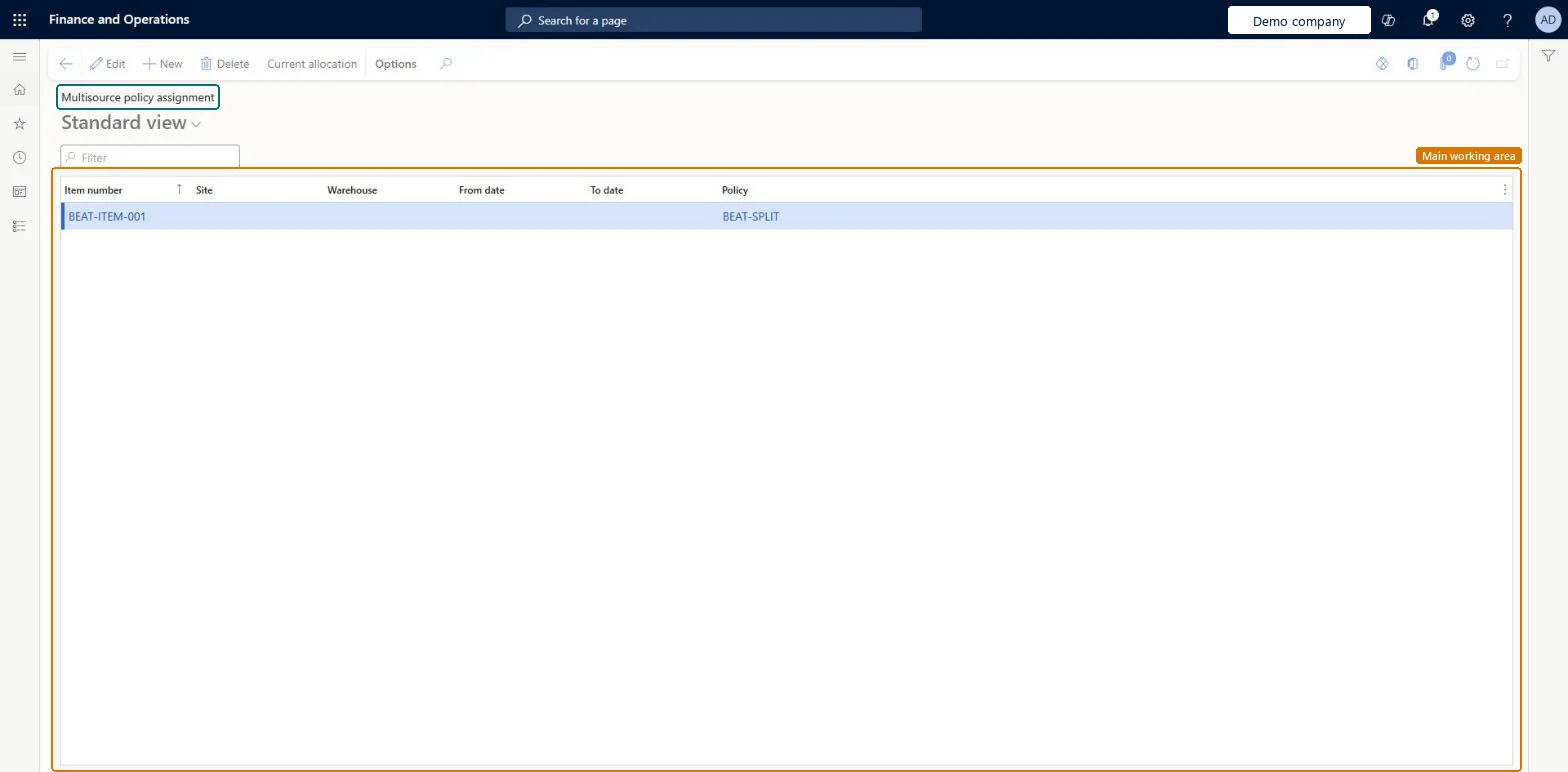
Multisource policy assignments page in Dynamics 365
The page in Dynamics 365. page title tab to open what to set or check
Functional consultant · Solution architect

2Where it fits

Business processProcure goods and services
Menu pathProcurement and sourcing › Setup › Policies › Multisource policy assignments
Set up firstMultisource policies Microsoft Learn
Used next byCurrent allocation Microsoft Learn Planned purchase orders Microsoft Learn
Related pagesMultisource policies Microsoft Learn
In this process Set up Multisource policies · Set up Trade agreement journal names
End user · Functional consultant

3How to do it

About the examples: Examples and screenshots in this guide use BEAT, a demo company in a Dynamics 365 test environment. Use your own company's codes and values instead of copying them.

Step by step, with screenshots

Set up Multisource policy assignments1 screen

Use this page to set which vendor split applies to each product, and to compare actual purchases with the target split.

  1. Screen 1

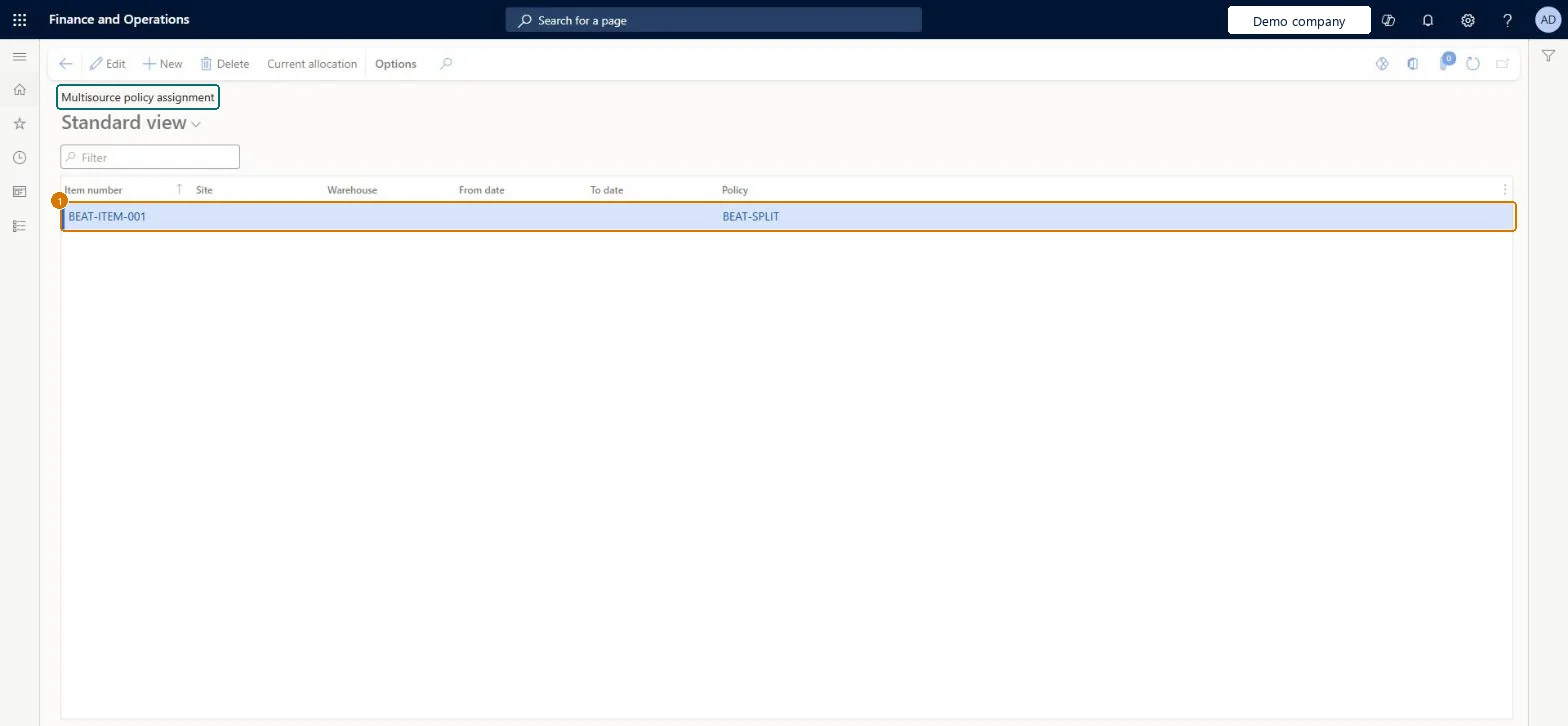
    Assign the multisource policy to an item

    Go to Procurement and sourcing > Setup > Policies > Multisource policy assignments

    1. Select New
    2. Enter the item number (and a site, warehouse or dates if the policy applies only there)
    3. Choose the policy
    4. Select Save
    1Item numberBEAT-ITEM-001
    PolicyBEAT-SPLIT
    Assign the multisource policy to an item (zoomed on the outlined fields)
    Show the full screenAssign the multisource policy to an item
    page title tab to open what to set or check

Steps from Microsoft

  1. Go to Procurement and sourcing > Setup > Policies > Multisource policy assignments.
  2. Select New, or select an existing assignment and select Edit.
  3. In the Item number field, select the item.
  4. Optionally select a Site and a Warehouse; leave them blank to apply to all.
  5. Enter the From date and To date.
  6. In the Policy field, select the multisource policy.
  7. Select Save.

Source: Microsoft Learn

Fields on the page

FieldWhat it meansExampleTable column
Item numberThe item that the policy is assigned to.Microsoft Learn BEAT-ITEM-001ItemId
SiteThe site where the policy applies; leave blank for all sites.Microsoft Learn InventSiteId
WarehouseThe warehouse where the policy applies; leave blank for all warehouses.Microsoft Learn InventLocationId
From dateThe first date that the assignment applies.Microsoft Learn ValidFromDate
To dateThe last date that the assignment applies.Microsoft Learn ValidToDate
PolicyThe multisource policy that applies to this item, site, warehouse and date range.Microsoft Learn SPLITPolicyName

Test checklist

  1. Create an assignment for an item with Site only and a second with Site and Warehouse, each pointing to a different policy.
  2. Run master planning for demand at that warehouse.
  3. Check the planned order vendor follows the warehouse-level policy.
  4. Open Current allocation and compare actual to target allocation.

Source: Microsoft Learn

Functional consultant

4Setup decisions

Setup stepRecommended value and whyDecision, common mistake and test
Set up Multisource policy assignmentsOne assignment per item with Site and Warehouse blank, plus site or warehouse assignments only where the split differs, each with From date and To dateBlank site and warehouse apply the policy everywhere, and when several assignments match a planned order the most specific one wins.Expecting short-term demand to arrive on time. Vendor calendars aren't considered in multi-vendor sourcing, so the chosen vendor may deliver later than another would; assign a vendor manually for urgent demand.

Feature management and licence

Feature to turn onSource products and materials from multiple vendors using Planning Optimization (Mandatory, on by default)

Microsoft Learn

Solution architect

5Design impact

Can it be undoneReversible: Assignments are dated with From date and To date and can be ended or edited; planning uses the assignment valid for the planned order date.
If you change it laterWhen more than one assignment matches a planned order, master planning uses the most specific one, such as an assignment that names a warehouse over one that names only a site. Microsoft Learn
Technical architect

6Technical

Menu itemMpsMultiSourcePolicyAssignment Checked in Dynamics 365
FormMpsMultiSourcePolicyAssignment Checked in Dynamics 365
TableMpsMultiSourcePolicyAssignmentShown as “Multisource policy assignment” in Record infoChecked in Dynamics 365
Data entitiesMpsMultiSourcePolicyAssignmentEntityMultisource policy assignment Checked in Dynamics 365
Who can open itPrivileges MPSMultiSourcePolicyAssignmentMaintainView multisource policy assignments MPSMultiSourcePolicyAssignmentViewDutiesMaintain multisource policy assignments MPSMultiSourcePolicyAssignmentMaintainView multisource policy assignments MPSMultiSourcePolicyAssignmentView
6 security rolesAuditor AuditPolicyManagerProduction planner ReqProductionPlannerBuying agent TradeBuyingAgentPurchasing manager TradePurchasingManagerAccounts payable manager VendInvoiceAccountsPayableManagerPurchasing agent VendPurchasingAgent
Checked in Dynamics 365
Roles to set it up and use itTo set it up or change itPurchasing agent VendPurchasingAgentBuying agent TradeBuyingAgentProduction planner ReqProductionPlannerTo use itPurchasing manager TradePurchasingManagerAccounts payable manager VendInvoiceAccountsPayableManagerAuditor AuditPolicyManagerGive people one of these roles. On this system, 6 roles can open this page.Checked in Dynamics 365
Actions on the pageOptions: Personalize, Page options, ShareChecked in Dynamics 365
Developer

7Developer

Open it by URLhttps://<your-environment>/?mi=MpsMultiSourcePolicyAssignment
Integrate withMpsMultiSourcePolicyAssignmentEntity data entity Checked in Dynamics 365
Everyone

8Sources

To cite this step: PS-SETUP-160, Set up Multisource policy assignments. Beyond ERP Atlas Hub, 2026-11-11. https://www.beyonderp.cloud/atlas/step/PS-SETUP-160