SETUP GUIDEHow to set it up8 sections. Choose a role to highlight what matters to you.
Everyone
1What it is and why
What it is
A setup page where you group resources and projects so that workers can only record time and costs on the projects allowed for them.
What you do here
Use this page to control which projects each worker or group of workers can enter in journals and timesheets.
Example
For example, BEAT's group LISBON-TEAM lists its 9 Lisbon consultants and the projects PRJ-0042 and PRJ-0057, so when validation is on for those workers they can't record hours on PRJ-0090.
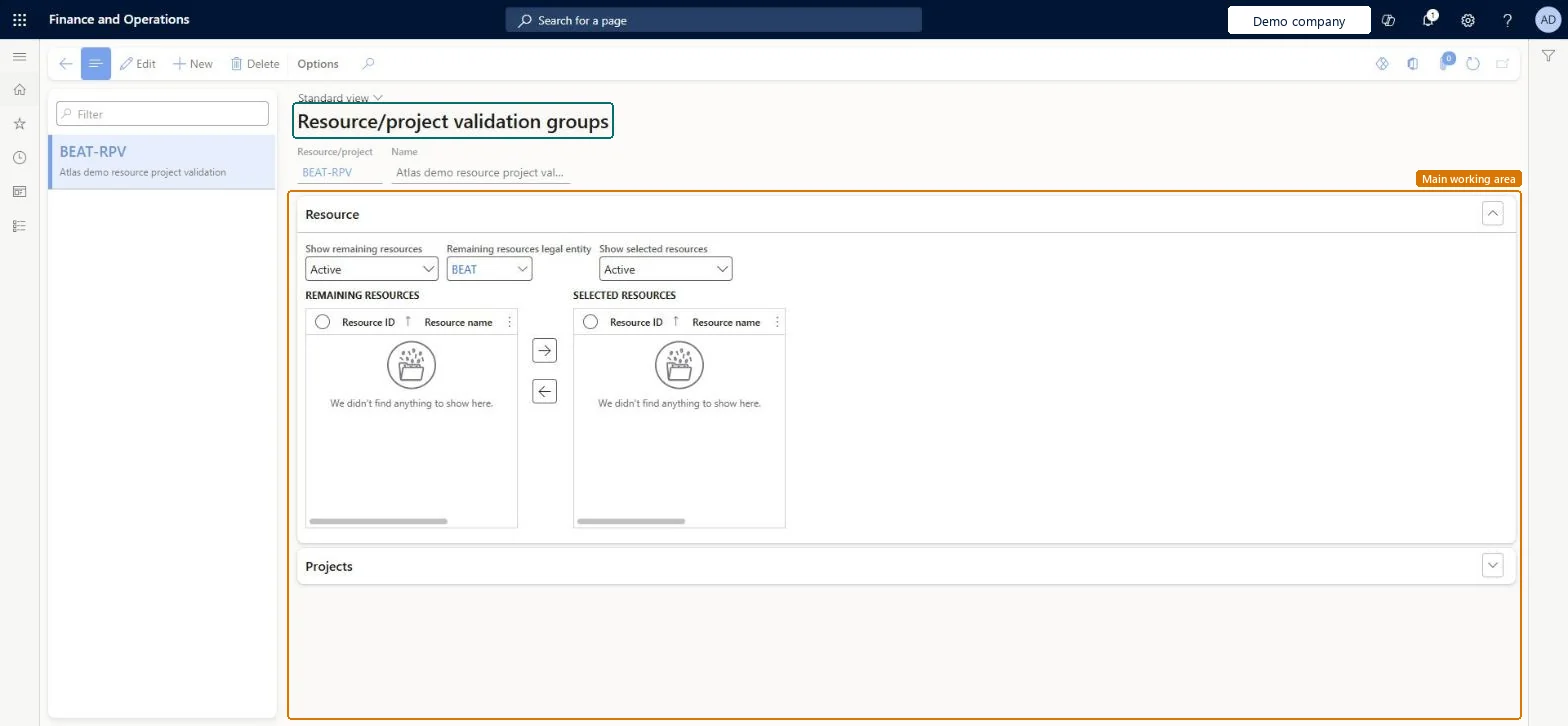
The page in Dynamics 365. page title tab to open what to set or check
About the examples: Examples and screenshots in this guide use BEAT, a demo company in a Dynamics 365 test environment. Use your own company's codes and values instead of copying them.
Step by step, with screenshots
Set up Resource/project validation groups1 screen
Use this page to control which projects each worker or group of workers can enter in journals and timesheets.
Screen 1
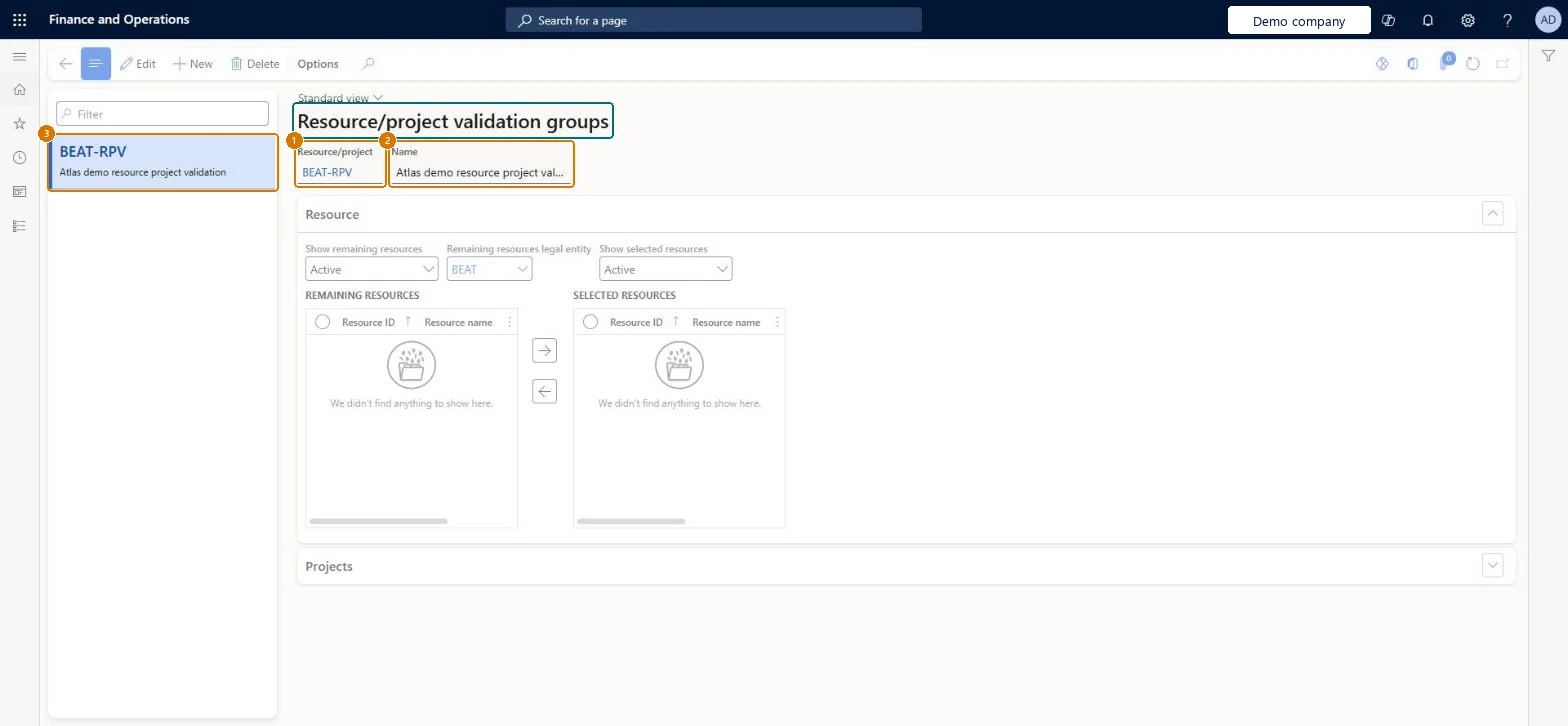
Create a resource and project validation group
Go to Project management and accounting > Setup > Validation > Resource/project validation groups
Select New
Enter the group code and name
Select Save
Move the workers the group applies to into Selected resources, then add the projects they may enter
1Resource/project
BEAT-RPV
2Name
Resource project validation
Show the full screen page title tab to open what to set or check
Steps from Microsoft
Go to Project management and accounting > Setup > Validation > Resource/project validation groups.
Select New and enter the group ID and Name.
In Legal entity, select the company to take workers from, then add the projects and workers on the Projects and Worker FastTabs.
Turn on the matching validation for the projects or workers on their own pages, then enter a test journal line.
Validation is on for the worker and the project isn't in any of the worker's resource/project groups. Add the project to the group. Microsoft data model
Test checklist
Create group LISBON-TEAM with worker 000245 and project PRJ-0042.
Turn on project validation for worker 000245.
Enter hours for 000245 on PRJ-0090 and check they are refused.
Enter hours on PRJ-0042 and check they are accepted.
Validation only for workers who must book on a closed list of projects, such as subcontractorsThe group limits the projects a worker can book on, but only after validation is turned on for the worker.
Reversible: Validation can be turned off; posted lines are not rechecked.
If you change it later
Lines entered on journals and timesheets are checked against the group only where validation is turned on (on the project for project/category groups, on the worker for resource groups). Lines already posted are not rechecked. Microsoft data model
Technical architect
6Technical
Menu item
ProjValTableEmplProjChecked in Dynamics 365
Form
ProjValTableEmplProjChecked in Dynamics 365
Table
ProjValEmplProjTableShown as “Worker/project validation group” in Record infoKey field: GroupId, NameChecked in Dynamics 365
PrivilegesMaintain project validation setup ProjTableValidationMaintainView project validation setup ProjTableValidationViewDutiesEnable project accounting process ProjProjectAccountingProcessEnable1 security roleProject supervisor ProjProjectSupervisorChecked in Dynamics 365
Roles to set it up and use it
To set it up or change itProject supervisor ProjProjectSupervisorGive people one of these roles. On this system, 1 role can open this page.Checked in Dynamics 365
Actions on the page
Options: Personalize, Page options, ShareChecked in Dynamics 365
ProjValEmplProjEntity (Project resource/project validation group): loaded for each company, in Microsoft's default template 650 - Project accounting.Load order: Microsoft's default template 650 - Project accounting loads Project resource/project validation group at execution unit 1, level 30, sequence 10. Lower levels load first, and entities at the same level load in sequence order.Load first: the default templates at lower levels (System setup to General ledger)Microsoft Learn
Checked in a working Dynamics 365 system, version 10.0.49: the menu item, form, table and security, the page, the demo records and the values in the screenshots.
To cite this step: PM-SETUP-400, Set up Resource/project validation groups. Beyond ERP Atlas Hub, 2026-11-11. https://www.beyonderp.cloud/atlas/step/PM-SETUP-400