Chief executive officer, Project accountant, Service delivery manager
Business process
Manage project financials
Menu item
ProjSalesPriceSubscription
Main table
SMASalesPriceSubscription
Data entity
SMAServiceSubscriptionSalesPriceEntity
Setup steps
1 on this page
Show what matters for
SETUP GUIDEHow to set it up8 sections. Choose a role to highlight what matters to you.
Everyone
1What it is and why
What it is
A setup page where you set sales prices for project subscriptions.
What you do here
Use this page to set subscription sales prices for one subscription or more broadly, for example for a whole project.
Example
For example, a monthly price of EUR 500 is set for project 9030, and a later EUR 550 price for one category on that project is used for that category's subscription fees.
The page in Dynamics 365. page title tab to open what to set or check
About the examples: Examples and screenshots in this guide use BEAT, a demo company in a Dynamics 365 test environment. Use your own company's codes and values instead of copying them.
Step by step, with screenshots
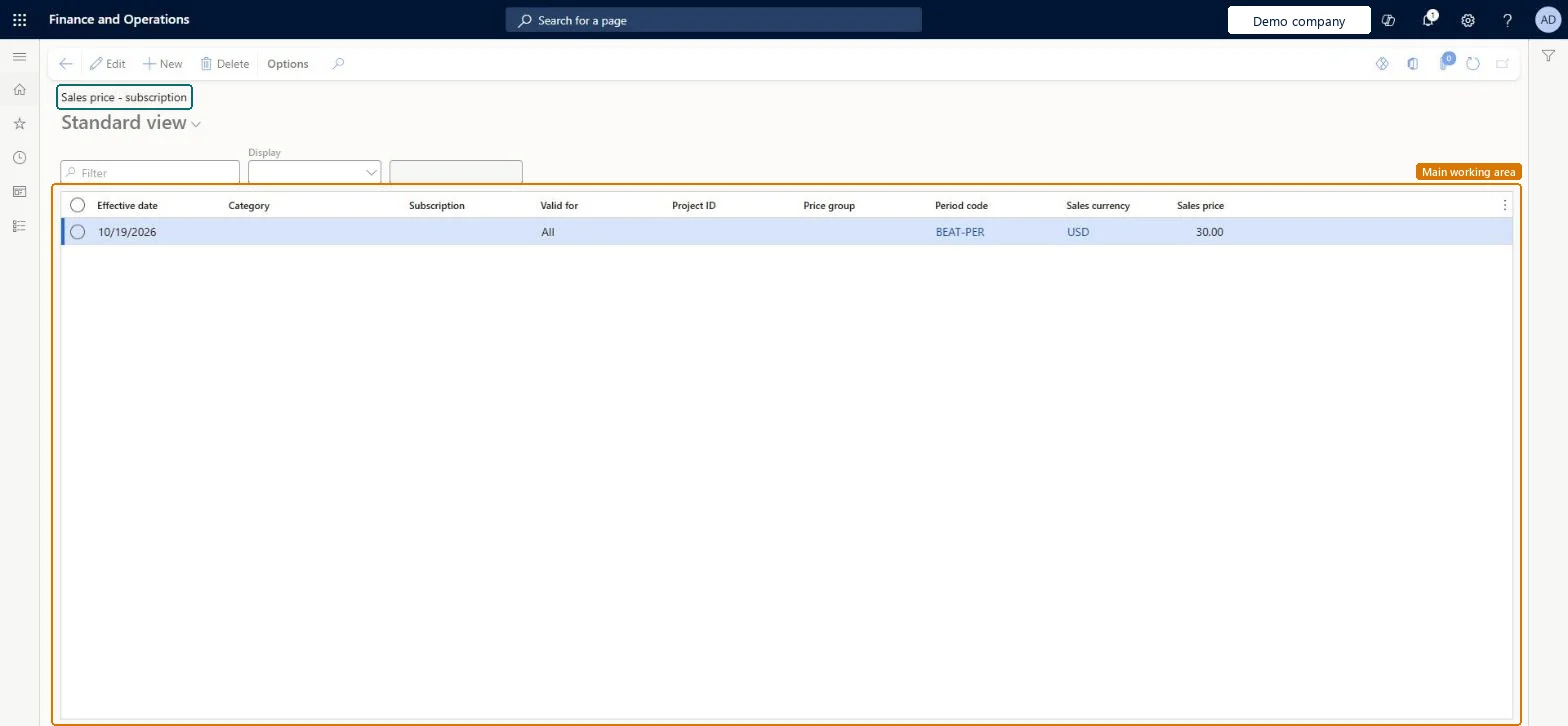
Set up Sales price (subscription)1 screen
Use this page to set subscription sales prices for one subscription or more broadly, for example for a whole project.
Screen 1
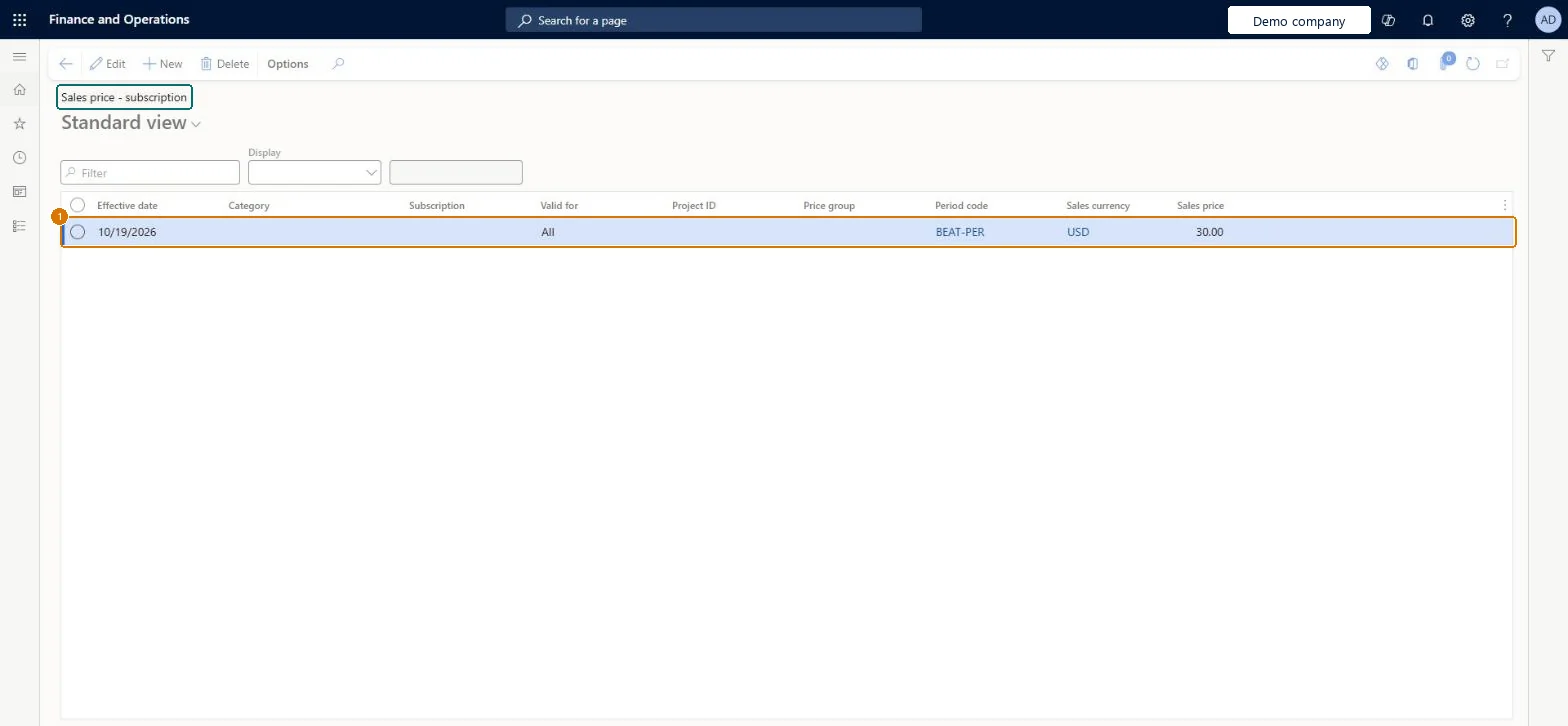
Set a subscription sales price
Go to Project management and accounting > Setup > Prices > Sales price (subscription)
Select New
Enter the effective date
Leave the subscription blank for every subscription, or select one
Set Valid for to All, or to Table or Group for a narrower price
Select the period code the price is charged for
Check the sales currency and enter the sales price
Select Save
1Effective date
10/19/2026
Valid for
All
Period code
BEAT-PER
Sales price
30.00
Show the full screen page title tab to open what to set or check
Steps from Microsoft
Go to Project management and accounting > Setup > Prices > Sales price (subscription).
Select New and enter the Effective date, the Category and the Subscription or Project ID the price covers.
Select the Period code; it must match the period code of the subscription.
Select the Sales currency, enter the Sales price and save.
Generate the subscription fees and check the price on the fee lines.
A price per project and period code, with category rows only where one subscription is priced differentlyThe price applies only when its period code and currency match the subscription, and then the most detailed row wins, so one row per project and period covers most subscriptions.
A subscription price only applies when its period code and currency match the subscription; then the most detailed match is used. Microsoft Learn
Technical architect
6Technical
Menu item
ProjSalesPriceSubscriptionChecked in Dynamics 365
Form
SMASalesPriceSubscriptionChecked in Dynamics 365
Table
SMASalesPriceSubscriptionShown as “Sales price - subscription” in Record infoKey field: ValidFrom, CategoryId, ProjValidFor, ProjId, ProjPriceGroup, SMASubscriptionIdChecked in Dynamics 365
Data entities
SMAServiceSubscriptionSalesPriceEntitySales price - subscription Microsoft data model
Who can open it
PrivilegesMaintain sales price subscriptions SMASalesPriceSubsciptionMaintainView sales price subscriptions SMASalesPriceSubsciptionViewDutiesReview service subscription process performance SMAServiceSubscriptionProcessPerfReviewInquire into service subscription sales price master SMAServiceSubscriptionSalesPriceInquireMaintain service subscription sales price master SMAServiceSubscrSalesPriceMasterMaintai3 security rolesChief executive officer CompanyChiefExecutiveOfficerProject accountant ProjProjectAccountantService delivery manager SMAServiceDeliveryManagerChecked in Dynamics 365
Roles to set it up and use it
To set it up or change itProject accountant ProjProjectAccountantService delivery manager SMAServiceDeliveryManagerTo use itChief executive officer CompanyChiefExecutiveOfficerGive people one of these roles. On this system, 3 roles can open this page.Checked in Dynamics 365
Actions on the page
Options: Personalize, Page options, ShareChecked in Dynamics 365
SMAServiceSubscriptionSalesPriceEntity Sales price - subscription, loaded for each company.Load order: Load subscription prices after project categories, projects and subscription period codes, because a price row refers to them.Load first: Project categories, Projects, Period codesMicrosoft Learn
Checked in a working Dynamics 365 system, version 10.0.49: the menu item, form, table and security, the page, the demo records and the values in the screenshots.
To cite this step: PM-SETUP-220, Set up Sales price (subscription). Beyond ERP Atlas Hub, 2026-11-11. https://www.beyonderp.cloud/atlas/step/PM-SETUP-220