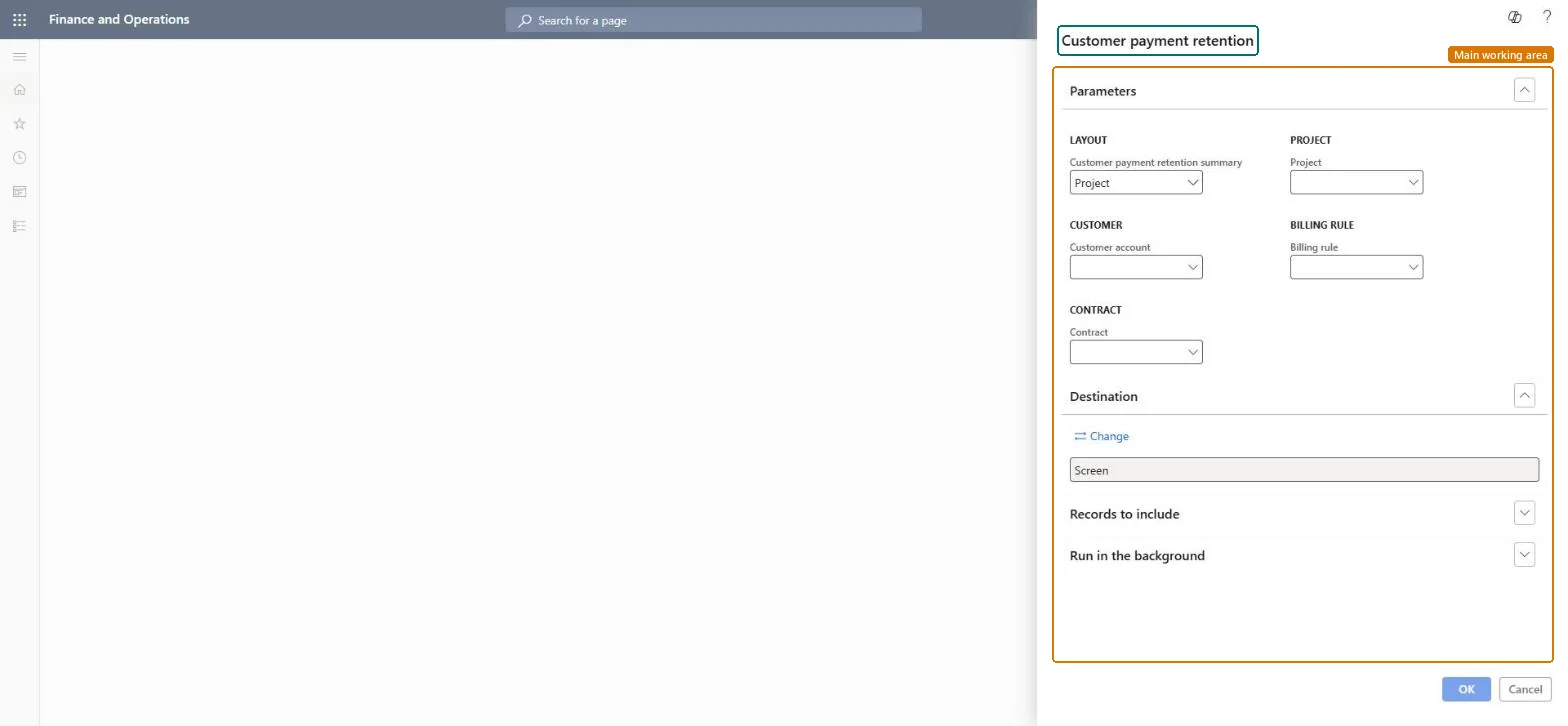
Choose the summary level for Customer payment retention
Project management and accountingInquiries and reportsRetention reports
output:PSACustomerRetention
Business process
Analyze project performance
Menu item
output:PSACustomerRetention
Setup steps
1 on this page
Show what matters for
SETUP GUIDEHow to set it up8 sections. Choose a role to highlight what matters to you.
Everyone
1What it is and why
What it is
A report that totals the payment retention customers hold back on project invoices, the retention percentage of the billing rules, summarized by customer, project contract, project or billing rule.
What you do here
Use it to see how much retained money each customer still owes on projects before you invoice a retention release.
Example
When PRJ-0042 reaches handover in November 2026, BEAT's project accountant runs the report by Contract for PC-0042: 10% retention on billing rule BR-01 has held back 18,500.00 of 185,000.00 invoiced, which is the amount to release.
The page in Dynamics 365. page title tab to open what to set or check
About the examples: Examples and screenshots in this guide use BEAT, a demo company in a Dynamics 365 test environment. Use your own company's codes and values instead of copying them.
When to run it
When to run it
When a project reaches the stage where retained amounts can be invoiced, or when a customer asks how much of their payments is still retained.
How often
On demand, at project milestones or before a retention release.
What the output shows
Retained customer payment amounts summarized at the level you chose (customer, contract, project or billing rule). A retention you expected but don't see usually means the billing rule has no retention percentage.
A project contract shows no retention although invoices were posted.
The billing rule has no retention percentage on its Payment retention terms; retention is deducted only from invoices posted after a percentage is set. Microsoft Learn
Set Customer payment retention summary to Contract (or Billing rule when one contract has several retention terms) and filter the contract you plan to release.The retention percentage is set per billing rule of the project contract, so contract or billing rule level matches how the release is agreed with the customer.
On the live system, Project manager, Project supervisor, Project accountant, Chief executive officer and Project assistant can run this page.
Checked in Dynamics 365
Solution architect
5Design impact
Shared or per company
Per legal entity: the report reads only the project data of the company you are signed in to, so run it in each company you close. Checked in Dynamics 365
Can it be undone
Reversible: Running or rerunning the report changes no data.
If you change it later
The report reads retained amounts on posted project invoices. Changing the retention percentage on a billing rule affects only invoices posted afterwards; the release is invoiced through an invoice proposal, after which the report shows a lower retained balance. Microsoft Learn
Technical architect
6Technical
Menu item
output:PSACustomerRetentionChecked in Dynamics 365
Form
SysOperationTemplateFormChecked in Dynamics 365
Roles to set it up and use it
To use itProject manager ProjProjectManagerProject supervisor ProjProjectSupervisorProject accountant ProjProjectAccountantChief executive officer CompanyChiefExecutiveOfficerProject assistant ProjProjectClerkGive people one of these roles. On this system, 9 roles can run this page.Checked in Dynamics 365
Load order: Customer payment retention has no data entity in Data management: it is an SSRS report (design PSACustomerRetention) that reads posted project data. There is nothing to migrate for the report itself; load the project data it reads, for example opening balances through Journals > Beginning balance, then run the report in the new system and compare its totals with the old one.Microsoft Learn
Checked in a working Dynamics 365 system, version 10.0.49: the menu item, form, table and security, the page.
To cite this step: PM-RC-170, Choose the summary level for Customer payment retention. Beyond ERP Atlas Hub, 2026-11-11. https://www.beyonderp.cloud/atlas/step/PM-RC-170