Project management and accountingInquiries and reportsTransactions inquiries
ProjTransRevenue
Used by
Chief executive officer, Field Service Integration User, Project accountant and 4 more roles
Business process
Analyze project performance
Menu item
ProjTransRevenue
Main table
ProjRevenueTrans
Setup steps
1 on this page
Show what matters for
SETUP GUIDEHow to set it up8 sections. Choose a role to highlight what matters to you.
Everyone
1What it is and why
What it is
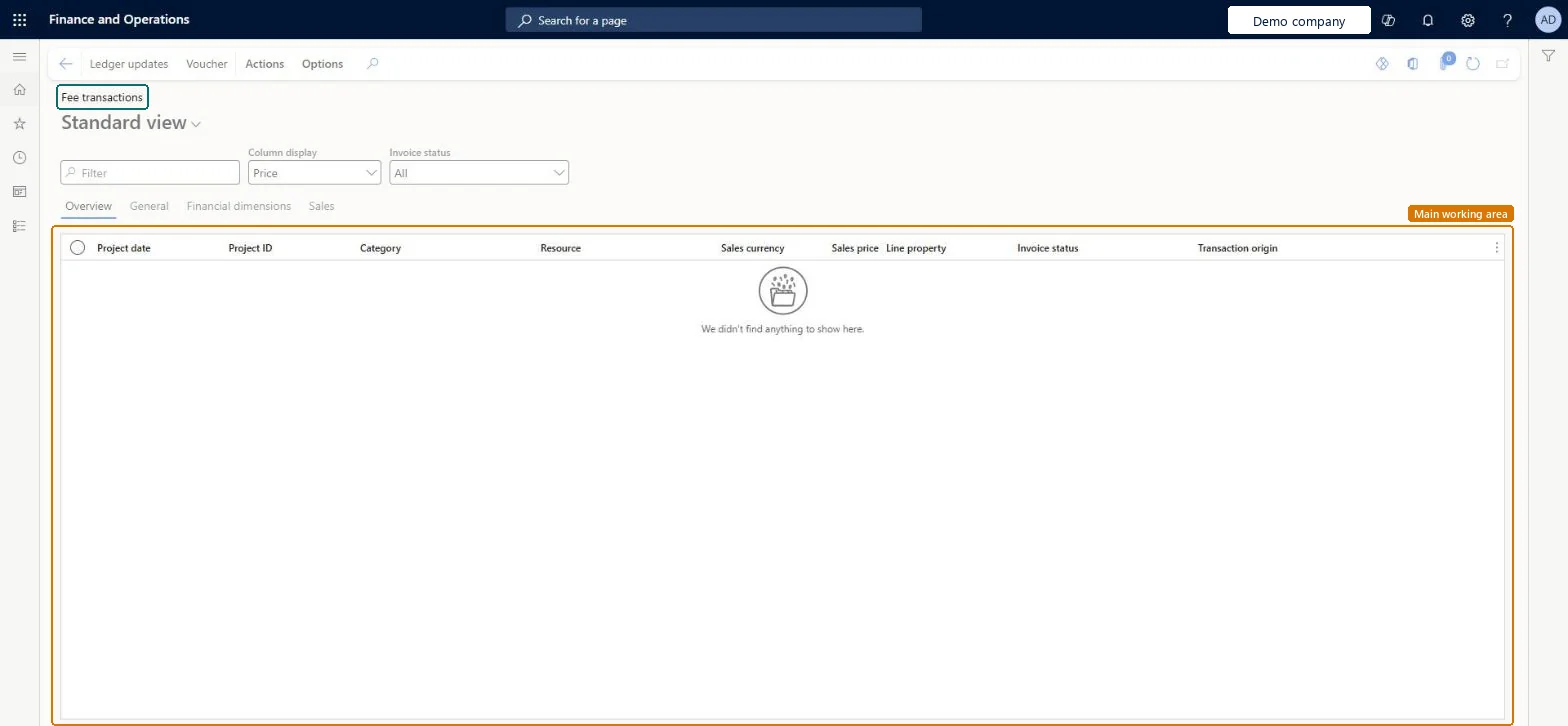
An inquiry that lists posted fee transactions on projects, with project date, project, category, resource, sales currency, sales price, line property, invoice status and transaction origin.
What you do here
Use it to answer 'which fees did we charge to the project and are they invoiced?'
Example
The BEAT project accountant checks PRJ-0042 before invoicing and finds the October management fee of 1,500.00 EUR from the fee journal, chargeable and not yet invoiced, plus September's fee already invoiced.
The page in Dynamics 365. page title tab to open what to set or check
About the examples: Examples and screenshots in this guide use BEAT, a demo company in a Dynamics 365 test environment. Use your own company's codes and values instead of copying them.
Setup steps on this page
Check fees before invoicing
Confirm fee amounts and invoice status before the invoice proposal.
Steps from Microsoft
Go to Project management and accounting > Inquiries and reports > Transactions inquiries > Fee.
Filter on Project ID and set Invoice status to see open fees.
Check Sales price and Sales currency against the fee agreed in the contract.
Include the open fee lines in the next invoice proposal, or adjust a wrong one on Adjust transactions.
On the live system, Project accountant and Project assistant maintain this page; Project manager, Project supervisor, Chief executive officer, Field Service Integration User and Service delivery manager view it.
A posted fee changes only through an adjustment; its invoice status changes when an invoice proposal with it is posted. Microsoft Learn
Technical architect
6Technical
Menu item
ProjTransRevenueChecked in Dynamics 365
Form
ProjTransRevenueChecked in Dynamics 365
Table
ProjRevenueTransShown as “Project fee transactions” in Record infoKey field: TransDate, ProjId, CategoryId, LinePropertyId, Resource, Resource_Name, Resource_ResourceId, Resource_ResourceCompanyId, ResourceCategoryChecked in Dynamics 365
Who can open it
PrivilegesMaintain all posted project transactions ProjPostedProjectTransactionsMaintainView all posted project transactions ProjPostedProjectTransactionsViewView fee transactions ProjTransRevenueViewDutiesMaintain project transactions ProjProjectTransactionsMaintainMaintain project transactions ProjProjectTransactionsMaintainNoPostReview project transactions ProjProjectTransactionsReviewInquire into project transaction status ProjProjectTransactionStatusInquireApprove posting of service orders SMAServiceOrdersJournalize7 security rolesChief executive officer CompanyChiefExecutiveOfficerField Service Integration User FieldServiceIntegrationUserProject accountant ProjProjectAccountantProject assistant ProjProjectClerkProject manager ProjProjectManagerProject supervisor ProjProjectSupervisorService delivery manager SMAServiceDeliveryManagerChecked in Dynamics 365
Roles to set it up and use it
To set it up or change itProject accountant ProjProjectAccountantProject assistant ProjProjectClerkTo use itProject manager ProjProjectManagerProject supervisor ProjProjectSupervisorChief executive officer CompanyChiefExecutiveOfficerField Service Integration User FieldServiceIntegrationUserService delivery manager SMAServiceDeliveryManagerGive people one of these roles. On this system, 7 roles can open this page.Checked in Dynamics 365
Actions on the page
Actions: Inquiries, FunctionsOptions: Personalize, Page options, ShareChecked in Dynamics 365
Developer
7Developer
Open it by URL
https://<your-environment>/?mi=ProjTransRevenue
Data migration
Load order: The Fee transactions inquiry has no data entity in Data management that writes posted transactions: lines are created by posting journals, timesheets or source documents. Open fees from a former system are loaded as fee beginning balance lines (ProjBeginningBalanceFeeEntity).Microsoft Learn