BeyondERP.Newsletter
Menu

Setup step on the My resource requests page · Project management and accounting

Follow up open resource requests

See which planned roles are not yet staffed.

Used by
Project manager
Business process
Plan projects
Menu item
ResViewResourceFulfillment
Main table
ResResourceFulfillmentView
Setup steps
1 on this page
Show what matters for
SETUP GUIDEHow to set it up8 sections. Choose a role to highlight what matters to you.
Everyone

1What it is and why

What it isThe project manager's view of the resource requests they raised, on the same form as Resource fulfillment, to follow whether each planned role has been staffed.
What you do hereUse it to check the status of your requests for roles on your projects and chase the ones still open before the work starts.
ExampleFor example, on Monday the BEAT project manager sees two open requests for PRJ-0042, Software developer for 80.00 hours and Tester for 40.00 hours, and asks the resource manager about the developer, who starts on 07/12/2026.
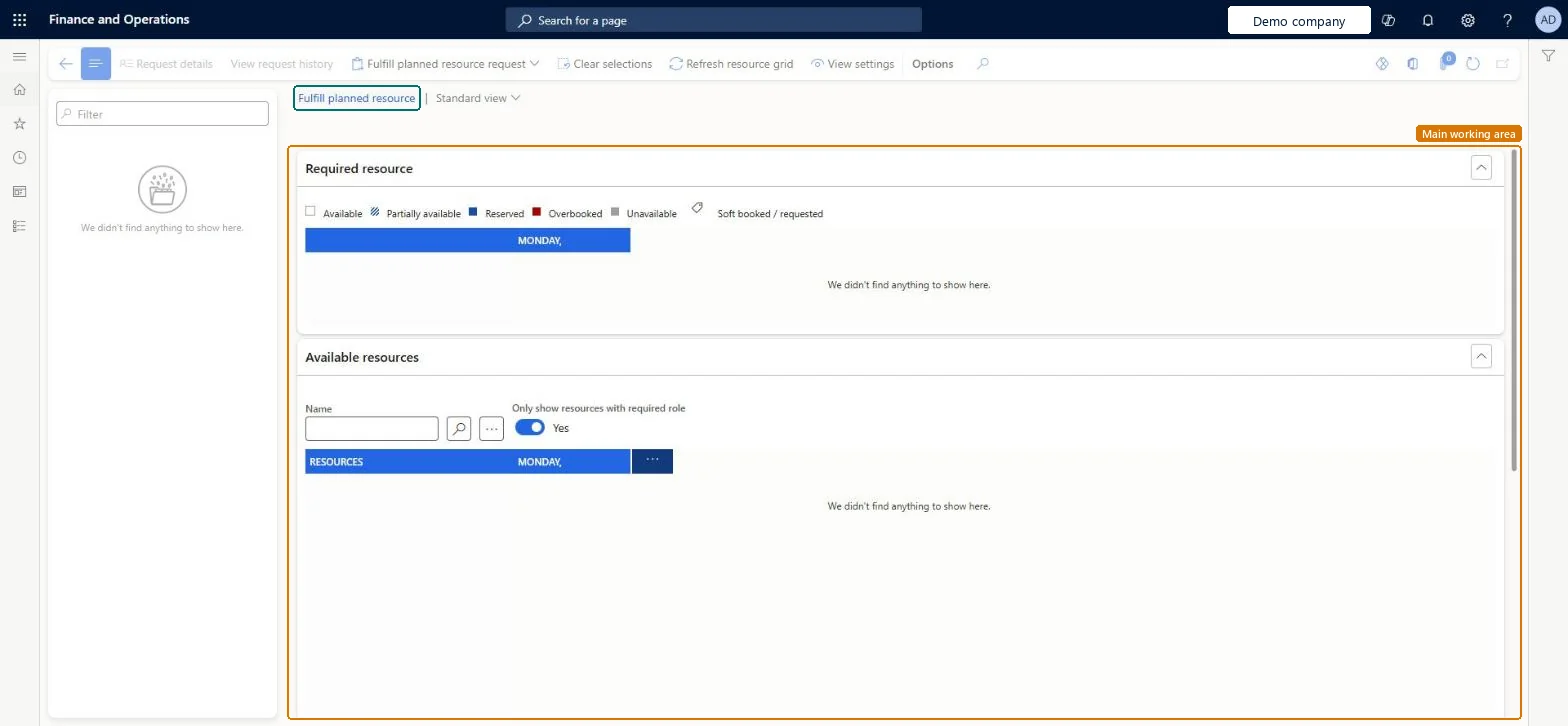
My resource requests page in Dynamics 365
The page in Dynamics 365. page title tab to open what to set or check
Functional consultant · Solution architect

2Where it fits

Business processPlan projects
Menu pathProject management and accounting › Project resources › My resource requests
Set up firstProject management and accounting workflows Microsoft Learn
Used next byResource fulfillment Microsoft Learn
Related pagesResource availability Microsoft Learn
In this process Fulfill planned roles in date order · Read forecasts by model
End user · Functional consultant

3How to do it

About the examples: Examples and screenshots in this guide use BEAT, a demo company in a Dynamics 365 test environment. Use your own company's codes and values instead of copying them.

Setup steps on this page

Follow up open resource requests

See which planned roles are not yet staffed.

Steps from Microsoft

  1. Go to Project management and accounting > Project resources > My resource requests.
  2. Filter the list on your project.
  3. Check which roles are still waiting for a worker.
  4. Open the project's Project team and scheduling tab to see the workers already assigned.
  5. Ask the resource manager to staff the open roles on Resource fulfillment.

Source: Microsoft Learn

Fields on the page

FieldWhat it meansExample
ProjectThe project the request is for.Microsoft Learn PRJ-0042
RoleThe planned role you asked to be staffed.Microsoft Learn Tester
Request statusShows whether the request is still open or has been fulfilled.Checked in Dynamics 365Open

Common errors and fixes

MessageWhat to do
A role you added to the project doesn't show as a request.Add it as a planned role on the project team; only planned roles become resource requests. Microsoft Learn

Test checklist

  1. Add a planned Tester role to PRJ-0042.
  2. Open My resource requests and filter on PRJ-0042.
  3. Assign a worker to the role on Resource fulfillment.
  4. Check the number of open requests for PRJ-0042 drops by one.

Source: Microsoft Learn

Functional consultant

4Setup decisions

Setup stepRecommended value and whyDecision, common mistake and test
Follow up open resource requestsFilter on your project and read the requests whose start date is closest first.The list mixes requests for all your projects; the start date tells which open role blocks work soonest.How do project managers follow staffing?Reading a request that left the list as cancelled: a fulfilled request leaves Resource fulfillment, so check the project team for the assigned worker.Test: See an open request

Feature management and licence

Licence or add-inOn the live system, Project manager use this page.

Checked in Dynamics 365

Solution architect

5Design impact

Shared or per companyPer company: requests belong to the projects of the legal entity you work in. Microsoft Learn
Can it be undoneReversible: Reversible: the list changes no data.
If you change it laterWhen the resource manager assigns a worker, the request is fulfilled and the worker replaces the planned role on the project team. Microsoft Learn
Technical architect

6Technical

Menu itemResViewResourceFulfillment Checked in Dynamics 365
FormResResourceFulfillment Checked in Dynamics 365
TableResResourceFulfillmentViewChecked in Dynamics 365
Who can open itPrivilegesMaintain project schedules ProjSchedulingMaintainMaintain project schedules ProjSchedulingViewDutiesInquire into project schedule master ProjProjectScheduleMasterInquireMaintain project schedule master ProjProjectScheduleMasterMaintain
1 security roleProject manager ProjProjectManager
Checked in Dynamics 365
Roles to set it up and use itTo use itProject manager ProjProjectManagerGive people one of these roles. On this system, 1 role can open this page.Checked in Dynamics 365
Actions on the pageOptions: Personalize, Page options, ShareChecked in Dynamics 365
Developer

7Developer

Open it by URLhttps://<your-environment>/?mi=ResViewResourceFulfillment
Data migrationLoad order: My resource requests has no data entity in Data management. Requests come from planned roles on projects. Add the planned roles on each project after the projects are loaded.Checked in Dynamics 365
Everyone

8Sources

To cite this step: PM-OPS-080, Follow up open resource requests. Beyond ERP Atlas Hub, 2026-11-11. https://www.beyonderp.cloud/atlas/step/PM-OPS-080