Project management and accountingProject resources
ResAvailabilityView
Business process
Plan projects
Menu item
ResAvailabilityView
Setup steps
1 on this page
Show what matters for
SETUP GUIDEHow to set it up8 sections. Choose a role to highlight what matters to you.
Everyone
1What it is and why
What it is
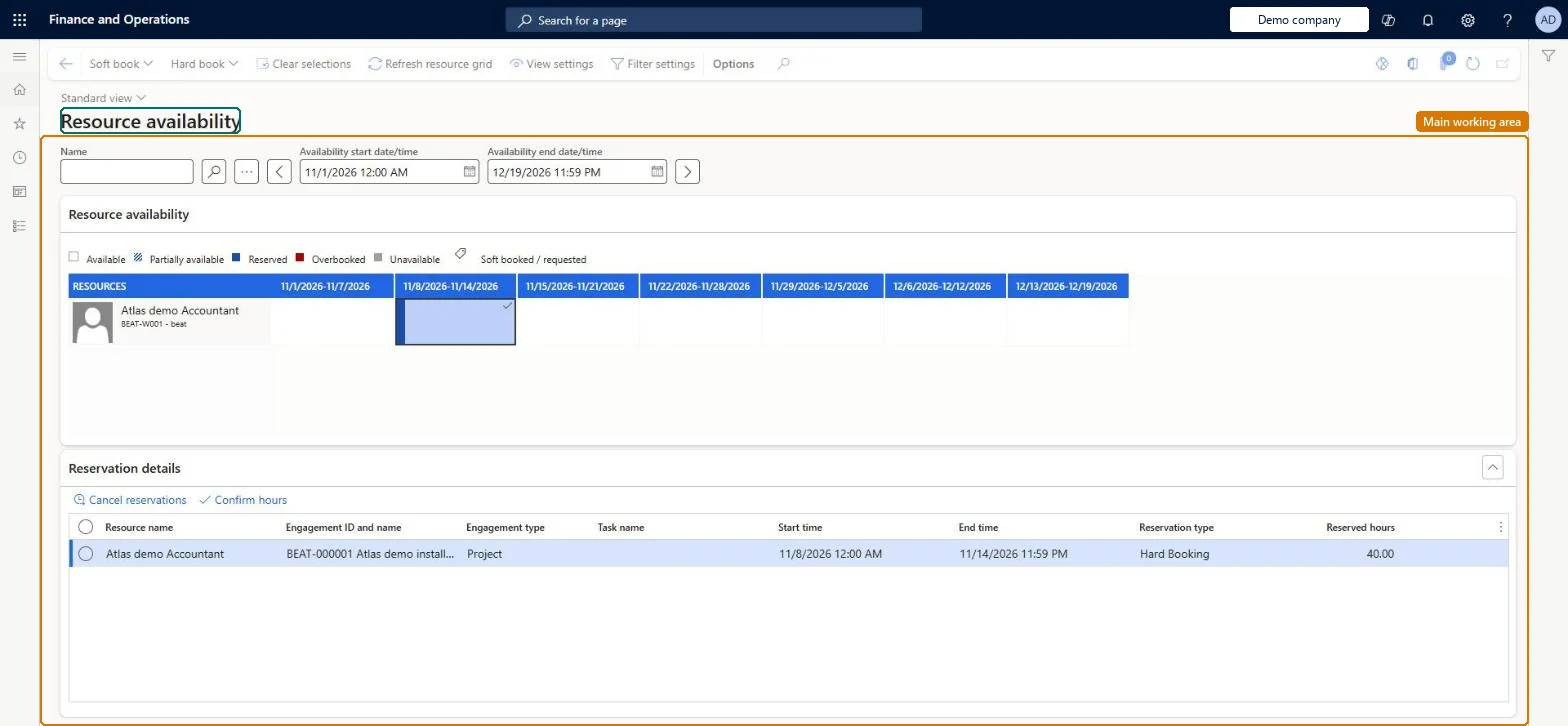
The calendar view of resource capacity: it shows, day by day, how much of each resource's working time is free, so a project manager can book the resource.
What you do here
Use it to check whether a resource has remaining capacity in the project period and to hard book the resource on the project.
Example
For example, the BEAT project manager opens Book from calendar on PRJ-0042, sets the view to Day, sees that Daniel has 4.00 free hours on 14/12/2026 and hard books him for full capacity.
The page in Dynamics 365. page title tab to open what to set or check
About the examples: Examples and screenshots in this guide use BEAT, a demo company in a Dynamics 365 test environment. Use your own company's codes and values instead of copying them.
Setup steps on this page
Read availability for the right dates
Book resources on capacity that is up to date.
Steps from Microsoft
Go to Project management and accounting > Project resources > Resource availability, or open a project and on Project team and scheduling select Book from calendar.
Select View settings, set the date range format to Day, and turn on availability descriptions and remaining capacity.
Select a resource in the list and read its free capacity for the project dates.
Select Hard book and Full capacity to book the resource.
Check the booked hours now show on the project's team for that resource.
Sets the time unit of the calendar, for example Day or Week.Microsoft Learn
Day
Remaining capacity
The working time still free for the resource after existing bookings.Microsoft Learn
4.00 hours
Hard book
Books the resource firmly on the project for the selected dates.Microsoft Learn
Full capacity
Common errors and fixes
Message
What to do
The calendar shows no capacity for a resource that works full time.
Check the resource has a working calendar and run the resource capacity synchronization for the dates you plan, as a batch with inclusive dates. Microsoft Learn
Test checklist
Check each resource has a calendar on Project setup for the worker.
Run Synchronize resources capacity roll-ups as a batch job with a start and end date that cover the planning horizon.
Open Resource availability and check the resource shows capacity on working days only.
Book the resource on a project and check remaining capacity drops.
Set the date range to the project period and turn on remaining capacity before you book.Free capacity depends on the dates shown and on the last synchronization of the calendars.
On the live system, Resource manager use this page.
Checked in Dynamics 365
Solution architect
5Design impact
Shared or per company
Per company: availability is read from the resource calendars of the legal entity you work in. Microsoft Learn
Can it be undone
Reversible: Bookings can be updated at any project stage.
If you change it later
When a calendar changes, the resource synchronization processes update the scheduling of project resources; bookings use the synchronized capacity. Microsoft Learn
Technical architect
6Technical
Menu item
ResAvailabilityView
Roles to set it up and use it
To set it up or change itResource manager ProjResourceManagerGive people one of these roles. On this system, 1 role can open this page.Checked in Dynamics 365
Load order: Resource availability has no data entity in Data management. Availability is calculated from resource calendars and bookings. Load the resources and their calendars, then run the capacity synchronization.Checked in Dynamics 365
To cite this step: PM-OPS-060, Read availability for the right dates. Beyond ERP Atlas Hub, 2026-11-11. https://www.beyonderp.cloud/atlas/step/PM-OPS-060