BeyondERP.Newsletter
Menu

Setup step on the Delete quotations page · Project management and accounting

Delete old closed quotations

Clean up quotations that will never be used.

Used by
Project manager, Rental coordinator agent, Rental manager and 4 more roles
Business process
Manage project contracts
Menu item
action:SalesQuotationDelete_Proj
Main table
SalesQuotationParmTable
Setup steps
1 on this page
Show what matters for
SETUP GUIDEHow to set it up8 sections. Choose a role to highlight what matters to you.
Everyone

1What it is and why

What it isA periodic page that permanently deletes several project quotations at once, chosen with a query and reviewed in a list before the delete.
What you do hereUse it to clean up old project quotations that will never be used again, after they are Lost or Canceled. Deleted quotations can't be restored, and they no longer appear in lost-deal analysis.
ExampleIn January 2027 BEAT deletes the 146 project quotations that were Lost or Canceled before 01/01/2025, after exporting them to Excel for the sales archive; quotations from 2025 and 2026 stay for pipeline analysis.
Delete quotations page in Dynamics 365
The page in Dynamics 365. page title tab to open what to set or check
Functional consultant · Solution architect

2Where it fits

Business processManage project contracts
Menu pathProject management and accounting › Periodic › Quotations › Delete quotations
Set up firstLose quotation Microsoft Learn Cancel quotation Microsoft Learn
Used next byProject quotations Microsoft Learn
Related pagesExpiring project quotations Microsoft Learn
In this process Withdraw replaced quotations · Create campaign quotations from a template
End user · Functional consultant

3How to do it

About the examples: Examples and screenshots in this guide use BEAT, a demo company in a Dynamics 365 test environment. Use your own company's codes and values instead of copying them.

When to run it

When to run itWhen old quotations that will never be used again clutter the list, for example after a yearly pipeline review.
How oftenOnce a year, as part of data cleanup.
Batch settingsReview the list on the page before you select Confirm deletion; the Batch button can run the deletion in the background.
What the output showsThe listed quotations and their lines are deleted.

Source: Microsoft Learn

Setup steps on this page

Delete old closed quotations

Clean up quotations that will never be used.

Steps from Microsoft

  1. Go to Project management and accounting > Periodic > Quotations > Delete quotations.
  2. Select Select and build the query, for example status Lost or Canceled and created before 01/01/2025, to load the matching quotations into the list.
  3. Check the Quotation status and Created date and time columns, and export the list to Excel if the quotations must be archived.
  4. Take any quotation you want to keep off the list: select its row and select Delete, which removes only the list row.
  5. Select Confirm deletion to delete the listed quotations, then search Quotations > Project quotations to make sure they are gone.

Source: Microsoft Learn

Fields on the page

FieldWhat it meansExample
SelectOpens the query that chooses the quotations to load into the delete list, for example by status and creation date.Checked in Dynamics 365Status Lost or Canceled, created before 01/01/2025
QuotationColumn of the delete list: the quotation that will be deleted when you select Confirm deletion.Checked in Dynamics 365QT-001204
Quotation statusColumn of the delete list: the status of each listed quotation; check that only Lost or Canceled ones are listed.Checked in Dynamics 365Lost
Created date and timeColumn of the delete list: when the quotation was created, to check the age of what you delete.Checked in Dynamics 36503/14/2024 09:12

Common errors and fixes

MessageWhat to do
Lost-deal analysis for earlier years is empty after the cleanup.Deleted quotations can't be restored. Export them before deleting, and keep the years you still analyze. Microsoft Learn

Test checklist

  1. Load quotations Lost or Canceled before 01/01/2025 (for example 146).
  2. Take 1 off the list.
  3. Confirm deletion.
  4. Search project quotations: 1 of the 146 remains.

Source: Microsoft Learn

Functional consultant

4Setup decisions

Setup stepRecommended value and whyDecision, common mistake and test
Delete old closed quotationsDelete only Lost or Canceled quotations older than the analysis period, after exporting them.The delete is permanent and removes them from pipeline analysis.How long are closed quotations kept?Deleting by date only and losing open or recent quotations.Test: Delete old lost quotations

Feature management and licence

Licence or add-inOn the live system, Project manager, Sales representative, Sales clerk, Rental manager and Rental coordinator agent use this page.

Checked in Dynamics 365

Solution architect

5Design impact

Shared or per companyPer company: it deletes the quotations of the legal entity you run it in. Microsoft data model
Can it be undoneIrreversible: Deleted quotations can't be restored.
If you change it laterPermanently deletes the selected project quotations and their lines; pipeline and lost-reason analysis no longer include them. Microsoft Learn
Technical architect

6Technical

Menu itemaction:SalesQuotationDelete_Proj Checked in Dynamics 365
FormSalesQuotationDeleteQuotations Checked in Dynamics 365
TableSalesQuotationParmTableShown as “Quotation - update table” in Record infoKey field: QuotationIdChecked in Dynamics 365
Who can open itPrivilegesDelete project quotations SalesQuotationDelete_ProjProcessDutiesMaintain project quotation ProjProjectQuotationMaintainMaintain rental sales quotations RentalSalesQuotationMaintainMaintain quotation SalesQuotationMaintain
8 security roles MCRTestUserRoleProject manager ProjProjectManagerRental coordinator agent RentalCoordinatorAgentRental manager RentalManagerRental representative RentalRepresentativeRental sales manager RentalSalesManagerSales clerk TradeSalesClerkSales representative TradeSalesRepresentative
Checked in Dynamics 365
Roles to set it up and use itTo use itProject manager ProjProjectManagerSales representative TradeSalesRepresentativeSales clerk TradeSalesClerkRental manager RentalManagerRental coordinator agent RentalCoordinatorAgentGive people one of these roles. On this system, 7 roles can run this page.Checked in Dynamics 365
Actions on the pageOptions: Personalize, Page options, ShareChecked in Dynamics 365
Developer

7Developer

Open it by URLhttps://<your-environment>/?mi=action:SalesQuotationDelete_Proj
Data migrationLoad order: Delete quotations has no data entity in Data management: it stores only the temporary delete list (SalesQuotationParmTable). Migrate the quotations you keep with ProjQuotationHeaderEntity.Load first: ProjQuotationHeaderEntityMicrosoft data model
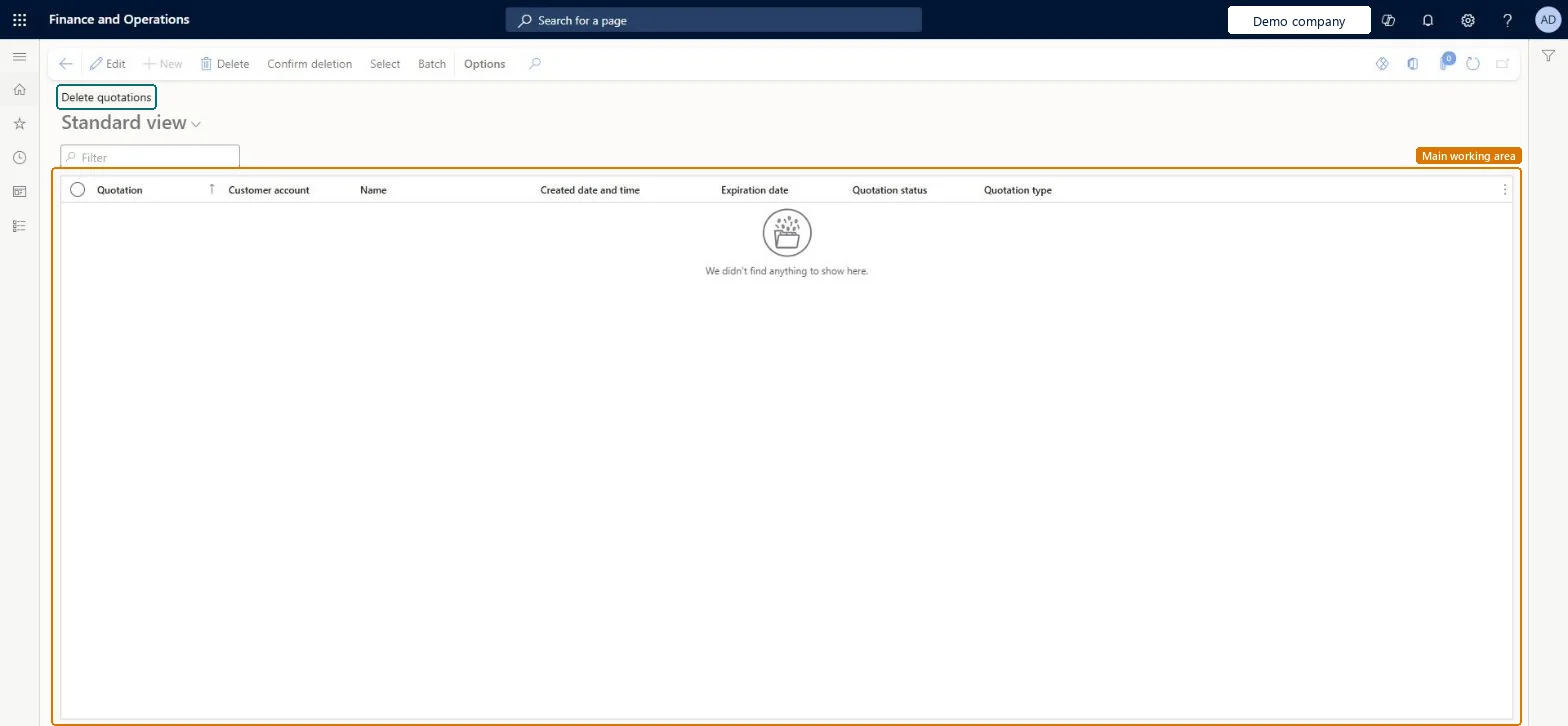
Table definitionSalesQuotationParmTable columns and relations Microsoft data model
Everyone

8Sources

To cite this step: PM-JOB-230, Delete old closed quotations. Beyond ERP Atlas Hub, 2026-11-11. https://www.beyonderp.cloud/atlas/step/PM-JOB-230