BeyondERP.Newsletter
Menu

Setup step on the Missing timesheets email page · Project management and accounting

Remind workers about missing timesheets

Get timesheets in on time each period.

Business process
Manage project delivery
Menu item
action:TSMissingTimesheetsEmail
Setup steps
1 on this page
Show what matters for
SETUP GUIDEHow to set it up8 sections. Choose a role to highlight what matters to you.
Everyone

1What it is and why

What it isA periodic job, titled Email: Missing timesheets, that sends reminder emails about timesheets that are missing for the timesheet period you choose.
What you do hereUse it at the end of each timesheet period to remind workers who haven't entered a timesheet, so hours are posted on time.
ExampleBEAT uses weekly timesheet periods. Every Monday at 08:00 the job runs for the week that ended on Sunday 11/08/2026; 6 of 54 workers have no timesheet for that week and get the reminder.
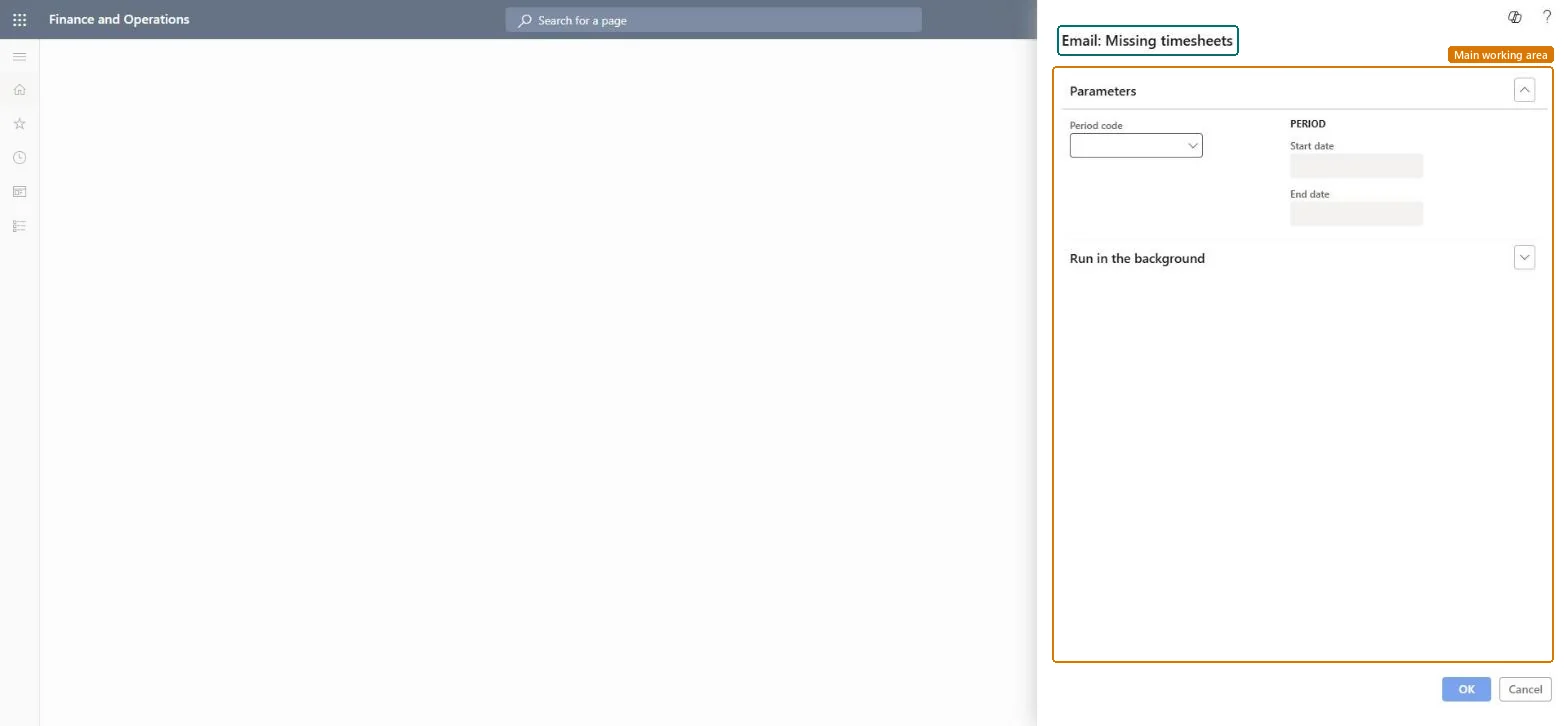
Missing timesheets email page in Dynamics 365
The page in Dynamics 365. page title tab to open what to set or check
Functional consultant · Solution architect

2Where it fits

Business processManage project delivery
Menu pathProject management and accounting › Periodic › Timesheets › Missing timesheets email
Set up firstTimesheet period types Microsoft Learn Email parameters Microsoft Learn
Used next byAll timesheets Microsoft Learn
Related pagesUnposted timesheets Microsoft Learn
In this process Schedule posting of integration journals · Reset stuck timesheets to Draft
End user · Functional consultant

3How to do it

About the examples: Examples and screenshots in this guide use BEAT, a demo company in a Dynamics 365 test environment. Use your own company's codes and values instead of copying them.

When to run it

When to run itAt the end of each timesheet period.
How oftenOnce per timesheet period.
Batch settingsRun it as a recurring batch job after each period ends.
What the output showsReminder emails for the missing timesheets of the selected period; no timesheet changes.

Source: Microsoft Learn

Setup steps on this page

Remind workers about missing timesheets

Get timesheets in on time each period.

Steps from Microsoft

  1. Go to Project management and accounting > Periodic > Timesheets > Missing timesheets email.
  2. Choose the Period code of the timesheet period you want to remind workers about.
  3. Check the Start date and End date shown under Period: they must be the period that just ended.
  4. Set the job up to recur once per period, for example every Monday morning.
  5. Afterwards, open Timesheets > All timesheets for the period and check that the reminded workers start entering their timesheets.

Source: Microsoft Learn

Fields on the page

FieldWhat it meansExample
Period codeThe timesheet period type whose period you remind workers about.Checked in Dynamics 365WEEK
Start dateWith End date, shows the dates of the selected period; both are read-only.Checked in Dynamics 36511/02/2026 to 11/08/2026

Common errors and fixes

MessageWhat to do
Nobody receives the reminder.Check the email setup (Email parameters and the email distributor batch) and the email address of the workers. Checked in Dynamics 365

Test checklist

  1. Pick a period where 1 test worker has no timesheet.
  2. Run the job for that period code.
  3. Check the email was sent to that worker only.
  4. Check workers with a timesheet got nothing.

Source: Microsoft Learn

Functional consultant

4Setup decisions

Setup stepRecommended value and whyDecision, common mistake and test
Remind workers about missing timesheetsRecurring job right after each period ends, for the period type in use.Workers are reminded while the week is still fresh, so hours are posted before month end.Who should be reminded?Running it for the current, still open period, which reminds everyone.Test: Reminder for a missing timesheet

Feature management and licence

Licence or add-inOn the live system, Project manager and Manager use this page.

Checked in Dynamics 365

Solution architect

5Design impact

Shared or per companyPer company: it checks the timesheets of the legal entity you run it in. Microsoft data model
Can it be undoneIrreversible: Emails can't be recalled.
If you change it laterSends emails only; no timesheets change. Microsoft Learn
Technical architect

6Technical

Menu itemaction:TSMissingTimesheetsEmail Checked in Dynamics 365
FormDialog Checked in Dynamics 365
Roles to set it up and use itTo use itProject manager ProjProjectManagerManager HcmManagerGive people one of these roles. On this system, 2 roles can run this page.Checked in Dynamics 365
Developer

7Developer

Open it by URLhttps://<your-environment>/?mi=action:TSMissingTimesheetsEmail
Data migrationLoad order: Missing timesheets email has no data entity in Data management: it is a periodic job and keeps no records of its own. Nothing to migrate; set up the recurring job in the target system.Microsoft Learn
Everyone

8Sources

To cite this step: PM-JOB-140, Remind workers about missing timesheets. Beyond ERP Atlas Hub, 2026-11-11. https://www.beyonderp.cloud/atlas/step/PM-JOB-140