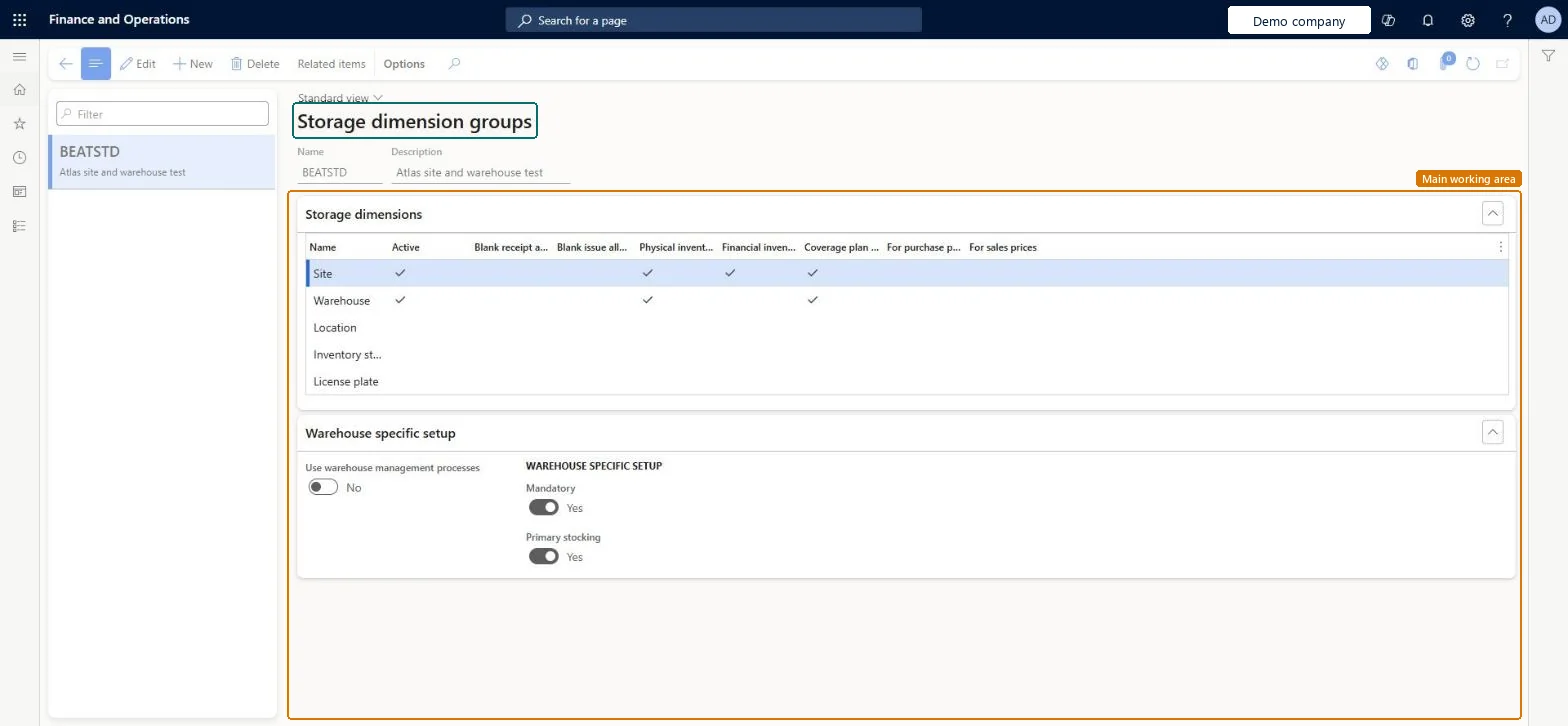
Setup step on the Storage dimension groups page · Product information management
Set up Storage dimension groups
Use this page to set, for each storage dimension, whether it is active and whether inventory is tracked physically and financially by it, and whether the group uses warehouse management processes.
Product information managementSetupDimension and variant groups
EcoResStorageDimensionGroup
Used by
Product designer, Product design manager, Inventory accountant and 5 more roles
Business process
Develop product strategy
Menu item
EcoResStorageDimensionGroup
Main table
EcoResStorageDimensionGr
Data entity
EcoResStorageDimensionGroupEntity
Setup steps
1 on this page
Show what matters for
SETUP GUIDEHow to set it up8 sections. Choose a role to highlight what matters to you.
Everyone
1What it is and why
What it is
A setup page where you define storage dimension groups, which set the storage dimensions, such as Site, Warehouse and Location, that control how items are stored and taken from inventory.
What you do here
Use this page to set, for each storage dimension, whether it is active and whether inventory is tracked physically and financially by it, and whether the group uses warehouse management processes.
Example
For example, if Financial inventory is enabled for the Warehouse dimension, each warehouse has its own cost, and receipts and issues from different warehouses are not settled against each other.
The page in Dynamics 365. page title tab to open what to set or check
About the examples: Examples and screenshots in this guide use BEAT, a demo company in a Dynamics 365 test environment. Use your own company's codes and values instead of copying them.
Setup steps on this page
Set up Storage dimension groups
Use this page to set, for each storage dimension, whether it is active and whether inventory is tracked physically and financially by it, and whether the group uses warehouse management processes.
How to use it
Go to Product information management > Setup > Dimension and variant groups > Storage dimension groups.
Select New, and enter a Name and a Description.
On the Storage dimensions FastTab, select Active for each dimension that you use, and set the Blank receipt allowed, Blank issue allowed, Physical inventory, Financial inventory, Coverage plan by dimension, For purchase prices and For sales prices options.
On the Warehouse specific setup FastTab, set Use warehouse management processes, Mandatory and Primary stocking.
Source: Checked in Dynamics 365
Fields on the page
Field
What it means
Table column
Physical inventory
Keeps detailed inventory records by the dimension, so receipts, issues and movements are tracked by it.Microsoft Learn
IsPhysicalInventoryEnabled
Financial inventory
Keeps detailed financial records by the dimension. It cannot be enabled for the Location dimension.Microsoft Learn
IsFinancialInventoryEnabled
Blank receipt allowed
Lets users receive or move inventory when a dimension that is not mandatory, such as the license plate, is not specified.Microsoft Learn
IsAllowBlankReceiptEnabled
Blank issue allowed
Lets users issue or move inventory when a dimension that is not mandatory is not specified.Microsoft Learn
IsAllowBlankIssueEnabled
Use warehouse management processes
Enables the group for warehouse management processes. Enable it if you might use these features in the future.Microsoft Learn
IsWarehouseWHSEnabled
Test checklist
Create a storage dimension group with Site, Warehouse and Location active
Assign it to a new released product and post a receipt to a site, warehouse and location
Check the on-hand list shows the quantity by location
Post an issue from a different warehouse of the same site and run inventory close
Check the settlement follows the financial dimensions you selected
Site, Warehouse and Location active with Physical inventory; Financial inventory on Site; Use warehouse management processes = Yes if WMS might ever be usedLearn says Site is always financially tracked, that location can't be financial, and that a financial warehouse gives a separate cost per warehouse. It also advises enabling Use warehouse management processes if you might use WMS later.
One-way: Warning: Use warehouse management processes can't be changed after the group is saved. Once transactions exist you can't change Active, Blank issue allowed, Blank receipt allowed, Physical inventory or Financial inventory. Moving an item to another group needs zero on-hand and Value open = No on all transactions.
If you change it later
After a storage dimension group is saved, its Use warehouse management processes setting can no longer be changed. Microsoft Learn
Technical architect
6Technical
Menu item
EcoResStorageDimensionGroupChecked in Dynamics 365
Form
EcoResStorageDimensionGroupChecked in Dynamics 365
Table
EcoResStorageDimensionGrShown as “STORAGE DIMENSION GROUPS” in Record infoKey field: NameChecked in Dynamics 365
PrivilegesMaintain storage dimension groups EcoResStorageDimensionGroupMaintainView storage dimension groups EcoResStorageDimensionGroupViewDutiesMaintain cost object definitions CostObjectDefinitionMaintainInquire into product management policies EcoResProductManagementPoliciesInquireEnable the product management process EcoResProductManagementProcessEnableInquire into logistic policies InventLogisticPoliciesInquire8 security rolesProduct designer BOMProductDesignerProduct design manager BOMProductDesignManagerInventory accountant InventCostAccountantInventory accountant clerk InventCostCostClerkAccounting manager LedgerAccountingManagerProduction supervisor ProdProductionSupervisorProcess engineer RouteProcessEngineerProcess engineering manager RouteProcessEngineeringManagerChecked in Dynamics 365
Roles to set it up and use it
To set it up or change itAccounting manager LedgerAccountingManagerProduct design manager BOMProductDesignManagerTo use itProduct designer BOMProductDesignerProcess engineer RouteProcessEngineerProcess engineering manager RouteProcessEngineeringManagerProduction supervisor ProdProductionSupervisorInventory accountant InventCostAccountantGive people one of these roles. On this system, 8 roles can open this page.Checked in Dynamics 365
Actions on the page
(Action Pane without tabs): Related itemsChecked in Dynamics 365
EcoResStorageDimensionGroupEntity (Storage dimension groups): shared by all companies, in Microsoft's default template 310 - Product information management.Load order: Microsoft's default template 310 - Product information management loads Storage dimension groups at execution unit 1, level 30, sequence 10. Lower levels load first, and entities at the same level load in sequence order.Load first: the default templates at lower levels (System setup to General ledger)Microsoft Learn