SETUP GUIDEHow to set it up8 sections. Choose a role to highlight what matters to you.
Everyone
1What it is and why
What it is
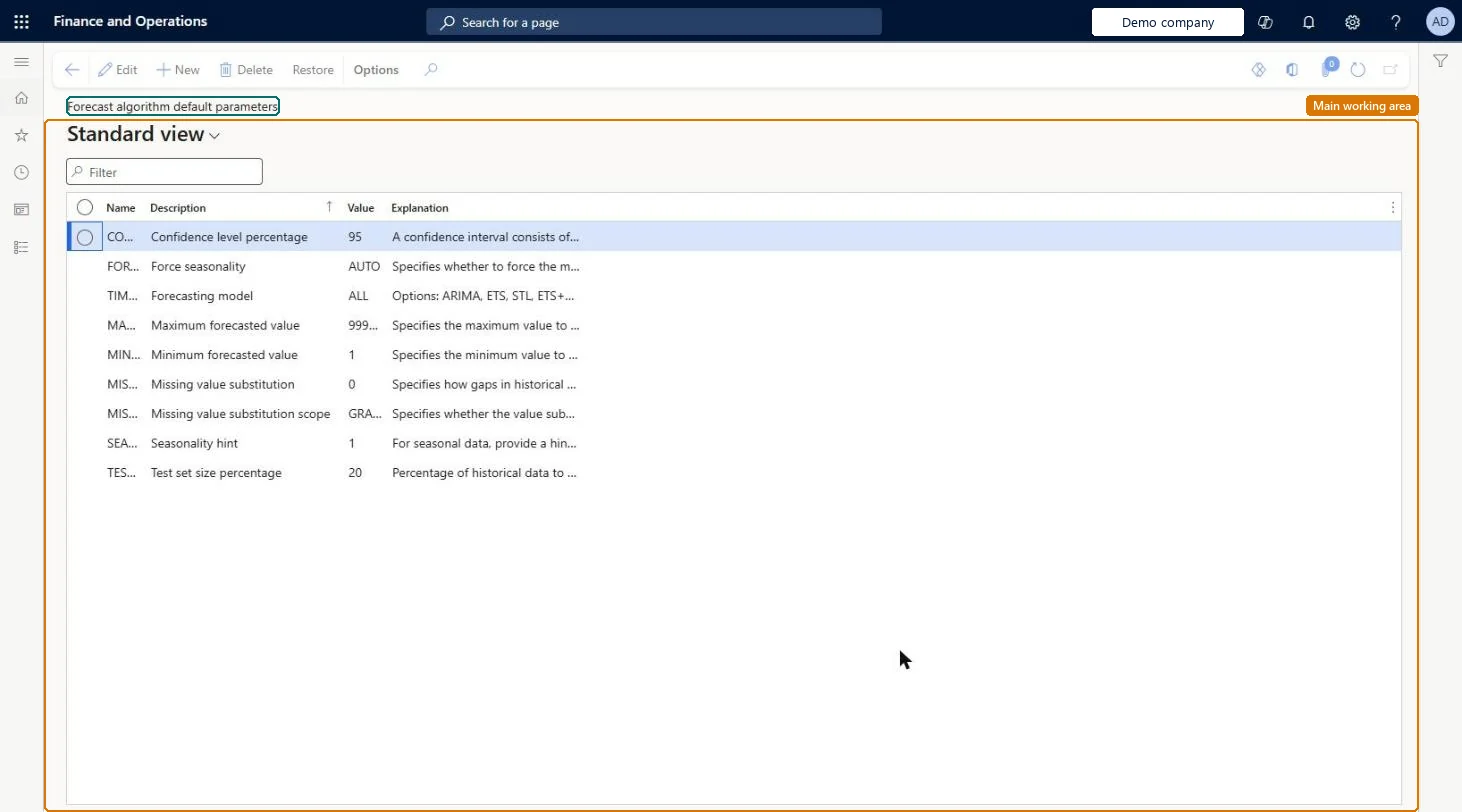
A setup page that lists the default parameters and values that Supply Chain Management sends to Azure Machine Learning when it generates demand forecasts.
What you do here
Use this page to set the default forecasting model options, such as the confidence level, seasonality, and which forecasting model to use.
Example
For example, for demand that repeats every six months, enter 6 as the value of the Seasonality hint parameter.
The page in Dynamics 365. page title tab to open what to set or check
About the examples: Examples and screenshots in this guide use BEAT, a demo company in a Dynamics 365 test environment. Use your own company's codes and values instead of copying them.
Setup steps on this page
Set up Forecasting algorithm parameters
Use this page to set the default forecasting model options, such as the confidence level, seasonality, and which forecasting model to use.
Steps from Microsoft
Go to Master planning > Setup > Demand forecasting > Forecasting algorithm parameters.
Select the parameter to change.
In the Value field, enter the default value, using the advice in the Explanation field.
To return to the standard list of parameters, select Restore on the Action Pane.
Keep the standard parameter list; set Forecasting model to ALL to let the system pick the best fitLearn says ALL selects the best-fit model and that parameters shouldn't be added or removed unless you've customised the experiment in Azure Machine Learning.
Adding or removing parameters or renaming them without a customised Azure experiment; Learn advises against it.
Solution architect
5Design impact
Can it be undone
Reversible: Values can be changed at any time, and Restore reverts the page to the standard list.
If you change it later
Do not add or remove parameters on this page unless the Azure Machine Learning experiment has been customized. Microsoft Learn
Technical architect
6Technical
Menu item
ReqDemPlanDefaultAlgorithmParametersChecked in Dynamics 365
Form
ReqDemPlanDefaultAlgorithmParametersChecked in Dynamics 365
Roles to set it up and use it
To use itProduction planner ReqProductionPlannerProduction manager ProdProductionManagerGive people one of these roles. On this system, 2 roles can open this page.Checked in Dynamics 365
Actions on the page
(Action Pane without tabs): RestoreChecked in Dynamics 365
Checked in a working Dynamics 365 system, version 10.0.49: the menu item, form, table and security, the page.
To cite this step: MP-DF-020, Set up Forecasting algorithm parameters. Beyond ERP Atlas Hub, 2026-11-11. https://www.beyonderp.cloud/atlas/step/MP-DF-020